Alternativa gratuita ao Jump Desktop
Mude para o HelpWire, uma alternativa avançada ao Jump Desktop para acesso rápido ao ambiente de trabalho remoto em PCs, Macs e Linux, ao mesmo tempo que reduz as suas despesas imediatamente.
- Interface fácil de usar
- Gratuito para usar
- Ótimo para empresas de qualquer dimensão
HelpWire vs. Jump Desktop: Comparação Rápida
Breve visão geral das funcionalidades e dos modelos de preços disponíveis tanto no Jump Desktop como no HelpWire.
|
HelpWire
|
Jump Desktop
Para Indivíduos
Equipas Pro
Equipas Enterprise
| |||
|---|---|---|---|---|
| Preço por mês | ||||
| Preço por mês | Gratuito para uso pessoal e empresarial |
Windows - Grátis Mac, iOS - $34.99 (pagamento único) |
$7.99 por mês | $15.99 por mês |
| Restrições do utilizador | ||||
| Restrições do utilizador | Sem limites | Sem limites | Sem limites | Sem limites |
| Plataformas suportadas | ||||
| Plataformas suportadas | Windows, Mac, Linux | Windows, Mac, iOS | Windows, Mac, iOS | Windows, Mac, iOS |
| Vista de vários monitores | ||||
| Vista de vários monitores | ||||
| Controlo de várias estações de trabalho por utilizador | ||||
| Controlo de várias estações de trabalho por utilizador | Ilimitado | Ilimitado | Ilimitado | Ilimitado |
| Gestão de Equipa | ||||
| Gestão de Equipa | ||||
| Gestão de Clientes | ||||
| Gestão de Clientes | ||||
| Chat e colaboração | ||||
| Chat e colaboração | Conversar | |||
| Transferência de ficheiros | ||||
| Transferência de ficheiros | ||||
| Acesso não supervisionado | ||||
| Acesso não supervisionado | ||||
| Acesso colaborativo | ||||
| Acesso colaborativo | ||||
| Gravação de sessão | ||||
| Gravação de sessão | ||||
| Personalização | ||||
| Personalização | ||||
| Suporte móvel | ||||
| Suporte móvel | iOS | iOS | iOS | |
| Partilha de ecrã | ||||
| Partilha de ecrã |
Funcionalidades do HelpWire
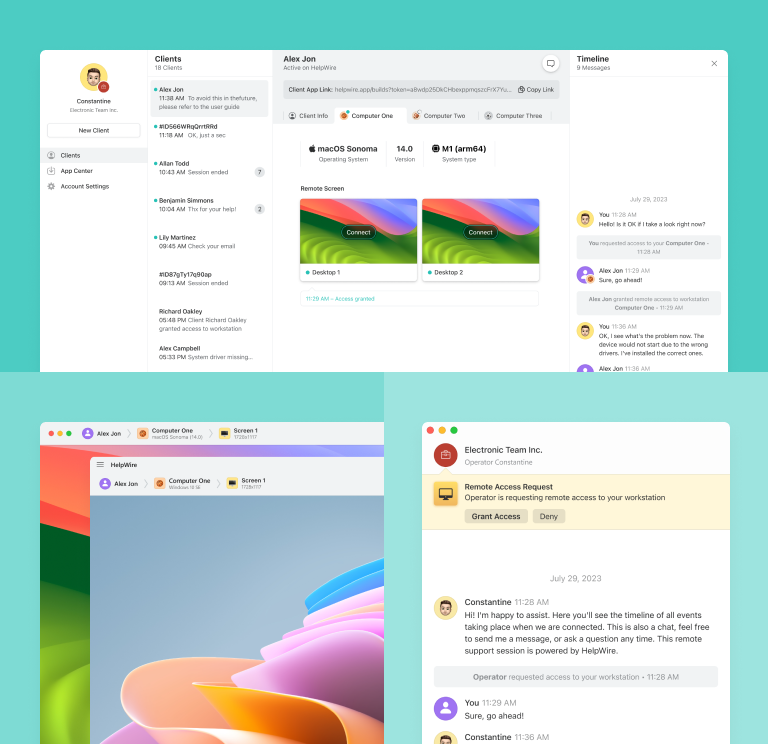
A HelpWire oferece funcionalidades essenciais que a tornam uma alternativa fiável ao Jump Desktop, garantindo uma gestão de ambiente de trabalho remoto fluida e eficiente.
Funcionalidades principais
Funcionalidades principais

Início Rápido da Sessão
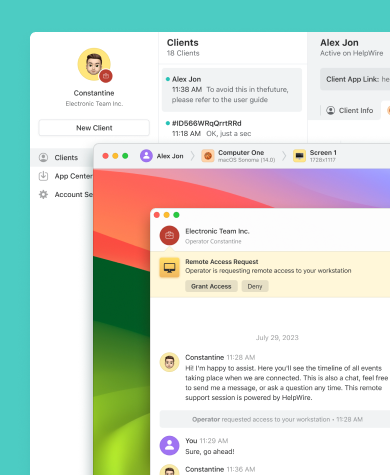
Inicie sessões remotas facilmente partilhando a ligação de conexão única com os seus clientes - sem necessidade de IDs ou palavras-passe complicadas.

Gestão de Clientes
Melhore a gestão remota dos seus clientes criando perfis de clientes, visualizando informações dos dispositivos e adicionando notas às sessões de suporte, tudo através da conta web.

Gestão de Equipa
Crie, gira e dissolva facilmente equipas de suporte, colabore numa base de clientes partilhada e utilize ferramentas integradas de gestão de equipas para prestar um suporte remoto excecional.

Chat Integrado
Melhore a eficiência da resolução remota de problemas com o chat integrado do HelpWire, permitindo interações diretas entre operadores e clientes.
Troca de Ficheiros
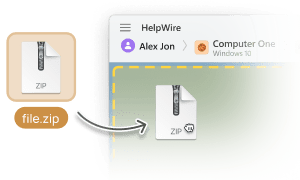
Transfira ficheiros sem esforço do computador do operador para o ambiente de trabalho remoto utilizando a simples função de copiar e colar.
Suporte Remoto para Várias Situações

Suporte de TI
Sendo uma solução gratuita de ambiente de trabalho remoto para suporte de TI, o HelpWire foi concebido para lidar de forma eficiente com configurações de sistemas, instalações de software e uma variedade de tarefas técnicas.

Trabalho Remoto
A HelpWire fornece acesso remoto rápido e seguro às estações de trabalho da empresa, permitindo que os funcionários trabalhem remotamente a partir de qualquer local.

Organizações Governamentais
Com o HelpWire, forneça suporte de TI para o governo e fortaleça os serviços através de controlo avançado de ambiente de trabalho remoto.
O que os nossos utilizadores dizem

4.9
Com base em 209 avaliações de clientes

Versão
2.2, 04/02/2026

Compatibilidade
macOS, Windows, Linux

Preço
Grátis
Aqui encontra algumas avaliações públicas de clientes sobre o HelpWire vindas de diversas fontes. Todas as avaliações são exibidas no idioma original.

I got a gatvol of teamviewer and its issues and moved over to HelpWire and I'm blown away.
Fast, effective and doesn't drain my computer's resources.
It works really well props to the devs.

My experience with HelpWire has been fantastic! The remote control process is incredibly smooth.

I appreciate HelpWire for its ease of use and comprehensive remote support tools all in one place.

HelpWire streamlines the remote support, allowing me to manage multiple clients efficiently, which improved overall service quality and client satisfaction.

The fact that I can easily segregate my clients and have a full history of my connection to them is amazing. I like the fact that I can send a link to them and then talk them through what to do when they receive it (many are elderly and techo-illiterate). The emails and link are professional and give them reassurance. I like unattended access for those clients that need that extra layer of help. Love this app.

The swift setup process and zero- configuration requirement for starting remote support sessions are what I appreciate most about HelpWire. It's remarkable how quickly I can connect with clients and start troubleshooting without any hassle.

Very good and free alternative to TV. Easy to use and nice concept. No annoying disconnections and forcing to buy premiumbussiness subscription or smth like that.

As a long-time TeamViewer user for personal projects and helping family, I grew increasingly frustrated with its frequent disconnections and persistent "commercial use" warnings. I decided to search for an alternative and found Helpwire. I am incredibly impressed. Helpwire provides a stable, reliable connection without any of the interruptions I faced before. The setup is simple, and it just works.

Its a great tool for remote support. It doesn't have the bells and whistles of its commercial rivals, but ask yourself how often do you need that stuff ? If you want to help someone out on a PC issue, or connect to a server for some admin this is perfect.

HelpWire software has been an invaluable asset for streamlining our customer support processes.

Probably the best free remote access app. I like seamless remote desktop experience and copy/paste functionality, reliability, and the fact it is free to use.

The experience is fantastic with a very smooth remote session experience. The optimised performance and smart connectivity feature ensures a seamless remote session with zero-lag.
It was handy for the odd occasion that someone needs a hand with their computer while I am not nearby. It was very reliable and able to see the other's screen to provide directions.
Absolutely Brilliant. Having worked on a whole bunch of other remote support software, from solarwinds dameware to anydesk and teamviewer, vnc viewer and the like, I have never had the joy I am having with Helpwire.

I've never been more satisfied with the service quality of a remote desktop application in my entire freelancing career. Considering the fact that it's a free remote desktop support solution, HelpWire is really worth a shot!

The interface is straightforward, so I can quickly connect to clients' devices and start troubleshooting without jumping through hoops. Plus, the performance is rock solid-no lag or sudden disconnections, which is crucial when I'm in the middle of solving a client's issue.
I appreciate Helpwire for its user-friendly interface and efficient problem-solving capabilities. It's designed to streamline the troubleshooting process, making it easier for people to find solutions to their technical issues quickly.
HelpWire really stands out for me because it's free and works seamlessly on both Mac and PC. I love how easy it is to get started. Basically, I can send a dedicated link to my colleague or client to initiate a remote session right away. The software is super fast and easy to use.
The Operator Dashboard is easy to use and you can start up a support session in seconds. The fact that it keeps the chat with the customer as well as logs of connections is a nice touch.

For nearly ten years I relied on another tool that recently became unusable, and HelpWire has stepped in as the perfect replacement.
How could I not like HelpWire! It ticks all the boxes for a great remote desktop/support service, and best of all, it's free. Real good, and worth more than a try.
Martin Lentz
Email Review

Your software worked just as well as Teamviewer. One thing works better and that is on the client side where they simply just have to grant me access. They don't have to provide me a one use password in order for me to connect.
Luca Albanese
Email Review
Simplicity of use, in particular on the client side that simply require to click on a link and give the required permissions. But the best feature, IMHO, is the ability to share the clients with other team members... and all of this for free! THANK YOU for this amazing app!!
Wilkin Miguel Julio Mercado
Email Review
It's easy to use and I didn't expect there to be a software as good as this one.
Michael Guggenbichler
Email Review
Absolutely Amazing Product for attended Access for individual operators or small teams! And you do not even have to pay!! There are so much remote access solutions, you have to pay tons of money and don't even provide the bare minimum. HelpWire Team, you're doing great! Looking forward to what you will bring in the future.
Perguntas frequentes
O Jump Desktop oferece uma gama de planos pagos, cada um com funcionalidades diferentes. Apenas a versão para Windows para uso pessoal é completamente gratuita.
Sim, o Jump Desktop é geralmente considerado uma solução segura de ambiente de trabalho remoto. Utiliza protocolos de encriptação fortes, como DTLS e TLS, para proteger as ligações entre dispositivos. A aplicação também suporta encriptação de ponta a ponta e oferece autenticação de dois fatores (2FA) para reforçar ainda mais a segurança.
O Jump Desktop não oferece suporte nativo para Linux. No entanto, ainda pode utilizá-lo para se ligar a máquinas Linux através de VNC ou RDP, com alguma configuração manual.