Electronic Team utilizza i cookie per migliorare la tua esperienza sul nostro sito web. Continuando a utilizzare questo sito web, accetti la nostra Cookie Policy. Scopri di più qui.

Accesso remoto gratuito e sicuro per il lavoro da remoto

HelpWire è uno strumento ideale per datori di lavoro e dipendenti, che rende il loro lavoro da remoto semplice e sicuro. Garantisce un accesso sicuro alle postazioni di lavoro di casa e dell'ufficio, offrendo al contempo connessioni veloci e affidabili per una gestione fluida dei server.

Facilità d'uso e installazione

Facilità d'uso e installazione

HelpWire offre un'interfaccia intuitiva che rende l'accesso alle sue funzionalità facile e fluido. Senza alcuna curva di apprendimento, offre vantaggi immediati, dandoti un accesso remoto sicuro per il lavoro a distanza con pochi clic.
Accesso non presidiato

Accesso non presidiato

HelpWire ti offre anche un accesso remoto completo alle postazioni di lavoro aziendali, facilitando una gestione fluida dei server remoti. Consente inoltre agli amministratori di sistema di fornire assistenza anche quando il computer di un dipendente è incustodito.

Sicurezza

HelpWire garantisce un'eccezionale sicurezza dei dati con crittografia AES-256 e protocolli TLS/SSL. Il suo solido sistema di sicurezza utilizza Auth0 per autenticazioni sicure e server AWS per un'archiviazione affidabile dei dati.

Sicurezza

Le funzionalità principali di HelpWire

Goditi una connettività ultraveloce, funzionalità desktop remoto migliorate e una sicurezza eccellente — tutto in un'unica potente soluzione.

Avvio rapido della sessione

Avvio rapido della sessione

HelpWire semplifica il lavoro da remoto utilizzando link univoci invece di ID di sessione e password, garantendoti una collaborazione sicura e senza problemi.

Trasferimento file

Trasferimento file

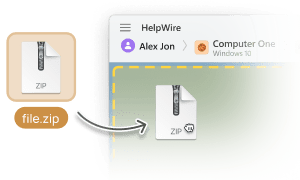
HelpWire semplifica i trasferimenti di file. È facile — basta copiare i file dal tuo computer locale e incollarli direttamente nel desktop remoto del cliente.

Vista multi-monitor

Vista multi-monitor

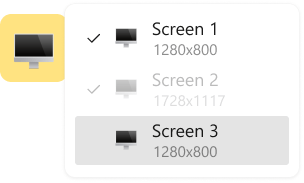
Per il lavoro da remoto, i membri del tuo team possono gestire le attività in modo efficiente passando da più monitor o utilizzando contemporaneamente configurazioni a doppio monitor.

Chat multiutente

Chat multiutente

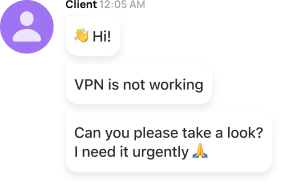
HelpWire semplifica la collaborazione in tempo reale, consentendo a più membri del team di supportare senza interruzioni lo stesso cliente mentre lavorano da remoto.

Impostazioni del display regolabili

Impostazioni del display regolabili

Personalizza la visualizzazione del tuo client remoto per adattarla al tuo lavoro da remoto ovunque ti trovi. Regola la larghezza e l'altezza, mantieni le impostazioni originali oppure scegli l'adattamento migliore per una visualizzazione più adatta.

Gestione clienti

Gestione clienti

I team di supporto tecnico remoto possono facilmente monitorare i clienti assistiti e gestirli direttamente dai loro browser, rendendo le loro operazioni efficienti.

Gestione del team

Gestione del team

HelpWire migliora anche la collaborazione remota con funzionalità come la gerarchia dei ruoli, gli inviti ai compagni di squadra, l'accesso tra team e altro ancora.

Supporto multipiattaforma

Supporto multipiattaforma

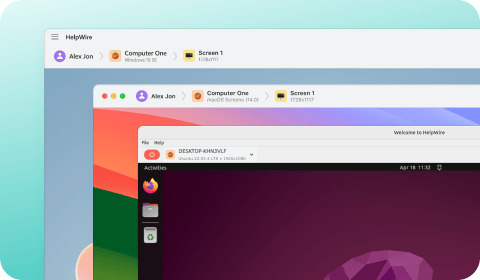
HelpWire rende il lavoro da remoto più semplice offrendo un supporto completo per Windows, Linux e macOS, assicurandoti soluzioni rapide in qualsiasi ambiente IT.

Accesso remoto sicuro - Vantaggi per i dipendenti

  • Supporto IT affidabile: Ogni volta che riscontri problemi tecnici, aspettare il supporto in loco può essere frustrante. Con HelpWire, i dipendenti possono ricevere assistenza remota immediata, consentendo ai team IT e agli amministratori di sistema di accedere e risolvere rapidamente i problemi, riducendo i tempi di inattività.
  • Accesso alle risorse dell'ufficio: I dipendenti di solito hanno bisogno di accedere a file, software o sistemi essenziali, sia in ufficio, in movimento o impegnandosi nel lavoro remoto da casa. HelpWire garantisce inoltre connessioni fluide a computer e server remoti, assicurando un flusso di lavoro continuo e senza interruzioni.
  • Prestazioni remote migliorate: Le VPN o gli RDP tradizionali spesso hanno difficoltà con attività ad alte prestazioni come applicazioni ad alto consumo di risorse o lo streaming 4K. In questo caso, HelpWire offre prestazioni superiori, consentendo ai dipendenti di gestire in modo efficiente attività impegnative tramite desktop remoti.
  • Utilizzo personale sicuro: A differenza delle VPN tradizionali, che instradano tutto il traffico attraverso le reti aziendali, HelpWire elimina il backhauling non necessario, dando priorità alle attività lavorative e mantenendo l'utilizzo personale privato e ordinato.
  • Accesso al server remoto: HelpWire offre anche un accesso remoto sicuro per i dipendenti, consentendo loro di utilizzare applicazioni, recuperare file e collaborare su risorse condivise come i database. Anche i team IT e gli sviluppatori possono monitorare, testare e distribuire aggiornamenti da remoto.

Accesso remoto sicuro - Vantaggi per i datori di lavoro

  • Sicurezza avanzata: Il lavoro da remoto da qualsiasi luogo aumenta gli accessi non autorizzati e il rischio di violazioni dei dati. Per affrontare questo problema, HelpWire protegge le tue connessioni con una crittografia avanzata, tutelando i tuoi dati aziendali sensibili. I team IT possono anche monitorare le sessioni per garantire la conformità ai protocolli di sicurezza, aggiungendo un ulteriore livello di protezione.
  • Sempre aggiornato: A differenza delle configurazioni VPN e RDP tradizionali, che richiedono aggiornamenti manuali, l'infrastruttura di HelpWire viene aggiornata automaticamente. Questo garantisce una maggiore affidabilità, una solida sicurezza e un risparmio di tempo, riducendo al minimo il rischio di vulnerabilità dovute a sistemi obsoleti.
  • Compatibilità multipiattaforma: Sebbene gestire più piattaforme possa essere difficile, HelpWire lo rende semplice con un supporto coerente sui principali sistemi operativi. I dipendenti possono rimanere produttivi su workstation Windows, Mac o Linux, mentre i team IT usufruiscono di un sistema di gestione efficace.
  • Assistenza clienti responsabile: I problemi tecnici possono influire e rallentare le operazioni. Pertanto, HelpWire fornisce un'assistenza clienti affidabile, offrendo soluzioni rapide senza il problema di dover risolvere problemi complessi come errori VPN o RDP.
  • Efficienza dei costi: HelpWire offre una soluzione conveniente per accedere a funzionalità avanzate di lavoro remoto, aiutandoti ad aumentare l'efficienza con spese minime. Le piccole imprese possono anche risparmiare su abbonamenti e spese operative, semplificando al contempo i flussi di lavoro da remoto.

Gli utenti che parlano della loro esperienza su HelpWire title icon

5.0 Basato sulle recensioni di piu’ di 209 clienti
version icon
Versione
2.2, 4 Febbr, 2026
compatibility icon
Compatibilità
macOS, Windows, Linux
price icon
Prezzo
Gratis
Ecco alcune delle recensioni pubbliche riguardo HelpWire, da parte dei nostri clienti e da varie fonti:
Thea M.
Office admin
Thea M.
I got a gatvol of teamviewer and its issues and moved over to HelpWire and I'm blown away. Fast, effective and doesn't drain my computer's resources. It works really well props to the devs.
Molly
Production worker
Molly
My experience with HelpWire has been fantastic! The remote control process is incredibly smooth.
Daniel Domingues
Founder, Lusha
Daniel Domingues
I appreciate HelpWire for its ease of use and comprehensive remote support tools all in one place.
Rabeea Sarfraz
Associate Software Engineer, Coeus Solutions GmbH
Rabeea Sarfraz
HelpWire streamlines the remote support, allowing me to manage multiple clients efficiently, which improved overall service quality and client satisfaction.
Mark V.
Remote Technical Support
Mark V.
The fact that I can easily segregate my clients and have a full history of my connection to them is amazing. I like the fact that I can send a link to them and then talk them through what to do when they receive it (many are elderly and techo-illiterate). The emails and link are professional and give them reassurance. I like unattended access for those clients that need that extra layer of help. Love this app.
Kyle Paterson
CEO, Enspire
Kyle Paterson
The swift setup process and zero- configuration requirement for starting remote support sessions are what I appreciate most about HelpWire. It's remarkable how quickly I can connect with clients and start troubleshooting without any hassle.
Yaroslav H.
Owner
Yaroslav H.
Very good and free alternative to TV. Easy to use and nice concept. No annoying disconnections and forcing to buy premiumbussiness subscription or smth like that.
Muhammad Ammar Z.
Senior Lecturer at Shifa College of Pharmaceutical Sciences
Muhammad Ammar Z.
As a long-time TeamViewer user for personal projects and helping family, I grew increasingly frustrated with its frequent disconnections and persistent "commercial use" warnings. I decided to search for an alternative and found Helpwire. I am incredibly impressed. Helpwire provides a stable, reliable connection without any of the interruptions I faced before. The setup is simple, and it just works.
Jonathan B.
IT Director
Jonathan B.
Its a great tool for remote support. It doesn't have the bells and whistles of its commercial rivals, but ask yourself how often do you need that stuff ? If you want to help someone out on a PC issue, or connect to a server for some admin this is perfect.
Nilay N.
Senior Education Management, Self-employed
Nilay N.
HelpWire software has been an invaluable asset for streamlining our customer support processes.
Darko V.
SEO specialist
Darko V.
Probably the best free remote access app. I like seamless remote desktop experience and copy/paste functionality, reliability, and the fact it is free to use.
Samit B.
Senior Communication Executive, Dairy
Samit B.
The experience is fantastic with a very smooth remote session experience. The optimised performance and smart connectivity feature ensures a seamless remote session with zero-lag.
Ben T
Admin Assistant
Ben T
It was handy for the odd occasion that someone needs a hand with their computer while I am not nearby. It was very reliable and able to see the other's screen to provide directions.
Jean K.
Engineer
Jean K.
Absolutely Brilliant. Having worked on a whole bunch of other remote support software, from solarwinds dameware to anydesk and teamviewer, vnc viewer and the like, I have never had the joy I am having with Helpwire.
Govind P.
Content Writer, Marketing and Advertising
Govind P.
I've never been more satisfied with the service quality of a remote desktop application in my entire freelancing career. Considering the fact that it's a free remote desktop support solution, HelpWire is really worth a shot!
The interface is straightforward, so I can quickly connect to clients' devices and start troubleshooting without jumping through hoops. Plus, the performance is rock solid-no lag or sudden disconnections, which is crucial when I'm in the middle of solving a client's issue.
Adyrosan B.
Business Leader or Manager
Adyrosan B.
I appreciate Helpwire for its user-friendly interface and efficient problem-solving capabilities. It's designed to streamline the troubleshooting process, making it easier for people to find solutions to their technical issues quickly.
Anna K.
Sales Marketing
Anna K.
HelpWire really stands out for me because it's free and works seamlessly on both Mac and PC. I love how easy it is to get started. Basically, I can send a dedicated link to my colleague or client to initiate a remote session right away. The software is super fast and easy to use.
EJ S.
Business Leader or Manager
EJ S.
The Operator Dashboard is easy to use and you can start up a support session in seconds. The fact that it keeps the chat with the customer as well as logs of connections is a nice touch.
For nearly ten years I relied on another tool that recently became unusable, and HelpWire has stepped in as the perfect replacement.
How could I not like HelpWire! It ticks all the boxes for a great remote desktop/support service, and best of all, it's free. Real good, and worth more than a try.
Martin Lentz
Email Review
Martin Lentz
Your software worked just as well as Teamviewer. One thing works better and that is on the client side where they simply just have to grant me access. They don't have to provide me a one use password in order for me to connect.
Luca Albanese
Email Review
Luca Albanese
Simplicity of use, in particular on the client side that simply require to click on a link and give the required permissions. But the best feature, IMHO, is the ability to share the clients with other team members... and all of this for free! THANK YOU for this amazing app!!
Wilkin Miguel Julio Mercado
Email Review
Wilkin Miguel Julio Mercado
It's easy to use and I didn't expect there to be a software as good as this one.
Michael Guggenbichler
Email Review
Michael Guggenbichler
Absolutely Amazing Product for attended Access for individual operators or small teams! And you do not even have to pay!! There are so much remote access solutions, you have to pay tons of money and don't even provide the bare minimum. HelpWire Team, you're doing great! Looking forward to what you will bring in the future.