Nota: Tutti i prezzi mostrati sono mensili secondo il piano di fatturazione mensile di RemotePC. La fatturazione annuale riduce il costo del 25%, e un impegno di 2 anni consente di risparmiare fino al 50%, anche se questi sconti si applicano solo al primo anno - i rinnovi vengono addebitati alle tariffe standard. L'aggiunta di utenti oltre il limite del tuo piano comporta costi aggiuntivi per utente, e il superamento del limite di computer costa $20/computer all'anno. RDP Connector è un componente aggiuntivo a pagamento a $20/computer all'anno. Pagina ufficiale dei prezzi.
Alternativa gratuita e più semplice a RemotePC
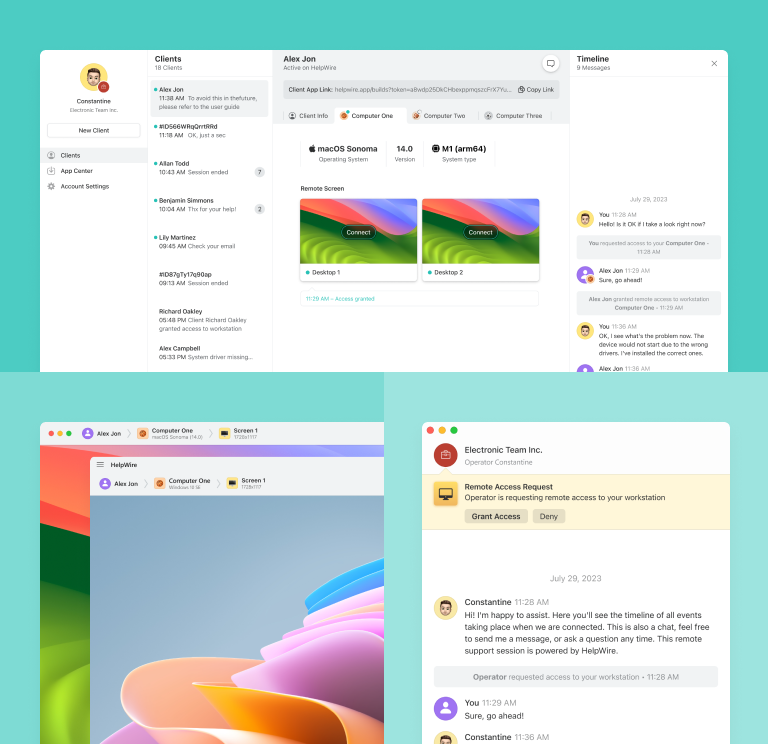
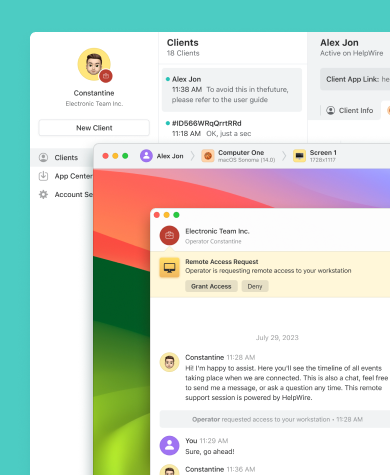
HelpWire offre le stesse funzionalità fondamentali di RemotePC per un supporto remoto rapido, ma a costo assolutamente zero.
- Accesso completo senza costi nascosti
- Esperienza di desktop remoto senza interruzioni
- Interfaccia intuitiva
HelpWire vs. RemotePC: Confronto rapido
Ecco una rapida panoramica delle funzionalità dettagliate e del confronto dei piani tariffari tra RemotePC e HelpWire.
| Funzionalità |
HelpWire
|
RemotePC
Solo
Pro
Team
Enterprise
| |||
|---|---|---|---|---|---|
| Prezzo all'anno | |||||
| Prezzo all'anno | Gratis | $2.95/mese | $9.95/mese | $29.95/mese | $59.95/mese |
| Condizioni | |||||
| Condizioni | Nessun limite | 1 utente, 1 computer | 1 utente, 10 computer | Utenti illimitati, 50 computer | Utenti illimitati, 100 computer |
| Supporto multipiattaforma | |||||
| Supporto multipiattaforma | Windows, Mac, Linux | Windows, Mac, Linux | Windows, Mac, Linux | Windows, Mac, Linux | Windows, Mac, Linux |
| Trasferimento file | |||||
| Trasferimento file | |||||
| Prestazioni ottimizzate | |||||
| Prestazioni ottimizzate | |||||
| Vista multi-monitor | |||||
| Vista multi-monitor | |||||
| Chat integrata | |||||
| Chat integrata | |||||
| Sicurezza robusta | |||||
| Sicurezza robusta | |||||
| Riavvio remoto | |||||
| Riavvio remoto | |||||
| Dispositivi mobili | |||||
| Dispositivi mobili |
Funzionalità di HelpWire
Rispetto a RemotePC, gli utenti hanno accesso illimitato a tutte le funzionalità di HelpWire, garantendo un servizio di desktop remoto affidabile senza costi aggiuntivi. Le caratteristiche principali includono una connettività rapida e stabile, prestazioni del desktop remoto migliorate e protocolli di sicurezza di altissimo livello.
Scopri di più
Scopri di più

Avvio rapido della sessione
Condividi un link di connessione desktop remoto per avviare sessioni di supporto istantaneamente e senza problemi, senza ID o password complicati. Non sono richieste configurazioni di firewall o VPN.
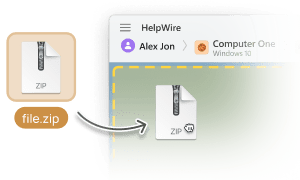
Trasferimento file
Trasferisci i file al desktop remoto del tuo cliente semplicemente copiandoli e incollandoli in una finestra di sessione remota, eliminando la necessità di archiviazione intermedia o di piattaforme di hosting di file.

Gestione clienti
HelpWire semplifica la gestione dei clienti consentendoti di mantenere un elenco organizzato dei clienti, accedere alle informazioni di base del dispositivo e annotare note su di loro direttamente tramite il tuo browser.

Chat integrata
Aumenta l'efficienza e la soddisfazione dei clienti con la chat di supporto istantanea di HelpWire. Le interazioni dirette con i clienti accelerano la risoluzione dei problemi.
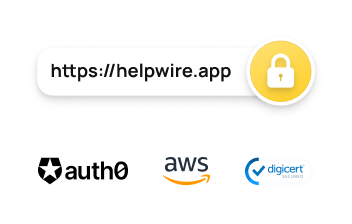
Sicurezza robusta
Con la sicurezza di HelpWire
misure come l'autenticazione affidabile di Auth0, la crittografia end-to-end AES-256, i data center AWS sicuri e le connessioni compatibili con i firewall, operatori e clienti possono sentirsi al sicuro durante le sessioni di desktop remoto.
Soluzione di supporto remoto su misura per esigenze diverse
HelpWire si rivolge a una vasta gamma di settori, esigenze e servizi, aumentando l'efficienza aziendale e riducendo al minimo le spese.

Fornitori di servizi gestiti
I fornitori di servizi gestiti possono contare su HelpWire, un software di accesso remoto MSP, per un supporto rapido e sicuro alle infrastrutture IT dei clienti e ai sistemi degli utenti.

Vendita al dettaglio
Aumenta la produttività e riduci i costi nel tuo reparto di assistenza clienti con un intuitivo servizio desktop remoto per sistemi POS che perfeziona i tuoi processi di assistenza remota.

Produzione
HelpWire offre supporto remoto per il settore manifatturiero, migliorando la qualità del servizio con funzionalità avanzate di accesso remoto per il settore.
Cosa dicono i nostri utenti

4.9
Basato sulle recensioni di piu’ di 209 clienti

Versione
2.2, 4 Febbr, 2026

Compatibilità
macOS, Windows, Linux

Prezzo
Gratis
Qui troverete alcune recensioni pubbliche dei clienti su HelpWire provenienti da varie fonti. Tutte le recensioni sono mostrate nella loro lingua originale.

I got a gatvol of teamviewer and its issues and moved over to HelpWire and I'm blown away.
Fast, effective and doesn't drain my computer's resources.
It works really well props to the devs.

My experience with HelpWire has been fantastic! The remote control process is incredibly smooth.

I appreciate HelpWire for its ease of use and comprehensive remote support tools all in one place.

HelpWire streamlines the remote support, allowing me to manage multiple clients efficiently, which improved overall service quality and client satisfaction.

The fact that I can easily segregate my clients and have a full history of my connection to them is amazing. I like the fact that I can send a link to them and then talk them through what to do when they receive it (many are elderly and techo-illiterate). The emails and link are professional and give them reassurance. I like unattended access for those clients that need that extra layer of help. Love this app.

The swift setup process and zero- configuration requirement for starting remote support sessions are what I appreciate most about HelpWire. It's remarkable how quickly I can connect with clients and start troubleshooting without any hassle.

Very good and free alternative to TV. Easy to use and nice concept. No annoying disconnections and forcing to buy premiumbussiness subscription or smth like that.

As a long-time TeamViewer user for personal projects and helping family, I grew increasingly frustrated with its frequent disconnections and persistent "commercial use" warnings. I decided to search for an alternative and found Helpwire. I am incredibly impressed. Helpwire provides a stable, reliable connection without any of the interruptions I faced before. The setup is simple, and it just works.

Its a great tool for remote support. It doesn't have the bells and whistles of its commercial rivals, but ask yourself how often do you need that stuff ? If you want to help someone out on a PC issue, or connect to a server for some admin this is perfect.

HelpWire software has been an invaluable asset for streamlining our customer support processes.

Probably the best free remote access app. I like seamless remote desktop experience and copy/paste functionality, reliability, and the fact it is free to use.

The experience is fantastic with a very smooth remote session experience. The optimised performance and smart connectivity feature ensures a seamless remote session with zero-lag.
It was handy for the odd occasion that someone needs a hand with their computer while I am not nearby. It was very reliable and able to see the other's screen to provide directions.
Absolutely Brilliant. Having worked on a whole bunch of other remote support software, from solarwinds dameware to anydesk and teamviewer, vnc viewer and the like, I have never had the joy I am having with Helpwire.

I've never been more satisfied with the service quality of a remote desktop application in my entire freelancing career. Considering the fact that it's a free remote desktop support solution, HelpWire is really worth a shot!

The interface is straightforward, so I can quickly connect to clients' devices and start troubleshooting without jumping through hoops. Plus, the performance is rock solid-no lag or sudden disconnections, which is crucial when I'm in the middle of solving a client's issue.
I appreciate Helpwire for its user-friendly interface and efficient problem-solving capabilities. It's designed to streamline the troubleshooting process, making it easier for people to find solutions to their technical issues quickly.
HelpWire really stands out for me because it's free and works seamlessly on both Mac and PC. I love how easy it is to get started. Basically, I can send a dedicated link to my colleague or client to initiate a remote session right away. The software is super fast and easy to use.
The Operator Dashboard is easy to use and you can start up a support session in seconds. The fact that it keeps the chat with the customer as well as logs of connections is a nice touch.

For nearly ten years I relied on another tool that recently became unusable, and HelpWire has stepped in as the perfect replacement.
How could I not like HelpWire! It ticks all the boxes for a great remote desktop/support service, and best of all, it's free. Real good, and worth more than a try.
Martin Lentz
Email Review

Your software worked just as well as Teamviewer. One thing works better and that is on the client side where they simply just have to grant me access. They don't have to provide me a one use password in order for me to connect.
Luca Albanese
Email Review
Simplicity of use, in particular on the client side that simply require to click on a link and give the required permissions. But the best feature, IMHO, is the ability to share the clients with other team members... and all of this for free! THANK YOU for this amazing app!!
Wilkin Miguel Julio Mercado
Email Review
It's easy to use and I didn't expect there to be a software as good as this one.
Michael Guggenbichler
Email Review
Absolutely Amazing Product for attended Access for individual operators or small teams! And you do not even have to pay!! There are so much remote access solutions, you have to pay tons of money and don't even provide the bare minimum. HelpWire Team, you're doing great! Looking forward to what you will bring in the future.
FAQ
RemotePC non è completamente gratuito. Offre una prova gratuita di 7 giorni, ma per l'uso continuativo è necessario un abbonamento o una licenza.
Infatti, HelpWire offre un servizio di desktop remoto gratuito senza alcun costo nascosto.
RemotePC vanta un solido sistema di sicurezza. Incorpora più livelli di protezione, come gli standard di settore TLS v1.2 e la crittografia AES a 256 bit, chiavi personalizzabili definite dall'utente, autenticazione a due fattori, dispositivi attendibili e un'opzione per oscurare lo schermo host, garantendo che le tue attività su un dispositivo a cui si accede da remoto rimangano private. Il software è inoltre conforme a normative come HIPAA, GDPR, PCI, SOC 2 Type e FIPS.