Electronic Team utiliza cookies para mejorar su experiencia en nuestro sitio web. Al continuar utilizando este sitio web, usted acepta nuestra Política de Cookies. Obtenga más información aquí.

Software gratuito de escritorio remoto para Windows

Conéctate a cualquier máquina Windows, Mac o Linux en segundos: sin VPN, sin configuración de red, sin registro de cuenta en el lado del cliente.
Logotipo de G2
G2
5.0
logotipo de capterra
Capterra
5.0
Logotipo de SourceForge
SourceForge
5.0
Logotipo de TrustRadius
TrustRadius
5.0

HelpWire vs RDP

Windows ofrece una solución nativa de escritorio remoto.

Descubra las ventajas y desventajas de HelpWire frente al escritorio remoto integrado en Windows.
Ventajas:
  • HelpWire es multiplataforma. Es compatible con Windows, Linux, y macOS.
  • Varios operadores pueden conectarse al mismo cliente.
  • HelpWire incluye una función de chat de soporte.
  • Ofrece soporte multilingüe para una mayor accesibilidad.
  • Ofrece una opción para guardar los datos del cliente en un directorio de clientes para mayor comodidad.
Contras:
  • El RDP nativo de Windows ofrece un rendimiento más rápido.

Cómo configurar una conexión de escritorio remoto en Windows usando HelpWire

Aquí está el proceso paso a paso para usar HelpWire para iniciar una conexión de escritorio remoto en Windows:
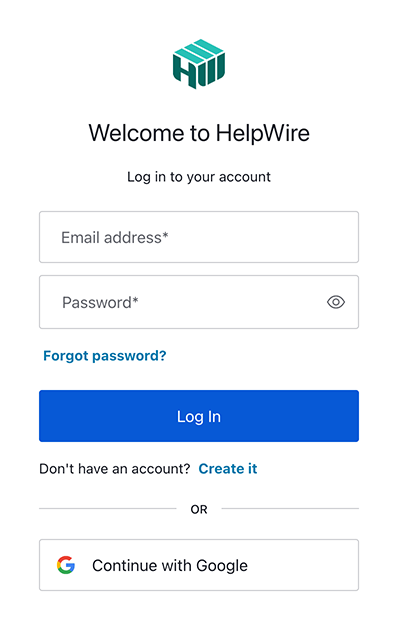
1. Regístrese para obtener su cuenta de HelpWire.
Si no tienes una cuenta de HelpWire, regístrate y crea una nueva cuenta proporcionando tu dirección de correo electrónico o usando tu perfil de Google.
Regístrate o inicia sesión en tu cuenta de HelpWire
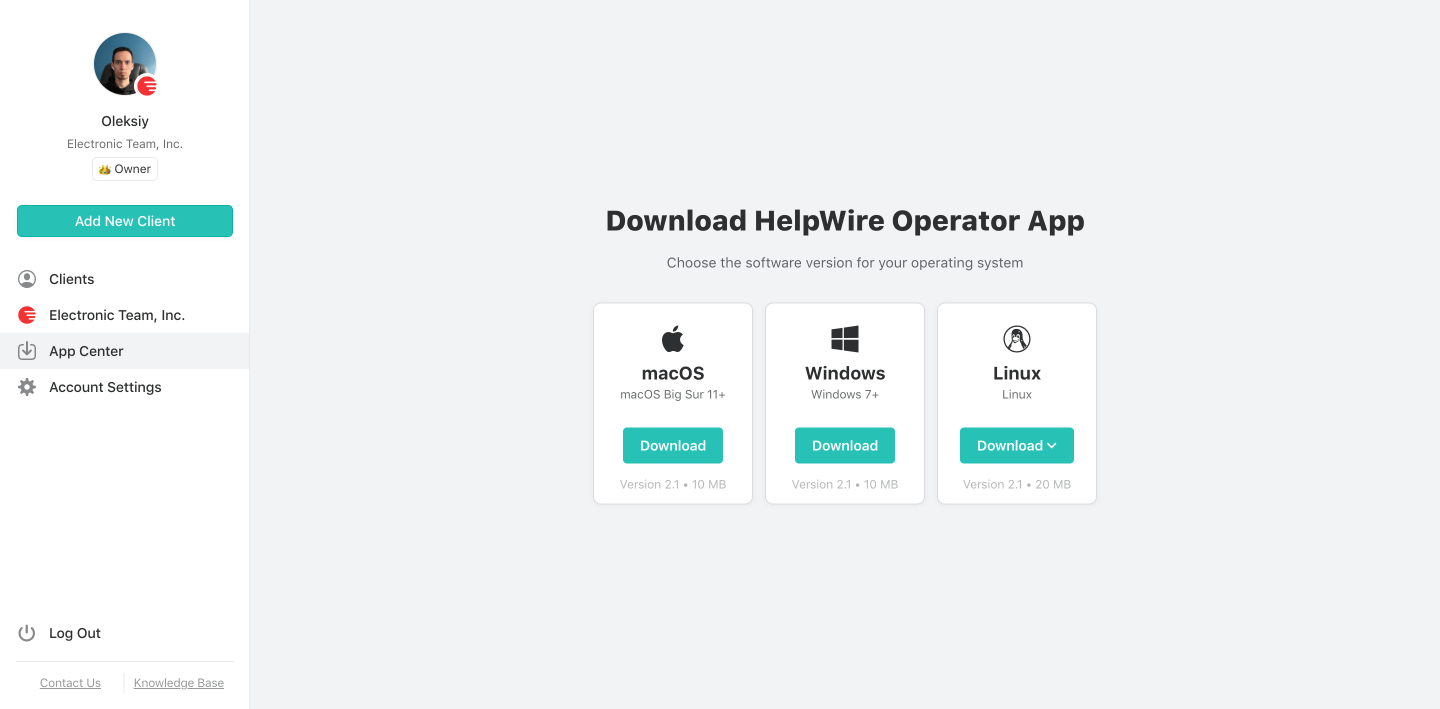
2. Descargue la aplicación Operator de HelpWire.
Ve al “App Center” y encuentra la aplicación HelpWire Operator. Descarga el instalador de Windows en tu sistema.
Descarga e instala la aplicación HelpWire Operator
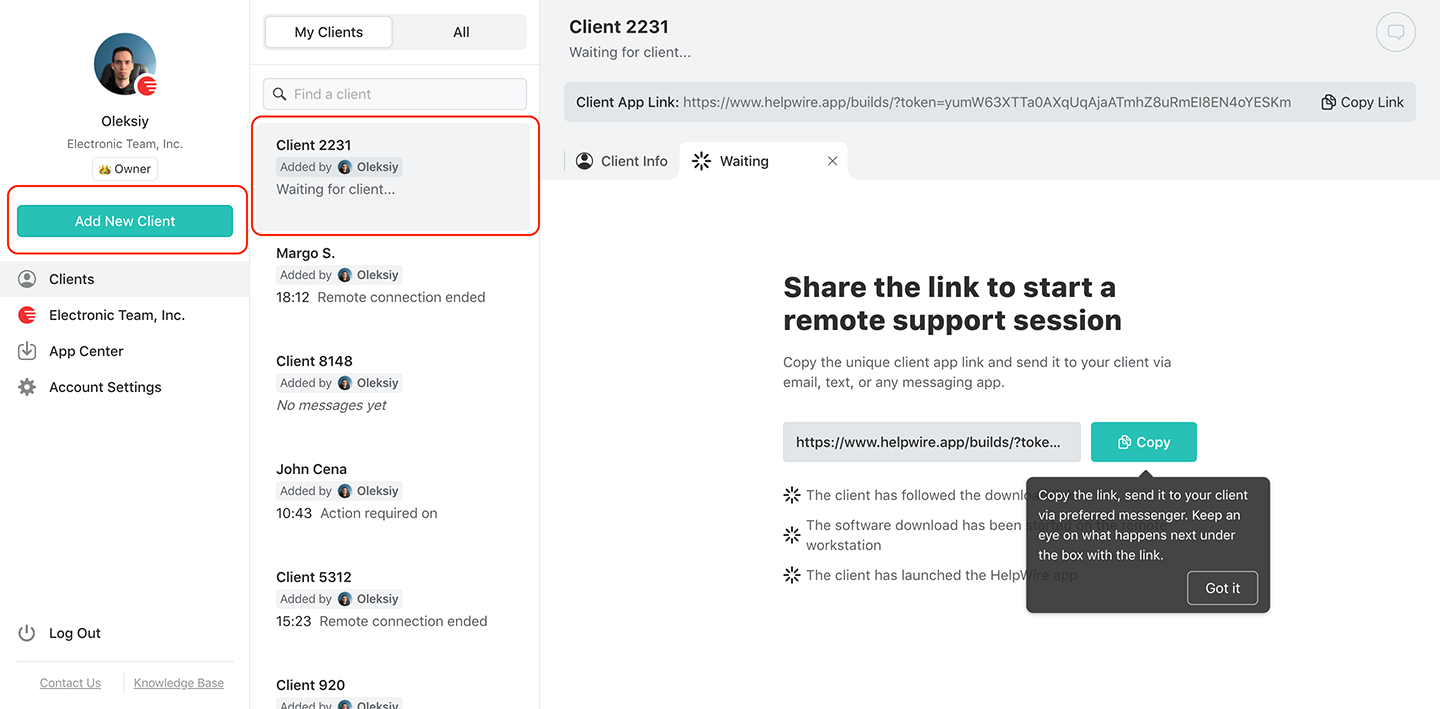
3. Crea uno nuevo o elige un cliente existente.
Si no se ha agregado ningún cliente antes, cree un nuevo cliente, o si ya ha creado uno, elíjalo de la lista “Clientes”. En la barra de herramientas principal, encontrará un botón junto a cada opción.
Agregar un nuevo cliente o seleccionar uno existente
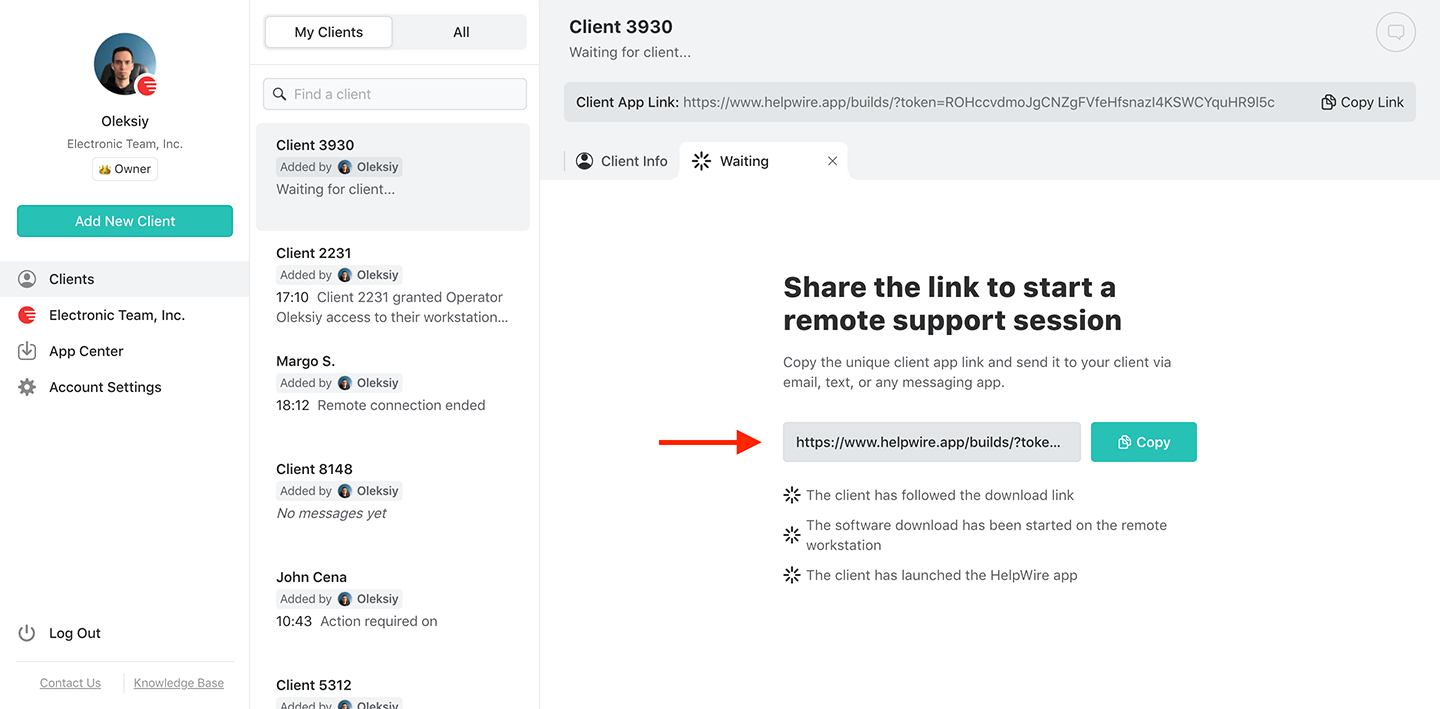
4. Comparte el enlace con tu cliente.
Encuentra el enlace de la aplicación del cliente en el perfil del cliente. Debería estar en la barra de herramientas superior. Comparte este enlace con tu cliente por correo electrónico, mensajería instantánea, SMS o cualquier otro canal que tú y el cliente consideren conveniente.
Comparte el enlace con tu cliente
5. Obtén permiso de acceso.
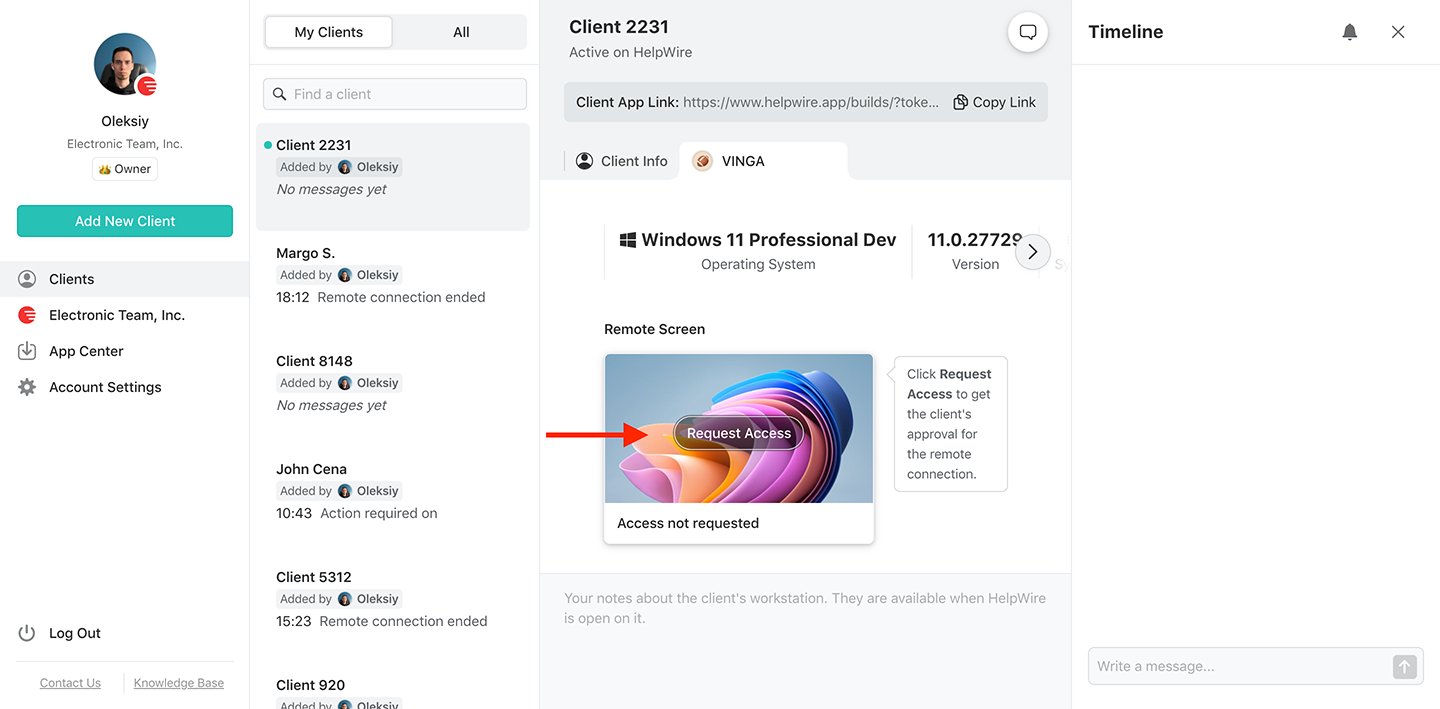
Después de que el cliente reciba el enlace, espere a que instale e inicie la aplicación HelpWire Client en sus sistemas. Una vez hecho esto, haga clic en el botón “Request Access” y espere a que el cliente apruebe su solicitud.
Obtén permisos de acceso del cliente remoto
6. Conéctese al cliente remoto.
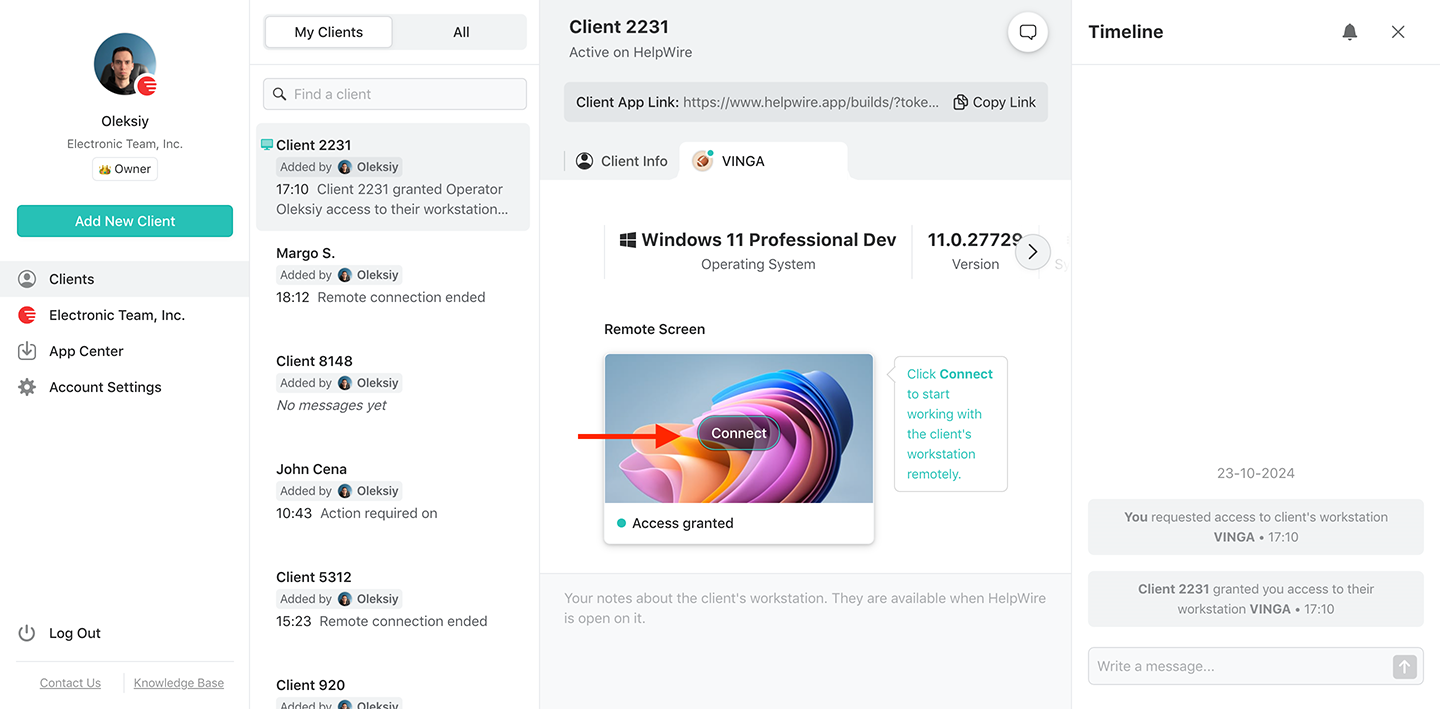
Inicie una sesión de control de escritorio remoto a un cliente remoto desde su estación de trabajo Windows presionando el botón “Connect”. El botón debería estar en la pestaña del perfil de cliente que haya elegido.
Conéctate a tu cliente remoto desde tu Mac
7. Finaliza la sesión remota.
Una vez que hayas terminado con tu tarea de control remoto, finaliza la sesión remota. Hay tres maneras de hacerlo:

  • Cierra la aplicación HelpWire Operator de Windows en tu computadora con el cierre estándar de ventanas del sistema.
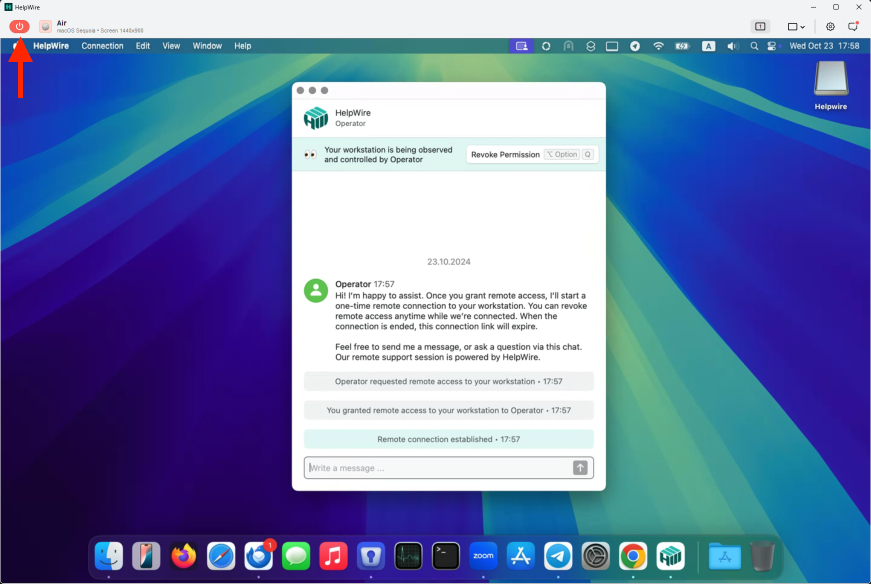
  • En la barra de herramientas del operador, localiza el botón rojo y presiónalo.
  • En la computadora remota, cierra la aplicación HelpWire Client.
Finalizar la sesión

Capacidades de nuestro software de escritorio remoto para Windows

Compatibilidad multiplataforma

Compatibilidad multiplataforma

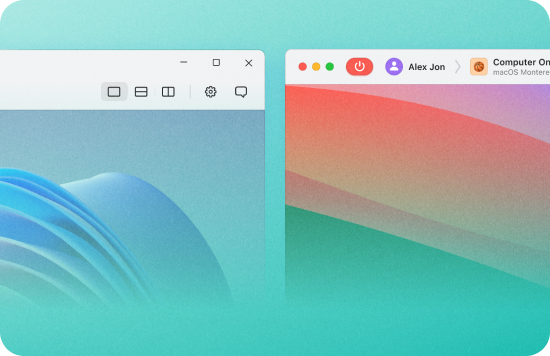
HelpWire es una solución multiplataforma, compatible con Windows, macOS y Linux. Así, puedes conectarte desde tu computadora con Windows a cualquier sistema Windows 7+, Linux o macOS, y viceversa.
Inicio de sesión mediante enlace

Inicio de sesión mediante enlace

Conecte su computadora a las estaciones de trabajo y computadoras de los clientes sin esfuerzo y en tiempo real mediante enlaces generados de forma única con la ayuda de HelpWire.
Controla varias estaciones de trabajo

Controla varias estaciones de trabajo

Ofrezca soporte remoto simultáneo a los distintos escritorios remotos, estaciones de trabajo y dispositivos de su cliente, independientemente del sistema operativo en el que se ejecuten.
Transferencia de archivos

Transferencia de archivos

Copie y pegue o arrastre y suelte archivos en la ventana de control remoto de HelpWire para enviarlos a sus clientes de forma segura. Tenga la seguridad de que nadie puede interceptar sus archivos, ya que HelpWire protege sus conexiones remotas con tecnologías avanzadas.
Vista de varios monitores

Vista de varios monitores

Vea y gestione varias pantallas remotas a la vez o cambie entre ellas durante una sesión. Esto le ahorra tiempo dedicado a gestionar pantallas separadas en diferentes computadoras.
Chat durante la sesión

Chat en sesión

El chat integrado permite a los operadores comunicarse con los clientes durante una sesión sin cambiar a una herramienta independiente.
Gestión de clientes

Gestión de clientes

HelpWire proporciona herramientas esenciales, como listas detalladas de clientes y el historial de sesiones de soporte. También puede recopilar detalles de los dispositivos y estaciones de trabajo de su cliente y consolidarlos en un único perfil de cliente.
Gestión del equipo

Gestión del equipo

Agrega o elimina miembros del equipo cuando quieras y gestiona tu equipo de soporte según las necesidades actuales.

Escritorio remoto de Windows para administradores de sistemas, mesas de ayuda y trabajadores independientes

Administradores de sistemas

Administradores de sistemas

Administrar equipos Windows en una oficina distribuida implica sobrecarga de VPN o configuración de RDP por dispositivo. HelpWire ofrece a los administradores de sistemas acceso multiplataforma desde una sola aplicación de operador. Conéctese a equipos Windows, Mac o Linux sin cambiar la configuración de red de su cliente.
Aprenda mas
Ayuda y mesas de servicio

Ayuda y mesas de servicio

Windows es la plataforma dominante en la mayoría de los entornos corporativos, pero configurar RDP para cada llamada de soporte requiere acceso VPN y derechos de administrador de red. HelpWire elimina esa sobrecarga: comparte un enlace, obtén acceso, resuelve el problema, todo sin necesidad de configurar ajustes de red en ninguno de los dos lados.
Aprenda mas
Expertos informáticos autónomos

Expertos informáticos autónomos

La mayoría de los clientes de TI freelance están en Windows. HelpWire te permite conectarte a cualquier equipo con Windows 7+ mediante un enlace compartible, sin credenciales de administrador remoto ni software preinstalado del lado del cliente. Gestiona todos tus clientes desde una sola cuenta.

Lo que dicen nuestros usuarios title icon

4.6 Basado en 209 opiniones de clientes
version icon
Versión
2.2, 04/02/2026
compatibility icon
Compatibilidad
macOS, Windows, Linux
price icon
Precio
Gratis
Aquí encontrará algunas opiniones públicas de clientes sobre HelpWire procedentes de diversas fuentes. Todas las opiniones se muestran en su idioma original.
Thea M.
Office admin
Thea M.
I got a gatvol of teamviewer and its issues and moved over to HelpWire and I'm blown away. Fast, effective and doesn't drain my computer's resources. It works really well props to the devs.
Molly
Production worker
Molly
My experience with HelpWire has been fantastic! The remote control process is incredibly smooth.
Daniel Domingues
Founder, Lusha
Daniel Domingues
I appreciate HelpWire for its ease of use and comprehensive remote support tools all in one place.
Rabeea Sarfraz
Associate Software Engineer, Coeus Solutions GmbH
Rabeea Sarfraz
HelpWire streamlines the remote support, allowing me to manage multiple clients efficiently, which improved overall service quality and client satisfaction.
Mark V.
Remote Technical Support
Mark V.
The fact that I can easily segregate my clients and have a full history of my connection to them is amazing. I like the fact that I can send a link to them and then talk them through what to do when they receive it (many are elderly and techo-illiterate). The emails and link are professional and give them reassurance. I like unattended access for those clients that need that extra layer of help. Love this app.
Kyle Paterson
CEO, Enspire
Kyle Paterson
The swift setup process and zero- configuration requirement for starting remote support sessions are what I appreciate most about HelpWire. It's remarkable how quickly I can connect with clients and start troubleshooting without any hassle.
Yaroslav H.
Owner
Yaroslav H.
Very good and free alternative to TV. Easy to use and nice concept. No annoying disconnections and forcing to buy premiumbussiness subscription or smth like that.
Muhammad Ammar Z.
Senior Lecturer at Shifa College of Pharmaceutical Sciences
Muhammad Ammar Z.
As a long-time TeamViewer user for personal projects and helping family, I grew increasingly frustrated with its frequent disconnections and persistent "commercial use" warnings. I decided to search for an alternative and found Helpwire. I am incredibly impressed. Helpwire provides a stable, reliable connection without any of the interruptions I faced before. The setup is simple, and it just works.
Jonathan B.
IT Director
Jonathan B.
Its a great tool for remote support. It doesn't have the bells and whistles of its commercial rivals, but ask yourself how often do you need that stuff ? If you want to help someone out on a PC issue, or connect to a server for some admin this is perfect.
Nilay N.
Senior Education Management, Self-employed
Nilay N.
HelpWire software has been an invaluable asset for streamlining our customer support processes.
Darko V.
SEO specialist
Darko V.
Probably the best free remote access app. I like seamless remote desktop experience and copy/paste functionality, reliability, and the fact it is free to use.
Samit B.
Senior Communication Executive, Dairy
Samit B.
The experience is fantastic with a very smooth remote session experience. The optimised performance and smart connectivity feature ensures a seamless remote session with zero-lag.
Ben T
Admin Assistant
Ben T
It was handy for the odd occasion that someone needs a hand with their computer while I am not nearby. It was very reliable and able to see the other's screen to provide directions.
Jean K.
Engineer
Jean K.
Absolutely Brilliant. Having worked on a whole bunch of other remote support software, from solarwinds dameware to anydesk and teamviewer, vnc viewer and the like, I have never had the joy I am having with Helpwire.
Govind P.
Content Writer, Marketing and Advertising
Govind P.
I've never been more satisfied with the service quality of a remote desktop application in my entire freelancing career. Considering the fact that it's a free remote desktop support solution, HelpWire is really worth a shot!
The interface is straightforward, so I can quickly connect to clients' devices and start troubleshooting without jumping through hoops. Plus, the performance is rock solid-no lag or sudden disconnections, which is crucial when I'm in the middle of solving a client's issue.
Adyrosan B.
Business Leader or Manager
Adyrosan B.
I appreciate Helpwire for its user-friendly interface and efficient problem-solving capabilities. It's designed to streamline the troubleshooting process, making it easier for people to find solutions to their technical issues quickly.
Anna K.
Sales Marketing
Anna K.
HelpWire really stands out for me because it's free and works seamlessly on both Mac and PC. I love how easy it is to get started. Basically, I can send a dedicated link to my colleague or client to initiate a remote session right away. The software is super fast and easy to use.
EJ S.
Business Leader or Manager
EJ S.
The Operator Dashboard is easy to use and you can start up a support session in seconds. The fact that it keeps the chat with the customer as well as logs of connections is a nice touch.
For nearly ten years I relied on another tool that recently became unusable, and HelpWire has stepped in as the perfect replacement.
How could I not like HelpWire! It ticks all the boxes for a great remote desktop/support service, and best of all, it's free. Real good, and worth more than a try.
Martin Lentz
Email Review
Martin Lentz
Your software worked just as well as Teamviewer. One thing works better and that is on the client side where they simply just have to grant me access. They don't have to provide me a one use password in order for me to connect.
Luca Albanese
Email Review
Luca Albanese
Simplicity of use, in particular on the client side that simply require to click on a link and give the required permissions. But the best feature, IMHO, is the ability to share the clients with other team members... and all of this for free! THANK YOU for this amazing app!!
Wilkin Miguel Julio Mercado
Email Review
Wilkin Miguel Julio Mercado
It's easy to use and I didn't expect there to be a software as good as this one.
Michael Guggenbichler
Email Review
Michael Guggenbichler
Absolutely Amazing Product for attended Access for individual operators or small teams! And you do not even have to pay!! There are so much remote access solutions, you have to pay tons of money and don't even provide the bare minimum. HelpWire Team, you're doing great! Looking forward to what you will bring in the future.