Electronic Team utiliza cookies para mejorar su experiencia en nuestro sitio web. Al continuar utilizando este sitio web, usted acepta nuestra Política de Cookies. Obtenga más información aquí.

Escritorio remoto para administradores de sistemas: Caso de uso

HelpWire permite a los administradores de sistemas acceder remotamente a escritorios, aplicar actualizaciones, instalar software, solucionar problemas y ejecutar diversas tareas administrativas.
Soporte remoto bajo demanda

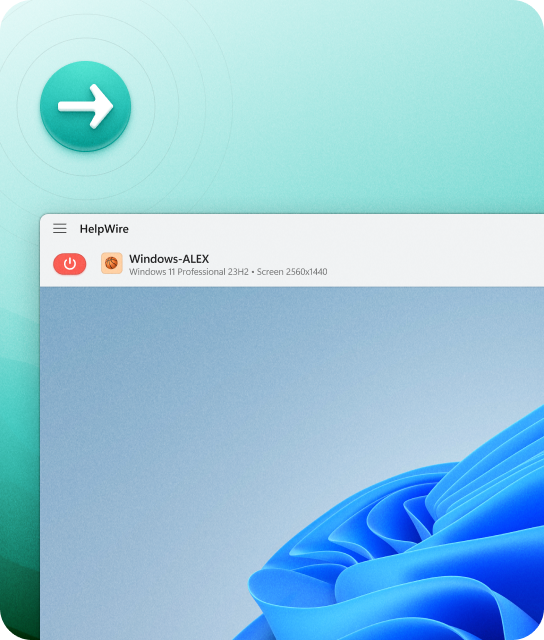
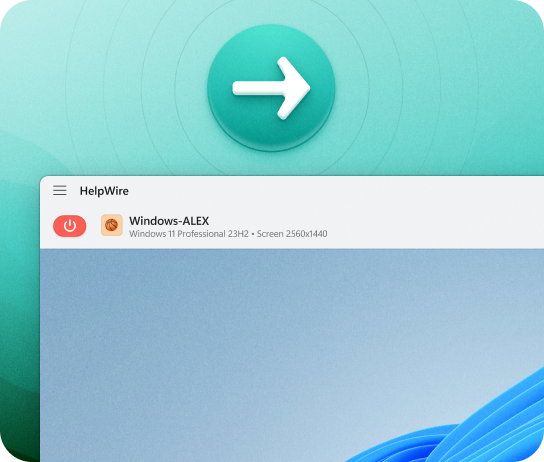
Conexión remota bajo demanda

Establezca una conexión inmediata con los usuarios remotos siempre que necesiten ayuda. Resuelva los problemas rápidamente y proporcione soporte bajo demanda.
Acceso remoto desatendido

Acceso remoto desatendido

Establezca una conexión remota a una estación de trabajo con Windows para realizar actualizaciones, acceder a archivos y resolver problemas técnicos en cualquier momento.

Funciones destacadas de HelpWire

HelpWire ofrece a los administradores de sistemas un conjunto práctico de funciones para una administración remota de sistemas segura, eficiente y consistente.
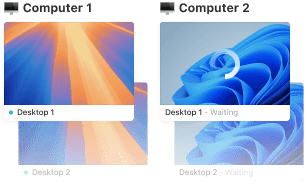
Controle múltiples estaciones de trabajo para mejorar el soporte de los administradores de sistemas

Control de múltiples estaciones de trabajo

Establezca conexiones remotas simultáneas a múltiples estaciones de trabajo de un solo cliente y cambie entre ellas sin esfuerzo para una mayor eficiencia.
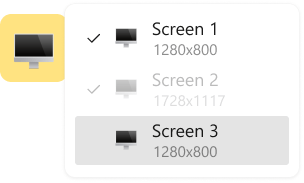
Herramienta de escritorio remoto con soporte para múltiples monitores

Compatibilidad con varios monitores

Facilite las vistas lado a lado de dos pantallas remotas o alterne entre varias pantallas de monitores remotos para una sesión remota completa.

Gestión sencilla de clientes para soporte remoto

Gestión de clientes

HelpWire agiliza la gestión y el seguimiento de clientes, permitiéndote anotar los problemas de los clientes directamente dentro del navegador.

Iniciar una sesión de soporte remoto

Inicio de sesión simple

HelpWire emplea aplicaciones cliente generadas de forma única para cada sesión remota, evitando la necesidad de manejar IDs de sesión y contraseñas.
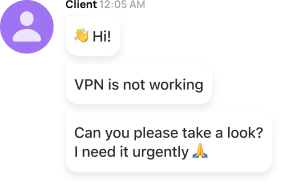
Chat integrado para soporte remoto

Mensajería instantánea

La función de chat de soporte integrada de HelpWire facilita una comunicación rápida y sencilla entre administradores de sistemas y clientes, eliminando la necesidad de correos electrónicos extensos o llamadas telefónicas frecuentes.
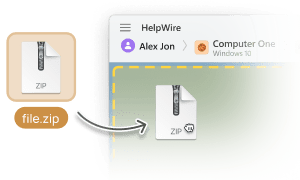
Transferencia de archivos para mejorar la asistencia remota

Transferencia de archivos

HelpWire agiliza la asistencia técnica al permitir a los administradores copiar y pegar archivos sin esfuerzo directamente en la ventana del escritorio remoto.

Funciones avanzadas de acceso remoto desatendido

Solución multiplataforma

Solución multiplataforma

Conéctese desde Windows, Linux, y macOS con HelpWire, y brinde soporte a sus clientes remotos utilizando aplicaciones nativas en su plataforma preferida.
Derechos de administrador

Derechos de administrador

Tras la aprobación del cliente, ejecute aplicaciones con privilegios de administrador en estaciones de trabajo remotas (solo disponible para computadoras con Windows).
Cambiar de cuenta de usuario

Cambiar de cuenta de usuario

Cree varias cuentas de usuario en la estación de trabajo remota y cambie entre ellas sin problemas en segundos.
Reiniciar estación de trabajo remota

Reiniciar estación de trabajo remota

Vuelva a conectarse de forma continua a la sesión de escritorio remoto después de cerrar sesión en la cuenta de usuario remota de Windows para volver a iniciar sesión en otra, o de reiniciar la estación de trabajo remota para realizar actualizaciones de software.
Colaboración en equipo

Colaboración en equipo

Trabaje con sus colegas en la misma estación de trabajo remota con acceso remoto desatendido simultáneo para varios miembros del equipo.
Detalles de la estación de trabajo

Detalles de la estación de trabajo

HelpWire reconoce y muestra automáticamente el nombre, el tipo y la versión del sistema operativo que está usando su cliente remoto.

Seguridad sólida

La seguridad de HelpWire prioriza la protección del entorno de escritorio remoto mediante una autenticación confiable, una infraestructura basada en AWS y protocolos de cifrado de primer nivel

HelpWire implementa el servicio de autenticación Auth0

Autenticación segura

HelpWire protege sus datos con el sistema de autenticación integrado Auth0, una plataforma en la que confían gigantes como Microsoft, AWS y muchos más.

Cifrado robusto de extremo a extremo

Cifrado de extremo a extremo

Acceda a escritorios remotos de forma segura utilizando protocolos de conexión como HTTPS y WSS, reforzados por TLS/SSL y la metodología avanzada de cifrado AES-256.


Infraestructura segura en la nube

Alojamiento de datos confiable

Tenga la seguridad de que sus datos y la información de sus clientes residen de forma segura dentro de la infraestructura en la nube de AWS de HelpWire, una plataforma también preferida por líderes de la industria como Samsung, Philips, Disney, Netflix y NASA.

Se requiere el permiso del cliente título

Acceso basado en consentimiento

HelpWire garantiza que solo puedas acceder a la estación de trabajo remota de un cliente con su consentimiento explícito.

Opiniones de los Usuarios sobre su Experiencia con HelpWire title icon

5.0 Basado en 209 opiniones de clientes
version icon
Versión
2.2, 04/02/2026
compatibility icon
Compatibilidad
macOS, Windows, Linux
price icon
Precio
Gratis
Estas son algunas de las reseñas públicas de HelpWire realizadas por nuestros clientes, procedentes de distintas fuentes:
Thea M.
Office admin
Thea M.
I got a gatvol of teamviewer and its issues and moved over to HelpWire and I'm blown away. Fast, effective and doesn't drain my computer's resources. It works really well props to the devs.
Molly
Production worker
Molly
My experience with HelpWire has been fantastic! The remote control process is incredibly smooth.
Daniel Domingues
Founder, Lusha
Daniel Domingues
I appreciate HelpWire for its ease of use and comprehensive remote support tools all in one place.
Rabeea Sarfraz
Associate Software Engineer, Coeus Solutions GmbH
Rabeea Sarfraz
HelpWire streamlines the remote support, allowing me to manage multiple clients efficiently, which improved overall service quality and client satisfaction.
Mark V.
Remote Technical Support
Mark V.
The fact that I can easily segregate my clients and have a full history of my connection to them is amazing. I like the fact that I can send a link to them and then talk them through what to do when they receive it (many are elderly and techo-illiterate). The emails and link are professional and give them reassurance. I like unattended access for those clients that need that extra layer of help. Love this app.
Kyle Paterson
CEO, Enspire
Kyle Paterson
The swift setup process and zero- configuration requirement for starting remote support sessions are what I appreciate most about HelpWire. It's remarkable how quickly I can connect with clients and start troubleshooting without any hassle.
Yaroslav H.
Owner
Yaroslav H.
Very good and free alternative to TV. Easy to use and nice concept. No annoying disconnections and forcing to buy premiumbussiness subscription or smth like that.
Muhammad Ammar Z.
Senior Lecturer at Shifa College of Pharmaceutical Sciences
Muhammad Ammar Z.
As a long-time TeamViewer user for personal projects and helping family, I grew increasingly frustrated with its frequent disconnections and persistent "commercial use" warnings. I decided to search for an alternative and found Helpwire. I am incredibly impressed. Helpwire provides a stable, reliable connection without any of the interruptions I faced before. The setup is simple, and it just works.
Jonathan B.
IT Director
Jonathan B.
Its a great tool for remote support. It doesn't have the bells and whistles of its commercial rivals, but ask yourself how often do you need that stuff ? If you want to help someone out on a PC issue, or connect to a server for some admin this is perfect.
Nilay N.
Senior Education Management, Self-employed
Nilay N.
HelpWire software has been an invaluable asset for streamlining our customer support processes.
Darko V.
SEO specialist
Darko V.
Probably the best free remote access app. I like seamless remote desktop experience and copy/paste functionality, reliability, and the fact it is free to use.
Samit B.
Senior Communication Executive, Dairy
Samit B.
The experience is fantastic with a very smooth remote session experience. The optimised performance and smart connectivity feature ensures a seamless remote session with zero-lag.
Ben T
Admin Assistant
Ben T
It was handy for the odd occasion that someone needs a hand with their computer while I am not nearby. It was very reliable and able to see the other's screen to provide directions.
Jean K.
Engineer
Jean K.
Absolutely Brilliant. Having worked on a whole bunch of other remote support software, from solarwinds dameware to anydesk and teamviewer, vnc viewer and the like, I have never had the joy I am having with Helpwire.
Govind P.
Content Writer, Marketing and Advertising
Govind P.
I've never been more satisfied with the service quality of a remote desktop application in my entire freelancing career. Considering the fact that it's a free remote desktop support solution, HelpWire is really worth a shot!
The interface is straightforward, so I can quickly connect to clients' devices and start troubleshooting without jumping through hoops. Plus, the performance is rock solid-no lag or sudden disconnections, which is crucial when I'm in the middle of solving a client's issue.
Adyrosan B.
Business Leader or Manager
Adyrosan B.
I appreciate Helpwire for its user-friendly interface and efficient problem-solving capabilities. It's designed to streamline the troubleshooting process, making it easier for people to find solutions to their technical issues quickly.
Anna K.
Sales Marketing
Anna K.
HelpWire really stands out for me because it's free and works seamlessly on both Mac and PC. I love how easy it is to get started. Basically, I can send a dedicated link to my colleague or client to initiate a remote session right away. The software is super fast and easy to use.
EJ S.
Business Leader or Manager
EJ S.
The Operator Dashboard is easy to use and you can start up a support session in seconds. The fact that it keeps the chat with the customer as well as logs of connections is a nice touch.
For nearly ten years I relied on another tool that recently became unusable, and HelpWire has stepped in as the perfect replacement.
How could I not like HelpWire! It ticks all the boxes for a great remote desktop/support service, and best of all, it's free. Real good, and worth more than a try.
Martin Lentz
Email Review
Martin Lentz
Your software worked just as well as Teamviewer. One thing works better and that is on the client side where they simply just have to grant me access. They don't have to provide me a one use password in order for me to connect.
Luca Albanese
Email Review
Luca Albanese
Simplicity of use, in particular on the client side that simply require to click on a link and give the required permissions. But the best feature, IMHO, is the ability to share the clients with other team members... and all of this for free! THANK YOU for this amazing app!!
Wilkin Miguel Julio Mercado
Email Review
Wilkin Miguel Julio Mercado
It's easy to use and I didn't expect there to be a software as good as this one.
Michael Guggenbichler
Email Review
Michael Guggenbichler
Absolutely Amazing Product for attended Access for individual operators or small teams! And you do not even have to pay!! There are so much remote access solutions, you have to pay tons of money and don't even provide the bare minimum. HelpWire Team, you're doing great! Looking forward to what you will bring in the future.