Electronic Team utilizza i cookie per migliorare la tua esperienza sul nostro sito web. Continuando a utilizzare questo sito web, accetti la nostra Cookie Policy. Scopri di più qui.

Software gratuito online per desktop remoto

HelpWire è un software di accesso remoto basato su cloud: connettiti ai client su Windows, Mac o Linux con un link condivisibile, da una qualsiasi di queste piattaforme. Nessuna VPN, nessun requisito di essere sulla stessa rete.
Logo G2
G2
5.0
logo di capterra
Capterra
5.0
Logo di SourceForge
SourceForge
5.0
Logo di TrustRadius
TrustRadius
5.0

Funzionalità di HelpWire per il supporto remoto online

La gamma di funzionalità di HelpWire consente a un team tecnico remoto di offrire agli utenti lo stesso livello di supporto come se fosse in loco.
Accesso non presidiato

Accesso non presidiato

Connettiti a un computer remoto anche quando non c'è nessuno disponibile ad accettare la sessione. Utile per manutenzione programmata, aggiornamenti software e attività di follow-up.
Supporto remoto su richiesta

Supporto remoto su richiesta

Avvia una sessione di supporto remoto con un utente che sta utilizzando attivamente il dispositivo. Ideale per la risoluzione dei problemi, la guida e le questioni che richiedono collaborazione in tempo reale.
Connessioni sicure

Connessioni sicure

Genera link persistenti e univoci per abilitare una connessione sicura alle postazioni di lavoro dei client.
Sessioni remote multiple

Sessioni remote multiple

HelpWire consente agli utenti di configurare più connessioni simultanee per semplificare il supporto ai clienti.
Vista multi-monitor

Vista multi-monitor

Gestisci più schermi contemporaneamente, consentendo un lavoro più efficiente e riducendo il tempo impiegato a passare da un computer all'altro.
Supporto multipiattaforma

Supporto multipiattaforma

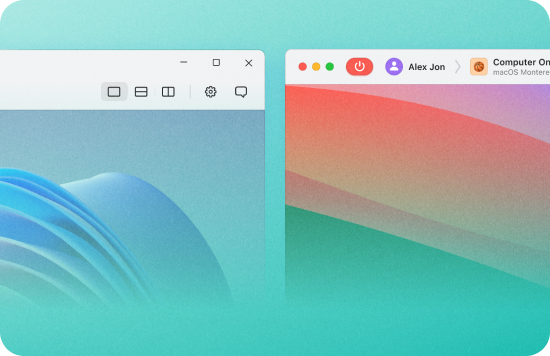
Questo software di desktop remoto online offre supporto multipiattaforma per i dispositivi che eseguono i sistemi operativi Windows, macOS e Linux.
Trasferimento file

Trasferimento file

Trascina i file nella finestra della sessione oppure usa gli appunti per copiarli tra i sistemi.
Chat nella sessione

Chat nella sessione

La chat integrata consente agli operatori di comunicare con i clienti durante una sessione remota: non è necessario alcuno strumento di messaggistica separato.

Come configurare una connessione desktop remoto online

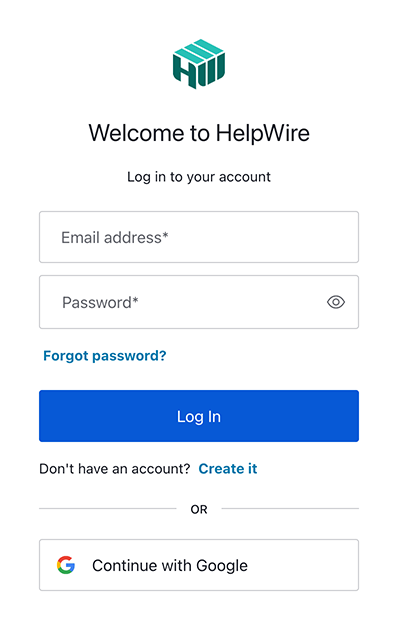
1. Registra il tuo account HelpWire:
Crea un nuovo account utilizzando un indirizzo email o il tuo profilo Google.
Registra un nuovo account HelpWire
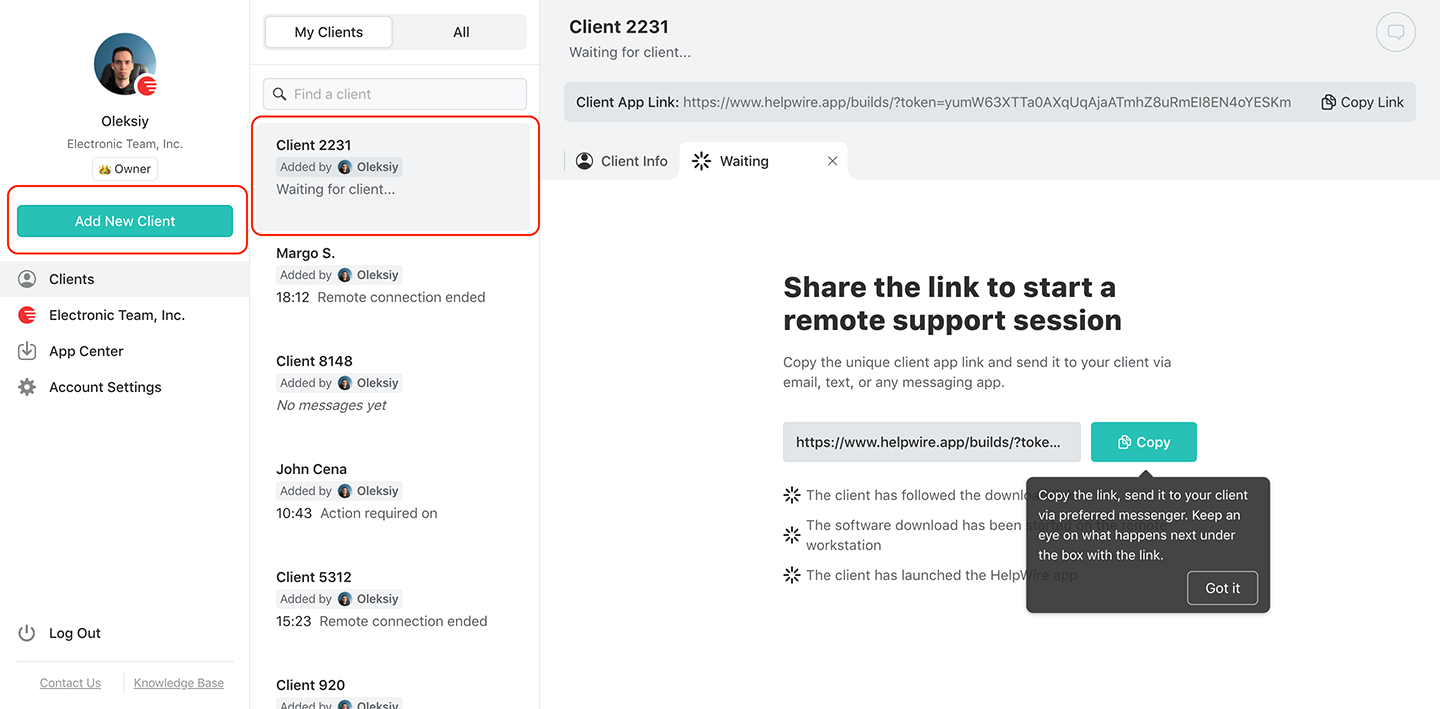
2. Crea un nuovo client.
Aggiungi un nuovo cliente o selezionane uno esistente
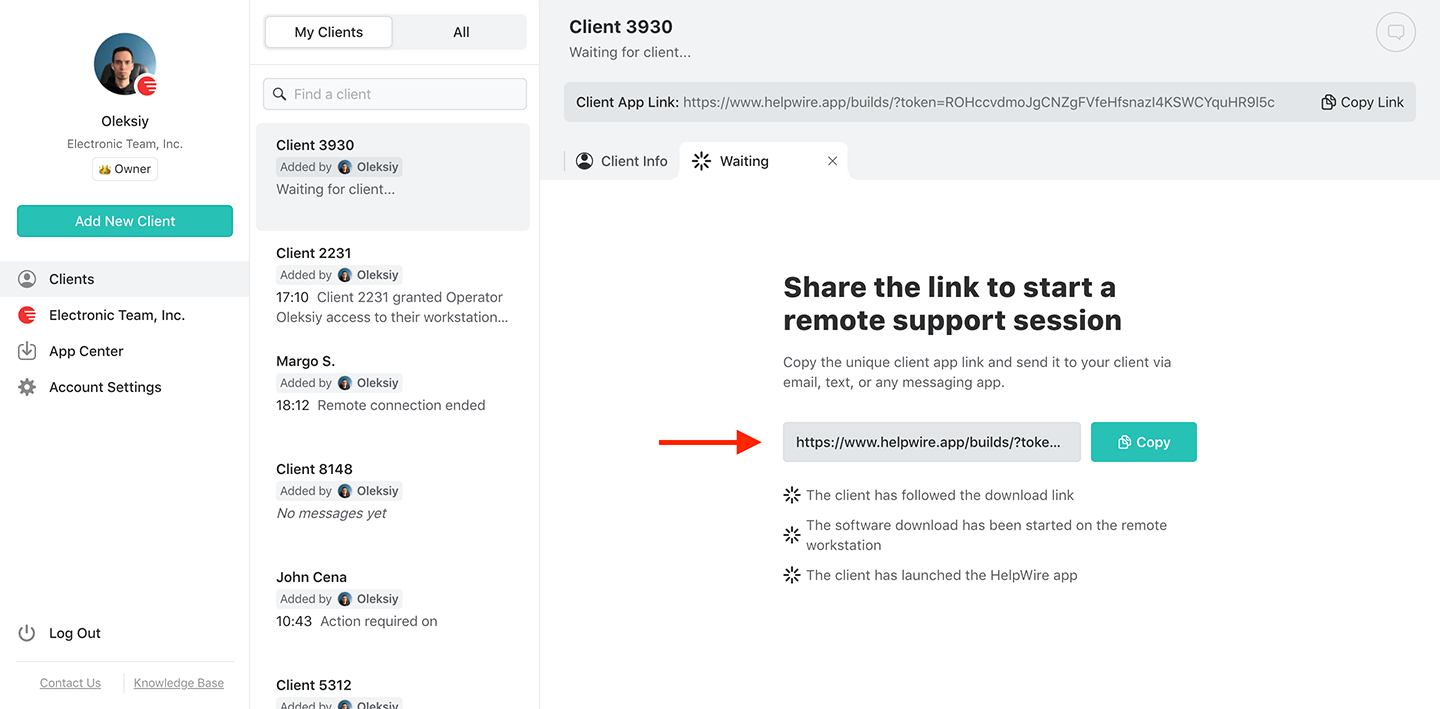
3. Condividi il link con il cliente:
Individua il link dell'app Client nella barra degli strumenti utente del profilo del cliente. Invia il link al tuo cliente tramite un'email sicura o un messaggio istantaneo.
Condividi il link con il tuo cliente per il supporto online remoto
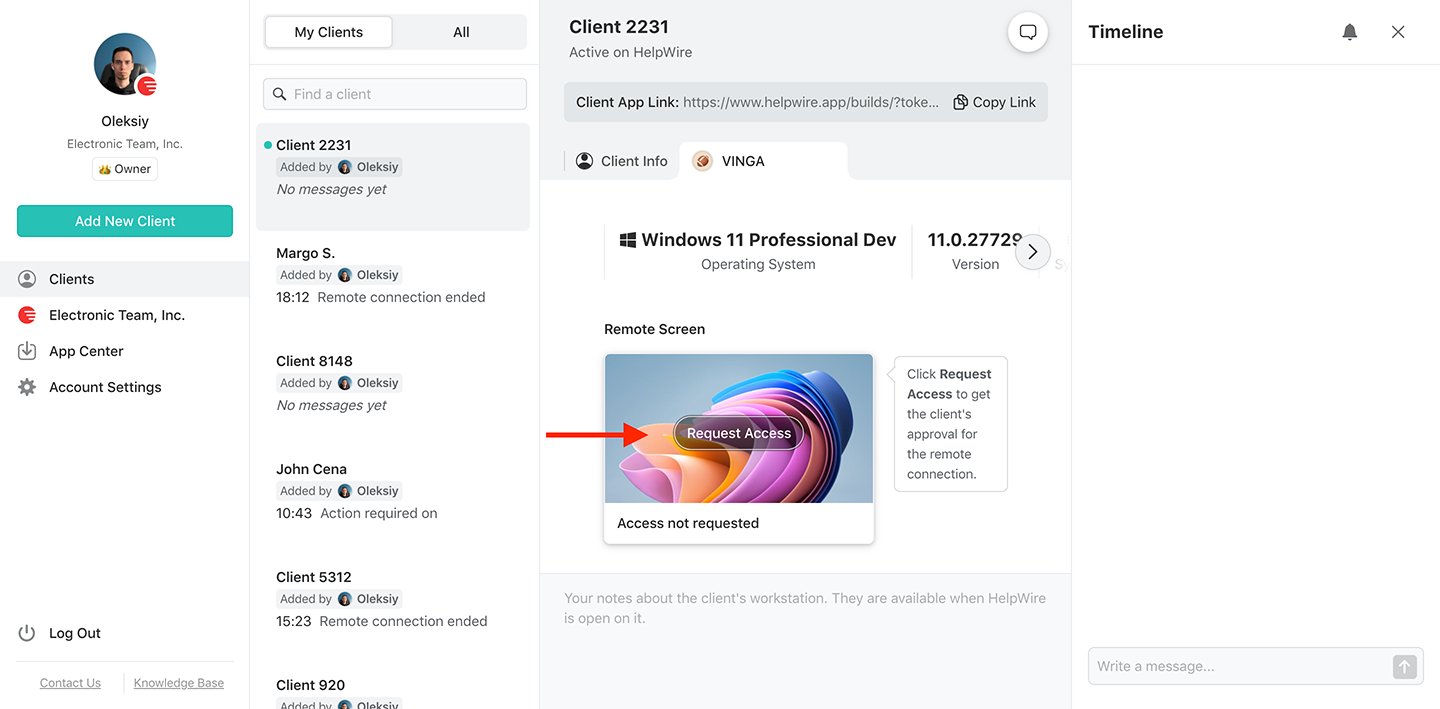
4. Ottieni il permesso di accesso:
Dopo che il cliente riceve il link, attendi che installi e avvii l'applicazione HelpWire Client sui propri sistemi. Una volta fatto, richiedi l'autorizzazione al cliente remoto facendo clic sul pulsante “Request Access” e attendendo l'approvazione del cliente.
Ottieni i permessi di accesso dal client remoto per il supporto remoto online
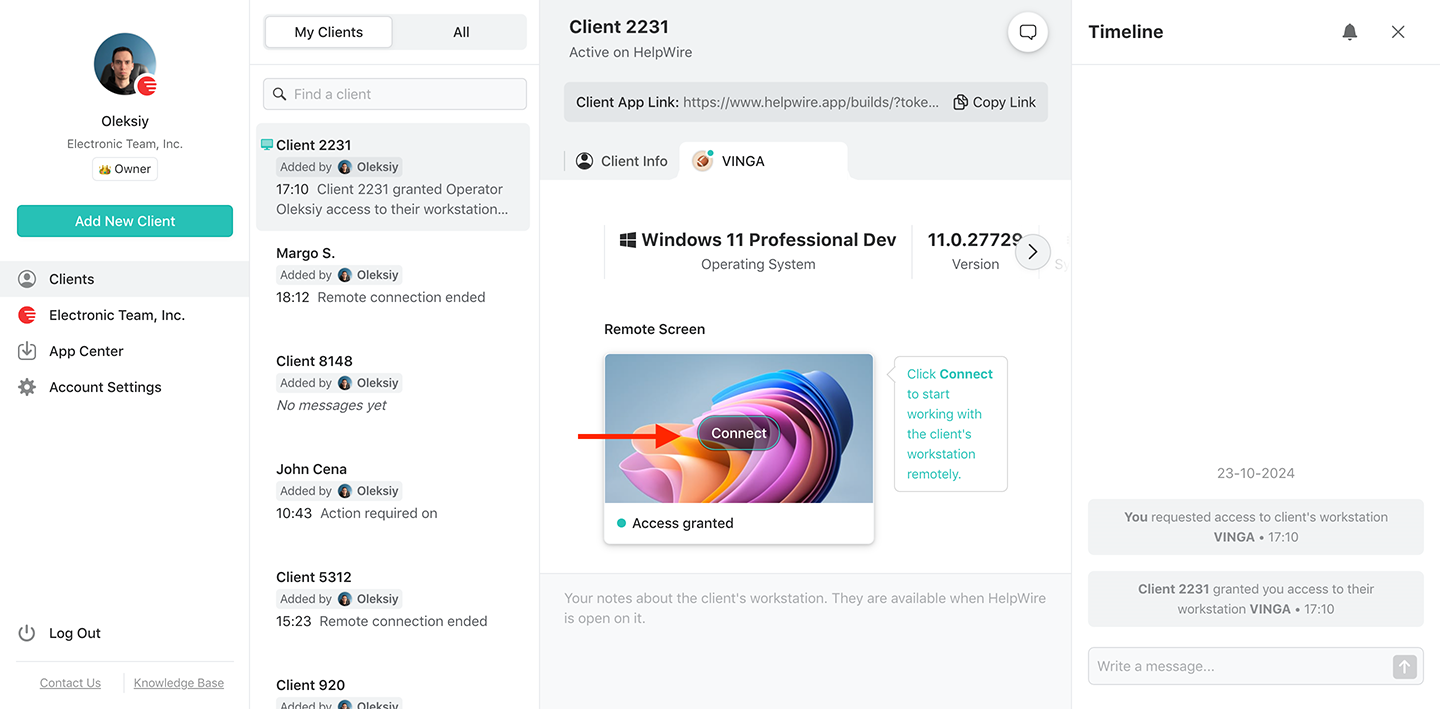
5. Connettiti al client remoto:
Premi il pulsante “Connetti” sul dispositivo del cliente nella dashboard basata su browser.
Connettiti al tuo client remoto per il supporto remoto online
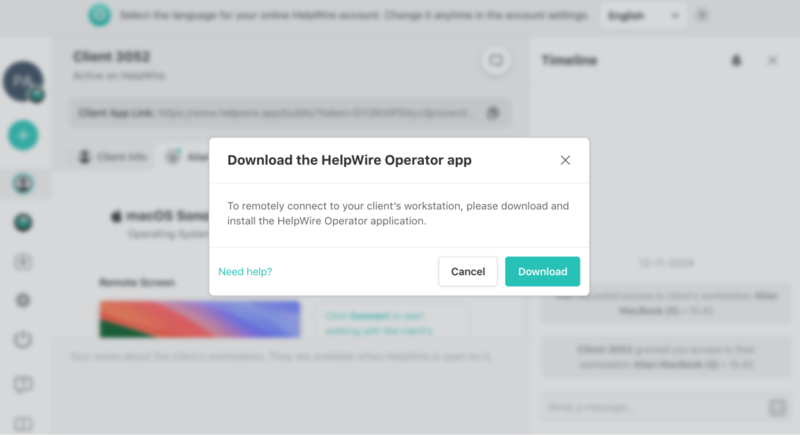
6. Scarica l’applicazione Operatore di HelpWire:
Se è la prima volta che ti connetti a un client remoto, ti verrà chiesto di scaricare e installare l'app HelpWire Operator.
Scarica HelpWire per il supporto remoto
7. Sei dentro.

Perché scegliere il desktop remoto di HelpWire rispetto alle soluzioni concorrenti?

Diamo un'occhiata ad alcune soluzioni alternative di desktop remoto online per vedere come si confrontano con HelpWire. Forniamo una tabella dopo queste recensioni per facilitare il confronto tra gli strumenti.

TeamViewer

TeamViewer è un popolare strumento online per desktop remoto che offre agli utenti un'interfaccia semplice e una velocità di connessione elevata. La sua opzione basata sul web consente ai team di ottenere l'accesso remoto senza installare alcun software.
Pro:
  • Più piani tariffari per soddisfare le tue esigenze;
  • Molte funzionalità aziendali per team tecnici remoti.
Contro:
  • La versione gratuita potrebbe essere contrassegnata per uso commerciale, influenzando la funzionalità della sessione.
Dai un'occhiata dettagliata alle differenze tra TeamViewer e HelpWire.

Chrome Remote Desktop

Chrome Remote Desktop è popolare tra gli utenti per la sua semplicità e l'integrazione con i servizi Google. Questa soluzione di desktop remoto basata sul web viene generalmente utilizzata per uso personale e non fornisce le funzionalità necessarie per un team professionale di supporto tecnico.
Pro:
  • Accesso multipiattaforma;
  • Gratuito da usare;
  • Configurazione semplice.
Contro:
  • Le sessioni sono limitate a un singolo utente;
  • Richiede un account Google per l'uso;
  • Funzionalità limitate senza chat o gestione utenti.
Questi svantaggi rendono HelpWire una migliore alternativa a Chrome Remote Desktop per il supporto desktop remoto.

ISL Online

ISL Online offre ai team di supporto professionale una soluzione RDP online versatile. Oltre a fornire accesso remoto, ISL Online dispone del supporto multi-monitor e della funzionalità di trasferimento file. Offre inoltre un'eccellente sicurezza con autenticazione a più fattori e crittografia end-to-end.
Pro:
  • Branding personalizzabile per un aspetto professionale;
  • Molteplici opzioni di integrazione;
  • Funzionalità avanzate di reportistica e analisi.
Contro:
  • La configurazione e l'accesso alle funzionalità avanzate possono richiedere tempo e competenze aggiuntive;
  • Più costoso delle soluzioni online alternative per l'accesso remoto.
Scopri di più su come funziona HelpWire come alternativa a ISL Online.

Confronto tra le migliori soluzioni di desktop remoto

Crediamo che HelpWire offra una delle migliori soluzioni di desktop remoto online per utenti privati e aziendali.
Funzionalità
HelpWire
TeamViewer
Chrome Remote Desktop
ISL Online
1
Disponibilità della versione gratuita
Piano gratuito disponibile per uso aziendale e personale
La versione gratuita è solo per uso personale
Gratuito per uso personale e aziendale
Versione gratuita limitata a 15 giorni
2
Accesso multipiattaforma
3
Gestione di team e clienti
4
Sicurezza
Crittografia TLS, AES-256, autenticazione Auth0, utilizza firme Digicert, hosting AWS sicuro e accesso dell'operatore remoto controllato dal cliente.
Autenticazione a due fattori, crittografia AES a 256 bit e controlli di accesso.
Autenticazione tramite account Google, crittografia TLS end-to-end, protezione tramite PIN.
Crittografia AES a 256 bit, registrazione della sessione, autenticazione a due fattori e opzione di self-hosting.
5
Curva di apprendimento
Avvio della sessione tramite link
Configurazione e utilizzo più complessi
Configurazione e utilizzo accessibili
Configurazione e utilizzo più complessi

Cosa dicono i nostri utenti title icon

4.6 Basato sulle recensioni di piu’ di 209 clienti
version icon
Versione
2.2, 4 Febbr, 2026
compatibility icon
Compatibilità
macOS, Windows, Linux
price icon
Prezzo
Gratis
Qui troverete alcune recensioni pubbliche dei clienti su HelpWire provenienti da varie fonti. Tutte le recensioni sono mostrate nella loro lingua originale.
Thea M.
Office admin
Thea M.
I got a gatvol of teamviewer and its issues and moved over to HelpWire and I'm blown away. Fast, effective and doesn't drain my computer's resources. It works really well props to the devs.
Molly
Production worker
Molly
My experience with HelpWire has been fantastic! The remote control process is incredibly smooth.
Daniel Domingues
Founder, Lusha
Daniel Domingues
I appreciate HelpWire for its ease of use and comprehensive remote support tools all in one place.
Rabeea Sarfraz
Associate Software Engineer, Coeus Solutions GmbH
Rabeea Sarfraz
HelpWire streamlines the remote support, allowing me to manage multiple clients efficiently, which improved overall service quality and client satisfaction.
Mark V.
Remote Technical Support
Mark V.
The fact that I can easily segregate my clients and have a full history of my connection to them is amazing. I like the fact that I can send a link to them and then talk them through what to do when they receive it (many are elderly and techo-illiterate). The emails and link are professional and give them reassurance. I like unattended access for those clients that need that extra layer of help. Love this app.
Kyle Paterson
CEO, Enspire
Kyle Paterson
The swift setup process and zero- configuration requirement for starting remote support sessions are what I appreciate most about HelpWire. It's remarkable how quickly I can connect with clients and start troubleshooting without any hassle.
Yaroslav H.
Owner
Yaroslav H.
Very good and free alternative to TV. Easy to use and nice concept. No annoying disconnections and forcing to buy premiumbussiness subscription or smth like that.
Muhammad Ammar Z.
Senior Lecturer at Shifa College of Pharmaceutical Sciences
Muhammad Ammar Z.
As a long-time TeamViewer user for personal projects and helping family, I grew increasingly frustrated with its frequent disconnections and persistent "commercial use" warnings. I decided to search for an alternative and found Helpwire. I am incredibly impressed. Helpwire provides a stable, reliable connection without any of the interruptions I faced before. The setup is simple, and it just works.
Jonathan B.
IT Director
Jonathan B.
Its a great tool for remote support. It doesn't have the bells and whistles of its commercial rivals, but ask yourself how often do you need that stuff ? If you want to help someone out on a PC issue, or connect to a server for some admin this is perfect.
Nilay N.
Senior Education Management, Self-employed
Nilay N.
HelpWire software has been an invaluable asset for streamlining our customer support processes.
Darko V.
SEO specialist
Darko V.
Probably the best free remote access app. I like seamless remote desktop experience and copy/paste functionality, reliability, and the fact it is free to use.
Samit B.
Senior Communication Executive, Dairy
Samit B.
The experience is fantastic with a very smooth remote session experience. The optimised performance and smart connectivity feature ensures a seamless remote session with zero-lag.
Ben T
Admin Assistant
Ben T
It was handy for the odd occasion that someone needs a hand with their computer while I am not nearby. It was very reliable and able to see the other's screen to provide directions.
Jean K.
Engineer
Jean K.
Absolutely Brilliant. Having worked on a whole bunch of other remote support software, from solarwinds dameware to anydesk and teamviewer, vnc viewer and the like, I have never had the joy I am having with Helpwire.
Govind P.
Content Writer, Marketing and Advertising
Govind P.
I've never been more satisfied with the service quality of a remote desktop application in my entire freelancing career. Considering the fact that it's a free remote desktop support solution, HelpWire is really worth a shot!
The interface is straightforward, so I can quickly connect to clients' devices and start troubleshooting without jumping through hoops. Plus, the performance is rock solid-no lag or sudden disconnections, which is crucial when I'm in the middle of solving a client's issue.
Adyrosan B.
Business Leader or Manager
Adyrosan B.
I appreciate Helpwire for its user-friendly interface and efficient problem-solving capabilities. It's designed to streamline the troubleshooting process, making it easier for people to find solutions to their technical issues quickly.
Anna K.
Sales Marketing
Anna K.
HelpWire really stands out for me because it's free and works seamlessly on both Mac and PC. I love how easy it is to get started. Basically, I can send a dedicated link to my colleague or client to initiate a remote session right away. The software is super fast and easy to use.
EJ S.
Business Leader or Manager
EJ S.
The Operator Dashboard is easy to use and you can start up a support session in seconds. The fact that it keeps the chat with the customer as well as logs of connections is a nice touch.
For nearly ten years I relied on another tool that recently became unusable, and HelpWire has stepped in as the perfect replacement.
How could I not like HelpWire! It ticks all the boxes for a great remote desktop/support service, and best of all, it's free. Real good, and worth more than a try.
Martin Lentz
Email Review
Martin Lentz
Your software worked just as well as Teamviewer. One thing works better and that is on the client side where they simply just have to grant me access. They don't have to provide me a one use password in order for me to connect.
Luca Albanese
Email Review
Luca Albanese
Simplicity of use, in particular on the client side that simply require to click on a link and give the required permissions. But the best feature, IMHO, is the ability to share the clients with other team members... and all of this for free! THANK YOU for this amazing app!!
Wilkin Miguel Julio Mercado
Email Review
Wilkin Miguel Julio Mercado
It's easy to use and I didn't expect there to be a software as good as this one.
Michael Guggenbichler
Email Review
Michael Guggenbichler
Absolutely Amazing Product for attended Access for individual operators or small teams! And you do not even have to pay!! There are so much remote access solutions, you have to pay tons of money and don't even provide the bare minimum. HelpWire Team, you're doing great! Looking forward to what you will bring in the future.
Domande frequenti