Alternativa gratuita a Remmina
Cambia a HelpWire, una alternativa gratuita a Remmina, y disfruta de una funcionalidad multiplataforma sin interrupciones, una interfaz intuitiva y soluciones de asistencia remota avanzadas para potenciar tu negocio.
- Fácil de usar
- Ideal para empresas de cualquier tamaño
- Sin costes ocultos
HelpWire vs. Remmina
Analicemos en detalle los precios y las características de Remmina y HelpWire.
| Funcionalidad |
HelpWire
|
Remmina |
|---|---|---|
| Precio | ||
| Precio | Gratuito | Gratuito |
| Compatibilidad multiplataforma | ||
| Compatibilidad multiplataforma | Compatibilidad nativa con operadores de Windows, macOS y Linux, con clientes en Windows y macOS. | Solo Linux y Windows mediante soluciones alternativas |
| Código abierto | ||
| Código abierto | ||
| Transferencia de archivos | ||
| Transferencia de archivos | Arrastrar y soltar o copiar y pegar | Compartir acceso a una carpeta remota |
| Portapapeles compartido | ||
| Portapapeles compartido | ||
| Compartición de sonido | ||
| Compartición de sonido | Aún no admite la compartición de sonido | Admite sonido remoto a través de RDP |
Funciones de HelpWire
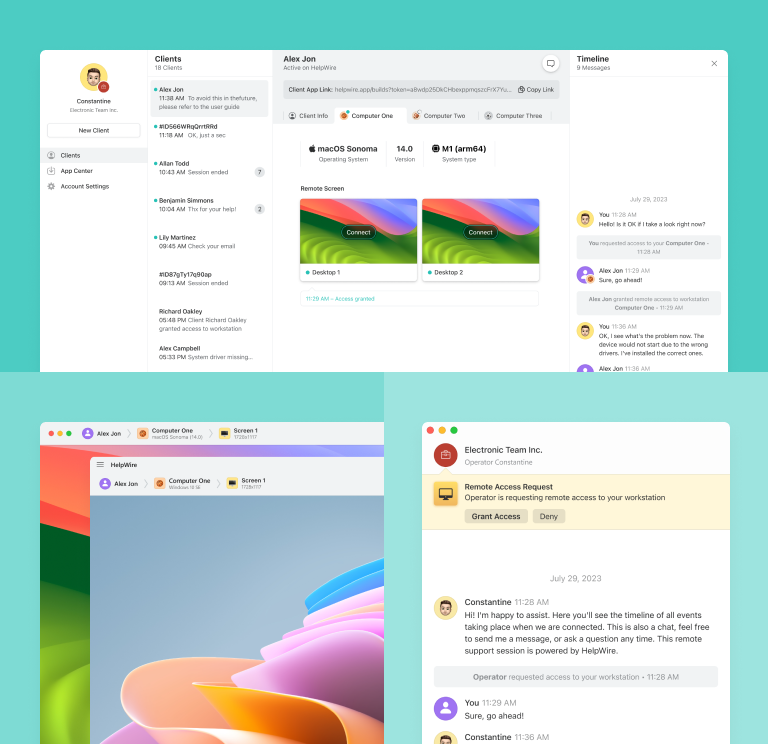
Elegir HelpWire garantiza el acceso completo a todas las funciones, proporcionando una gestión estable del escritorio remoto y convirtiéndolo en una excelente alternativa gratuita a Remmina.
Más información
Más información

Chat de soporte
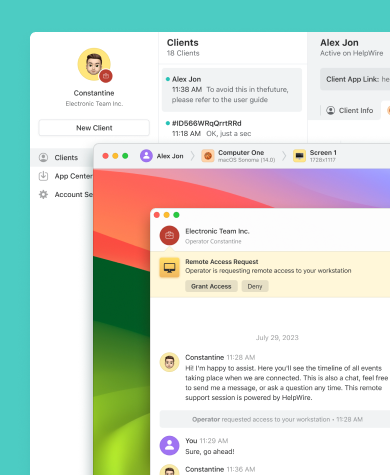
Con HelpWire Chat, tu empresa puede mejorar la eficiencia del soporte remoto bajo demanda y ofrecer soluciones rápidas y eficaces a las incidencias de los clientes.

Escritorio remoto fácil y gratuito para Windows
Comparte enlaces únicos generados por HelpWire para iniciar sesiones remotas con los equipos de tus clientes — sin necesidad de credenciales ni contraseñas.
Transferencia de archivos
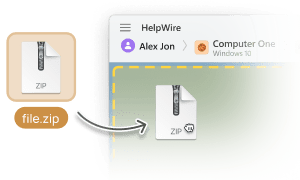
Copia y pega archivos fácilmente o utiliza la función arrastrar y soltar directamente en la ventana de control remoto de HelpWire para transferirlos a tus clientes.

Gestión de clientes
Experimenta una gestión del soporte al cliente sin complicaciones gracias a las herramientas intuitivas de HelpWire, que incluyen el historial de sesiones de asistencia y una lista completa de clientes.
Vista multipantalla
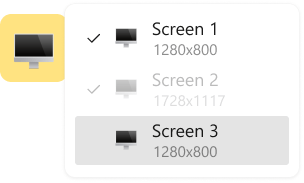
Aumenta la eficiencia y la productividad con la capacidad de HelpWire para ver y gestionar varias pantallas de ordenador simultáneamente.
Soporte remoto para cualquier rol, necesidad o sector

Administradores de sistemas
Las avanzadas herramientas seguras de acceso remoto para administradores de HelpWire permiten a los administradores de sistemas garantizar el funcionamiento fiable de equipos y redes remotos.

Proveedores de servicios gestionados
Con HelpWire, los proveedores de servicios gestionados (MSP) obtienen herramientas de gestión remota diseñadas para ofrecer un soporte de TI seguro y eficaz.

Organismos gubernamentales
Con HelpWire, puedes ofrecer soporte informático remoto para organismos gubernamentales y mejorar los servicios mediante un control avanzado del escritorio remoto.
Opiniones de los Usuarios sobre su Experiencia con HelpWire

5.0
Basado en 209 opiniones de clientes

Versión
2.2, 04/02/2026

Compatibilidad
macOS, Windows, Linux

Precio
Gratis
Estas son algunas de las reseñas públicas de HelpWire realizadas por nuestros clientes, procedentes de distintas fuentes:

I got a gatvol of teamviewer and its issues and moved over to HelpWire and I'm blown away.
Fast, effective and doesn't drain my computer's resources.
It works really well props to the devs.

My experience with HelpWire has been fantastic! The remote control process is incredibly smooth.

I appreciate HelpWire for its ease of use and comprehensive remote support tools all in one place.

HelpWire streamlines the remote support, allowing me to manage multiple clients efficiently, which improved overall service quality and client satisfaction.

The fact that I can easily segregate my clients and have a full history of my connection to them is amazing. I like the fact that I can send a link to them and then talk them through what to do when they receive it (many are elderly and techo-illiterate). The emails and link are professional and give them reassurance. I like unattended access for those clients that need that extra layer of help. Love this app.

The swift setup process and zero- configuration requirement for starting remote support sessions are what I appreciate most about HelpWire. It's remarkable how quickly I can connect with clients and start troubleshooting without any hassle.

Very good and free alternative to TV. Easy to use and nice concept. No annoying disconnections and forcing to buy premiumbussiness subscription or smth like that.

As a long-time TeamViewer user for personal projects and helping family, I grew increasingly frustrated with its frequent disconnections and persistent "commercial use" warnings. I decided to search for an alternative and found Helpwire. I am incredibly impressed. Helpwire provides a stable, reliable connection without any of the interruptions I faced before. The setup is simple, and it just works.

Its a great tool for remote support. It doesn't have the bells and whistles of its commercial rivals, but ask yourself how often do you need that stuff ? If you want to help someone out on a PC issue, or connect to a server for some admin this is perfect.

HelpWire software has been an invaluable asset for streamlining our customer support processes.

Probably the best free remote access app. I like seamless remote desktop experience and copy/paste functionality, reliability, and the fact it is free to use.

The experience is fantastic with a very smooth remote session experience. The optimised performance and smart connectivity feature ensures a seamless remote session with zero-lag.
It was handy for the odd occasion that someone needs a hand with their computer while I am not nearby. It was very reliable and able to see the other's screen to provide directions.
Absolutely Brilliant. Having worked on a whole bunch of other remote support software, from solarwinds dameware to anydesk and teamviewer, vnc viewer and the like, I have never had the joy I am having with Helpwire.

I've never been more satisfied with the service quality of a remote desktop application in my entire freelancing career. Considering the fact that it's a free remote desktop support solution, HelpWire is really worth a shot!

The interface is straightforward, so I can quickly connect to clients' devices and start troubleshooting without jumping through hoops. Plus, the performance is rock solid-no lag or sudden disconnections, which is crucial when I'm in the middle of solving a client's issue.
I appreciate Helpwire for its user-friendly interface and efficient problem-solving capabilities. It's designed to streamline the troubleshooting process, making it easier for people to find solutions to their technical issues quickly.
HelpWire really stands out for me because it's free and works seamlessly on both Mac and PC. I love how easy it is to get started. Basically, I can send a dedicated link to my colleague or client to initiate a remote session right away. The software is super fast and easy to use.
The Operator Dashboard is easy to use and you can start up a support session in seconds. The fact that it keeps the chat with the customer as well as logs of connections is a nice touch.

For nearly ten years I relied on another tool that recently became unusable, and HelpWire has stepped in as the perfect replacement.
How could I not like HelpWire! It ticks all the boxes for a great remote desktop/support service, and best of all, it's free. Real good, and worth more than a try.
Martin Lentz
Email Review

Your software worked just as well as Teamviewer. One thing works better and that is on the client side where they simply just have to grant me access. They don't have to provide me a one use password in order for me to connect.
Luca Albanese
Email Review
Simplicity of use, in particular on the client side that simply require to click on a link and give the required permissions. But the best feature, IMHO, is the ability to share the clients with other team members... and all of this for free! THANK YOU for this amazing app!!
Wilkin Miguel Julio Mercado
Email Review
It's easy to use and I didn't expect there to be a software as good as this one.
Michael Guggenbichler
Email Review
Absolutely Amazing Product for attended Access for individual operators or small teams! And you do not even have to pay!! There are so much remote access solutions, you have to pay tons of money and don't even provide the bare minimum. HelpWire Team, you're doing great! Looking forward to what you will bring in the future.
FAQ
Remmina es principalmente un cliente de escritorio remoto para sistemas Linux y no es compatible con equipos Windows. Actualmente, sus desarrolladores no ofrecen una versión para Windows. Sin embargo, Remmina permite conexiones remotas de Linux a Windows utilizando el Protocolo de Escritorio Remoto (RDP).
Basado en FreeRDP, Remmina admite varios protocolos, como RDP, VNC, NX, XDMCP, SPICE, X2Go y SSH.
Sí, Remmina puede usarse con fines comerciales. Funciona bajo la Licencia Pública General GNU v2.0, que permite el uso comercial, la modificación, la distribución y el uso privado del software.