Alternativa Simplificada e Gratuita ao TeamViewer
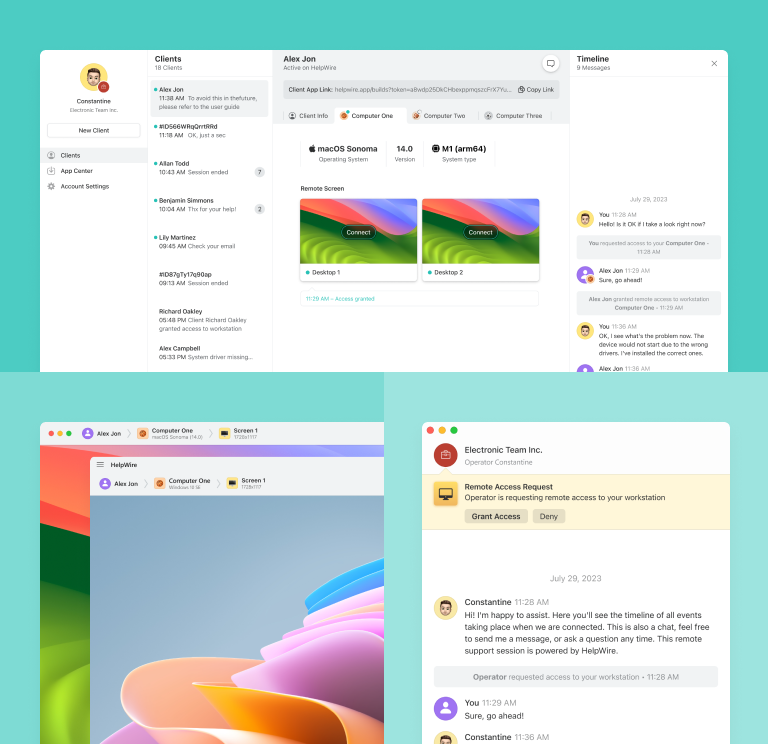
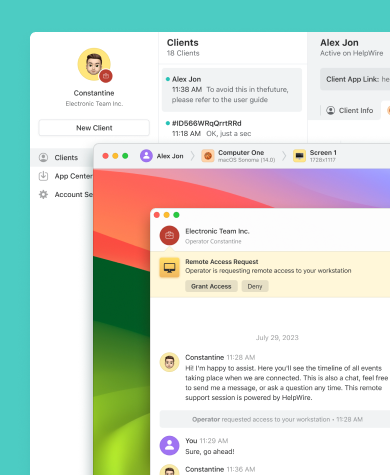
O HelpWire é uma alternativa gratuita ao TeamViewer, com recursos fundamentais para um suporte remoto rápido em Macs e PCs, tudo isso preservando seu orçamento.
- Interface de usuário amigável
- Assistência remota econômica
- Experiência de desktop remoto rápida
HelpWire vs. TeamViewer: Comparação Rápida
A seguir, um gráfico comparativo detalhando os recursos, as características e os preços do HelpWire e do TeamViewer.
| Características |
HelpWire
|
TeamViewer
Gratuito
Acesso remoto
Business
Premium
Corporate
| ||||
|---|---|---|---|---|---|---|
| Preço por mês | ||||||
| Preço por mês | Gratuito para uso pessoal e empresarial | Gratuito para uso não comercial | 24,90 $ | 50,90 $ | 112,90 $ | 229,90 $ |
| Restrições de utilizadores | ||||||
| Restrições de utilizadores | Sem limites | 1 utilizador (apenas uso pessoal) | 1 utilizador licenciado | 1 utilizador licenciado | 15 utilizadores licenciados | 30 utilizadores licenciados |
| Plataformas suportadas | ||||||
| Plataformas suportadas | Windows, macOS, Linux | Windows, macOS, Linux, iOS, Android | Windows, macOS, Linux, iOS, Android | Windows, macOS, Linux, Android, iOS, ChromeOS | Windows, macOS, Linux, Android, iOS, ChromeOS | Windows, macOS, Linux, Android, iOS, ChromeOS |
| Visualização multi-monitor | ||||||
| Visualização multi-monitor | ||||||
| Controlo de várias estações de trabalho por utilizador | ||||||
| Controlo de várias estações de trabalho por utilizador | Ilimitado | 1 | 3 | Ilimitado | Ilimitado | Ilimitado |
| Chat e colaboração | ||||||
| Chat e colaboração | Chat | Chat | Chat | VoIP, Video, Chat | VoIP, Video, Chat | VoIP, Video, Chat |
| Transferência de ficheiros | ||||||
| Transferência de ficheiros | ||||||
| Acesso remoto não supervisionado | ||||||
| Acesso remoto não supervisionado | ||||||
| Segurança reforçada | ||||||
| Segurança reforçada | ||||||
| Sessões de ambiente de trabalho remoto em simultâneo | ||||||
| Sessões de ambiente de trabalho remoto em simultâneo | 1 | 1 | 1 | 1 | 1 | 3 |
| Gravação de sessões | ||||||
| Gravação de sessões | ||||||
| Personalização | ||||||
| Personalização |
Recursos do HelpWire
Vamos analisar alguns dos recursos importantes do HelpWire, que o ajudarão a entender melhor sua comparação com o TeamViewer.
Saber mais
Saber mais

Chat Integrado
Aproveite o bate-papo de suporte para participar de conversas em tempo real, permitindo que as equipes de suporte obtenham informações mais profundas sobre os problemas dos clientes para obter resoluções mais eficientes e rápidas.
Transferência de Arquivos
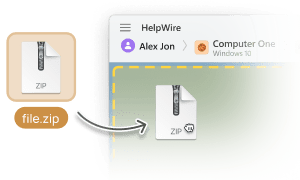
Transfira sem esforço arquivos do seu computador para uma janela de sessão de área de trabalho remota usando a funcionalidade intuitiva de copiar e colar.

Suporte Multiplataforma
Conecte-se com facilidade do Windows e Linux ao macOS e vice-versa, utilizando aplicativos nativos para cada plataforma.
Suporte Multi-monitor
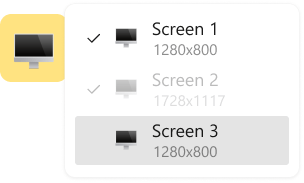
Visualize duas telas de uma estação de trabalho remota simultaneamente ou alterne entre vários monitores remotos, aprimorando o processo de suporte.

Início Rápido de Sessão
Inicie sessões remotas com facilidade, simplesmente enviando aos seus clientes o link de conexão à área de trabalho remota, dispensando a necessidade de entradas complexas de ID ou senha.
Suporte Remoto Adaptado a Diversas Necessidades

Suporte de TI
Aumente a eficácia do seu suporte remoto com o HelpWire, um desktop remoto gratuito para especialistas de tecnologia, que resolve problemas de configuração do sistema e instalação de software.

Manufatura
O HelpWire fornece acesso remoto seguro para a manufatura, aprimorando a qualidade do serviço com recursos avançados adaptados ao setor.

Instituições de Ensino
HelpWire se destaca como um software de acesso remoto inestimável para a educação, com uma interface fácil de usar, adequada para todos os níveis de habilidade, garantindo que as ferramentas educacionais digitais funcionem sem problemas.
O que os Usuários Dizem sobre sua Experiência com o HelpWire

5.0
Com base em 209 avaliações de clientes

Versão
2.2, 04/02/2026

Compatibilidade
macOS, Windows, Linux

Preço
Grátis
Aqui estão algumas das opiniões públicas sobre o HelpWire de nossos clientes, de várias fontes:

I got a gatvol of teamviewer and its issues and moved over to HelpWire and I'm blown away.
Fast, effective and doesn't drain my computer's resources.
It works really well props to the devs.

My experience with HelpWire has been fantastic! The remote control process is incredibly smooth.

I appreciate HelpWire for its ease of use and comprehensive remote support tools all in one place.

HelpWire streamlines the remote support, allowing me to manage multiple clients efficiently, which improved overall service quality and client satisfaction.

The fact that I can easily segregate my clients and have a full history of my connection to them is amazing. I like the fact that I can send a link to them and then talk them through what to do when they receive it (many are elderly and techo-illiterate). The emails and link are professional and give them reassurance. I like unattended access for those clients that need that extra layer of help. Love this app.

The swift setup process and zero- configuration requirement for starting remote support sessions are what I appreciate most about HelpWire. It's remarkable how quickly I can connect with clients and start troubleshooting without any hassle.

Very good and free alternative to TV. Easy to use and nice concept. No annoying disconnections and forcing to buy premiumbussiness subscription or smth like that.

As a long-time TeamViewer user for personal projects and helping family, I grew increasingly frustrated with its frequent disconnections and persistent "commercial use" warnings. I decided to search for an alternative and found Helpwire. I am incredibly impressed. Helpwire provides a stable, reliable connection without any of the interruptions I faced before. The setup is simple, and it just works.

Its a great tool for remote support. It doesn't have the bells and whistles of its commercial rivals, but ask yourself how often do you need that stuff ? If you want to help someone out on a PC issue, or connect to a server for some admin this is perfect.

HelpWire software has been an invaluable asset for streamlining our customer support processes.

Probably the best free remote access app. I like seamless remote desktop experience and copy/paste functionality, reliability, and the fact it is free to use.

The experience is fantastic with a very smooth remote session experience. The optimised performance and smart connectivity feature ensures a seamless remote session with zero-lag.
It was handy for the odd occasion that someone needs a hand with their computer while I am not nearby. It was very reliable and able to see the other's screen to provide directions.
Absolutely Brilliant. Having worked on a whole bunch of other remote support software, from solarwinds dameware to anydesk and teamviewer, vnc viewer and the like, I have never had the joy I am having with Helpwire.

I've never been more satisfied with the service quality of a remote desktop application in my entire freelancing career. Considering the fact that it's a free remote desktop support solution, HelpWire is really worth a shot!

The interface is straightforward, so I can quickly connect to clients' devices and start troubleshooting without jumping through hoops. Plus, the performance is rock solid-no lag or sudden disconnections, which is crucial when I'm in the middle of solving a client's issue.
I appreciate Helpwire for its user-friendly interface and efficient problem-solving capabilities. It's designed to streamline the troubleshooting process, making it easier for people to find solutions to their technical issues quickly.
HelpWire really stands out for me because it's free and works seamlessly on both Mac and PC. I love how easy it is to get started. Basically, I can send a dedicated link to my colleague or client to initiate a remote session right away. The software is super fast and easy to use.
The Operator Dashboard is easy to use and you can start up a support session in seconds. The fact that it keeps the chat with the customer as well as logs of connections is a nice touch.

For nearly ten years I relied on another tool that recently became unusable, and HelpWire has stepped in as the perfect replacement.
How could I not like HelpWire! It ticks all the boxes for a great remote desktop/support service, and best of all, it's free. Real good, and worth more than a try.
Martin Lentz
Email Review

Your software worked just as well as Teamviewer. One thing works better and that is on the client side where they simply just have to grant me access. They don't have to provide me a one use password in order for me to connect.
Luca Albanese
Email Review
Simplicity of use, in particular on the client side that simply require to click on a link and give the required permissions. But the best feature, IMHO, is the ability to share the clients with other team members... and all of this for free! THANK YOU for this amazing app!!
Wilkin Miguel Julio Mercado
Email Review
It's easy to use and I didn't expect there to be a software as good as this one.
Michael Guggenbichler
Email Review
Absolutely Amazing Product for attended Access for individual operators or small teams! And you do not even have to pay!! There are so much remote access solutions, you have to pay tons of money and don't even provide the bare minimum. HelpWire Team, you're doing great! Looking forward to what you will bring in the future.
FAQ
O HelpWire é a melhor alternativa gratuita ao TeamViewer, espelhando suas principais funcionalidades para controle e suporte remotos, disponível para aplicativos comerciais e pessoais sem nenhum custo.
O HelpWire é cada vez mais reconhecido como a melhor alternativa gratuita ao TeamViewer, devido às suas propostas semelhantes quanto à área de trabalho remota. Outros concorrentes de destaque incluem o Chrome Remote Desktop, Splashtop, LogMeIn e RemotePC.
O rótulo “melhor” é subjetivo, variando segundo as preferências do usuário ou da empresa. No entanto, existem alternativas gratuitas, como o HelpWire, que oferece recursos semelhantes e se destaca por oferecer suporte a diversas estações de trabalho, início rápido de sessões e outros recursos. Ele prioriza as conexões remotas seguras, consistentes e rápidas.