Kostenlose Alternative zu Remmina
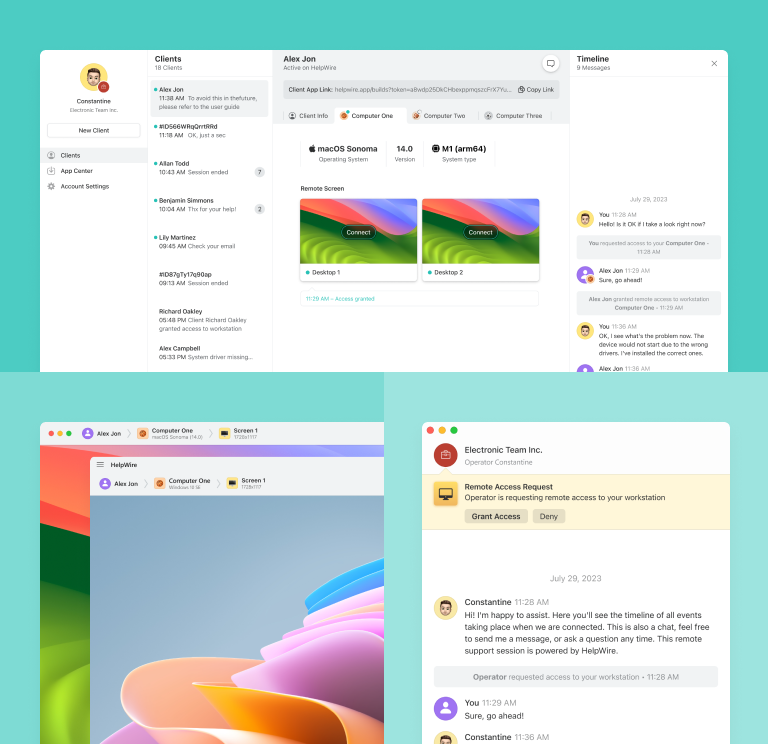
Wechseln Sie zu HelpWire – der kostenlosen Alternative zu Remmina – und profitieren Sie von nahtloser plattformübergreifender Funktionalität, einer intuitiven Benutzeroberfläche und leistungsstarken Remote-Support-Lösungen, die Ihr Unternehmen stärken.
- Einfache Bedienung
- Ideal für Unternehmen jeder Größe
- Keine versteckten Kosten
HelpWire vs. Remmina
Werfen wir einen detaillierten Blick auf die Preise und Funktionen von Remmina und HelpWire.
| Funktion |
HelpWire
|
Remmina |
|---|---|---|
| Preis | ||
| Preis | Kostenlos | Kostenlos |
| Plattformübergreifende Unterstützung | ||
| Plattformübergreifende Unterstützung | Native Unterstützung für Windows-, macOS- und Linux-Operatoren mit Windows- und macOS-Clients. | Nur Linux und Windows mit Workarounds |
| Open Source | ||
| Open Source | ||
| Dateiübertragung | ||
| Dateiübertragung | Drag-and-drop oder Kopieren-und-Einfügen | Freigabe des Zugriffs auf einen entfernten Ordner |
| Gemeinsame Zwischenablage | ||
| Gemeinsame Zwischenablage | ||
| Audiofreigabe | ||
| Audiofreigabe | Unterstützt noch keine Audiofreigabe | Unterstützt Remote-Audioübertragung über RDP |
HelpWire-Funktionen
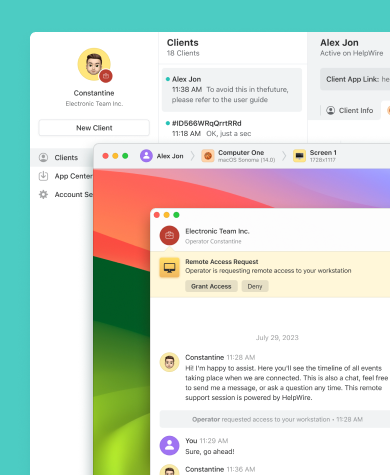
Die Entscheidung für HelpWire garantiert den vollständigen Zugriff auf alle Funktionen, sorgt für eine stabile Remote-Desktop-Verwaltung und macht es zu einer hervorragenden kostenlosen Alternative zu Remmina.
Mehr erfahren
Mehr erfahren

Support-Chat
Mit HelpWire Chat kann Ihr Unternehmen die Effizienz des On-Demand-Remote-Supports steigern und Kundenanfragen schnell und effektiv lösen.

Einfache und kostenlose Remote-Desktop-Lösung für Windows
Teilen Sie über HelpWire generierte, eindeutige URLs, um Remote-Sitzungen mit Kundenarbeitsplätzen zu starten – keine Anmeldedaten oder Passwörter erforderlich.
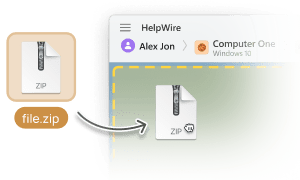
Dateiübertragung
Kopieren Sie Dateien einfach per Drag & Drop oder Kopieren-und-Einfügen direkt in das HelpWire-Fernsteuerungsfenster, um sie an Ihre Kunden zu übertragen.

Kundenverwaltung
Erleben Sie eine mühelose Verwaltung von Kundensupport mit den benutzerfreundlichen Tools von HelpWire, einschließlich Support-Sitzungsverlauf und einer umfassenden Kundenliste.
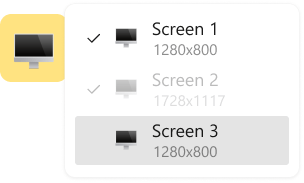
Mehrschirm-Ansicht
Steigern Sie Effizienz und Produktivität mit der HelpWire-Funktion, mehrere Computerbildschirme gleichzeitig anzuzeigen und zu verwalten.
Remote-Support für jede Rolle, jeden Bedarf und jede Branche

Systemadministratoren
Die fortschrittlichen, sicheren Remote-Access-Tools von HelpWire ermöglichen Systemadministratoren, den zuverlässigen Betrieb von entfernten Computersystemen und Netzwerken sicherzustellen.

Managed Service Provider
Mit HelpWire erhalten Managed Service Provider (MSP) Remote-Management-Tools für sichere IT- und Benutzersystemunterstützung.

Behörden und Organisationen
Mit HelpWire können Sie Remote-IT-Support für Behörden bereitstellen und Dienstleistungen durch fortschrittliche Remote-Desktop-Steuerung verbessern.
Nutzer sprechen über HelpWire Erfahrungen

5.0
Basierend auf 209 Kundenrezensionen

Version
2.2, der 4. Feb, 2026

Kompatibilität
macOS, Windows, Linux

Preis
Kostenlos
Hier sind einige der öffentlichen HelpWire-Bewertungen von unseren Kunden, aus verschiedenen Quellen:

I got a gatvol of teamviewer and its issues and moved over to HelpWire and I'm blown away.
Fast, effective and doesn't drain my computer's resources.
It works really well props to the devs.

My experience with HelpWire has been fantastic! The remote control process is incredibly smooth.

I appreciate HelpWire for its ease of use and comprehensive remote support tools all in one place.

HelpWire streamlines the remote support, allowing me to manage multiple clients efficiently, which improved overall service quality and client satisfaction.

The fact that I can easily segregate my clients and have a full history of my connection to them is amazing. I like the fact that I can send a link to them and then talk them through what to do when they receive it (many are elderly and techo-illiterate). The emails and link are professional and give them reassurance. I like unattended access for those clients that need that extra layer of help. Love this app.

The swift setup process and zero- configuration requirement for starting remote support sessions are what I appreciate most about HelpWire. It's remarkable how quickly I can connect with clients and start troubleshooting without any hassle.

Very good and free alternative to TV. Easy to use and nice concept. No annoying disconnections and forcing to buy premiumbussiness subscription or smth like that.

As a long-time TeamViewer user for personal projects and helping family, I grew increasingly frustrated with its frequent disconnections and persistent "commercial use" warnings. I decided to search for an alternative and found Helpwire. I am incredibly impressed. Helpwire provides a stable, reliable connection without any of the interruptions I faced before. The setup is simple, and it just works.

Its a great tool for remote support. It doesn't have the bells and whistles of its commercial rivals, but ask yourself how often do you need that stuff ? If you want to help someone out on a PC issue, or connect to a server for some admin this is perfect.

HelpWire software has been an invaluable asset for streamlining our customer support processes.

Probably the best free remote access app. I like seamless remote desktop experience and copy/paste functionality, reliability, and the fact it is free to use.

The experience is fantastic with a very smooth remote session experience. The optimised performance and smart connectivity feature ensures a seamless remote session with zero-lag.
It was handy for the odd occasion that someone needs a hand with their computer while I am not nearby. It was very reliable and able to see the other's screen to provide directions.
Absolutely Brilliant. Having worked on a whole bunch of other remote support software, from solarwinds dameware to anydesk and teamviewer, vnc viewer and the like, I have never had the joy I am having with Helpwire.

I've never been more satisfied with the service quality of a remote desktop application in my entire freelancing career. Considering the fact that it's a free remote desktop support solution, HelpWire is really worth a shot!

The interface is straightforward, so I can quickly connect to clients' devices and start troubleshooting without jumping through hoops. Plus, the performance is rock solid-no lag or sudden disconnections, which is crucial when I'm in the middle of solving a client's issue.
I appreciate Helpwire for its user-friendly interface and efficient problem-solving capabilities. It's designed to streamline the troubleshooting process, making it easier for people to find solutions to their technical issues quickly.
HelpWire really stands out for me because it's free and works seamlessly on both Mac and PC. I love how easy it is to get started. Basically, I can send a dedicated link to my colleague or client to initiate a remote session right away. The software is super fast and easy to use.
The Operator Dashboard is easy to use and you can start up a support session in seconds. The fact that it keeps the chat with the customer as well as logs of connections is a nice touch.

For nearly ten years I relied on another tool that recently became unusable, and HelpWire has stepped in as the perfect replacement.
How could I not like HelpWire! It ticks all the boxes for a great remote desktop/support service, and best of all, it's free. Real good, and worth more than a try.
Martin Lentz
Email Review

Your software worked just as well as Teamviewer. One thing works better and that is on the client side where they simply just have to grant me access. They don't have to provide me a one use password in order for me to connect.
Luca Albanese
Email Review
Simplicity of use, in particular on the client side that simply require to click on a link and give the required permissions. But the best feature, IMHO, is the ability to share the clients with other team members... and all of this for free! THANK YOU for this amazing app!!
Wilkin Miguel Julio Mercado
Email Review
It's easy to use and I didn't expect there to be a software as good as this one.
Michael Guggenbichler
Email Review
Absolutely Amazing Product for attended Access for individual operators or small teams! And you do not even have to pay!! There are so much remote access solutions, you have to pay tons of money and don't even provide the bare minimum. HelpWire Team, you're doing great! Looking forward to what you will bring in the future.
FAQ
Remmina ist in erster Linie ein Remote-Desktop-Client für Linux-Systeme und nicht mit Windows-Computern kompatibel. Derzeit bieten die Entwickler keine Windows-Version an. Allerdings unterstützt Remmina Remote-Verbindungen von Linux zu Windows über das Remote Desktop Protocol (RDP).
Remmina basiert auf FreeRDP und unterstützt mehrere Protokolle, darunter RDP, VNC, NX, XDMCP, SPICE, X2Go und SSH.
Ja, Remmina kann kommerziell genutzt werden. Es steht unter der GNU General Public License v2.0, die kommerzielle Nutzung, Modifikation, Verbreitung und private Nutzung erlaubt.