Kostenlose Alternative zu Supremo
Wechseln Sie zu HelpWire – einer zuverlässigen Supremo-Alternative – und profitieren Sie von essenziellen Funktionen für schnellen, professionellen Remote-Support auf Mac und PC, ohne Ihr Budget zu belasten.
- Benutzerfreundliche Oberfläche
- Exzellente Remote-Support-Funktionen
- Ideal für Unternehmen jeder Größe
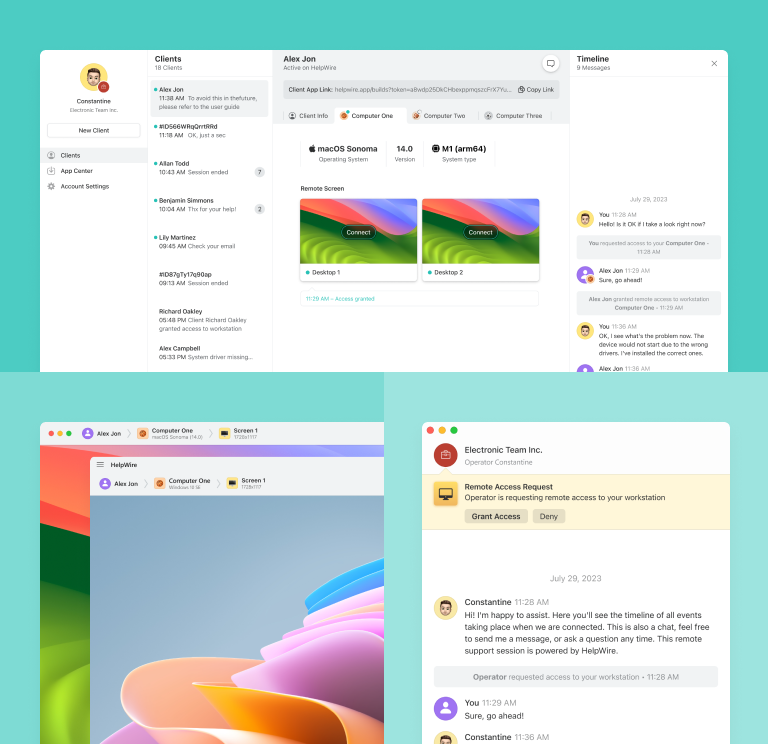
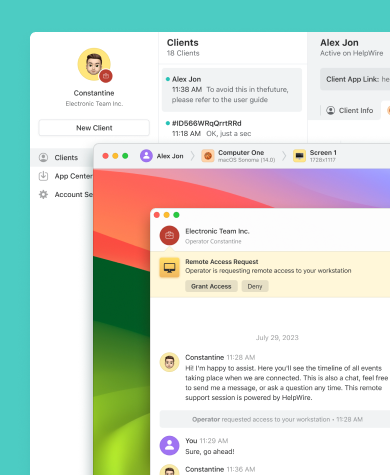
HelpWire vs. Supremo: Schnellvergleich
Werfen Sie einen Blick auf die Funktions- und Leistungsübersicht von HelpWire und Supremo.
| Funktionen |
HelpWire
|
Supremo Fernzugriff Solo Business Professional
| |||
|---|---|---|---|---|---|
| Preis pro Monat | |||||
| Preis pro Monat | Kostenlos für private und geschäftliche Nutzung | Kostenlos für nicht-professionelle und/oder nicht durchgehende Nutzung | $12 | $21 | $46 |
| Nutzungsbeschränkungen | |||||
| Nutzungsbeschränkungen | Keine Limits | Private Nutzung | 1 lizenzierter Benutzer | 1 lizenzierter Benutzer | 10 lizenzierte Benutzer |
| Unterstützte Plattformen | |||||
| Unterstützte Plattformen | Windows, Mac, Linux | Windows, Mac, Linux, iOS, Android | Windows, Mac, Linux, iOS, Android | Windows, Mac, Linux, iOS, Android | Windows, Mac, Linux, iOS, Android |
| Multi-Monitor-Ansicht | |||||
| Multi-Monitor-Ansicht | |||||
| Steuerung mehrerer Arbeitsstationen pro Benutzer | |||||
| Steuerung mehrerer Arbeitsstationen pro Benutzer | Unbegrenzt | Unbegrenzt | Unbegrenzt | Unbegrenzt | Unbegrenzt |
| Team-Management | |||||
| Team-Management | |||||
| Kundenverwaltung | |||||
| Kundenverwaltung | |||||
| Kollaboration | |||||
| Kollaboration | Chat | Chat | Chat | Chat | Chat |
| Dateiübertragung | |||||
| Dateiübertragung | |||||
| Gleichzeitige Remote-Desktop-Sitzungen | |||||
| Gleichzeitige Remote-Desktop-Sitzungen | 1 | 1 | 1 | 3 | 3–100, gegen Aufpreis |
| Mobile Unterstützung | |||||
| Mobile Unterstützung | |||||
| Unbeaufsichtigter Zugriff | |||||
| Unbeaufsichtigter Zugriff |
HelpWire-Funktionen
HelpWire bietet entscheidende Funktionen, die es zu einer starken Alternative zu Supremo machen und effizientes Remote-Desktop-Management gewährleisten.
Schlüsselfunktionen
Schlüsselfunktionen

Kundenverwaltung
Optimieren Sie Ihre Remote-Kundenverwaltung, indem Sie umfassende Kundenprofile erstellen, wichtige Geräteinformationen einsehen und Notizen zu Support-Sitzungen hinzufügen – alles bequem über Ihr Web-Konto.

Team-Management
Erstellen, organisieren und verwalten Sie Support-Teams im Handumdrehen. Arbeiten Sie mit einer gemeinsam genutzten Kundenbasis und nutzen Sie die integrierten Team-Management-Tools für effizienten Remote-Support und schnelle Problemlösung.
Starke Sicherheitsfunktionen
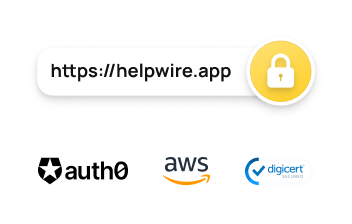
Schützen Sie Ihre Daten durch die leistungsfähigen Sicherheitsfunktionen von HelpWire, darunter Zwei-Faktor-Authentifizierung, sichere TLS/SSL-Verbindungen und vollständige AES-256-Verschlüsselung.
Dateiübertragung
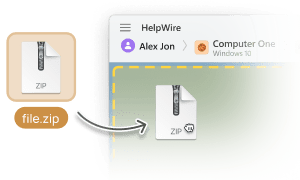
Übertragen Sie Dateien schnell und einfach vom Computer des Operators auf den entfernten Desktop – mittels einfachem Kopieren und Einfügen.

Einfache Sitzungsinitiierung
Starten Sie Remote-Sitzungen unkompliziert, indem Sie Ihren Kunden einen Verbindungslink senden – ohne komplizierte IDs oder Passwörter.
Remote-Support für verschiedene Einsatzbereiche

Medien- und Kreativprofis
HelpWire ermöglicht sicheren Fernzugriff für Medienschaffende, damit diese überall reibungslos bearbeiten, zusammenarbeiten und produzieren können.

Managed Service Providers (MSPs)
HelpWire, eine speziell für MSPs entwickelte Remote-Support-Lösung, bietet schnellen und sicheren MSP-Fernsupport für IT-Infrastrukturen und Benutzerumgebungen.

Einzelhandel
Steigern Sie die Effizienz und senken Sie die Kosten Ihres Kundensupports mit einem intuitiven Remote-Desktop-Service für POS-Systeme, der Ihre Supportprozesse deutlich optimiert.
Nutzer sprechen über HelpWire Erfahrungen

5.0
Basierend auf 209 Kundenrezensionen

Version
2.2, der 4. Feb, 2026

Kompatibilität
macOS, Windows, Linux

Preis
Kostenlos
Hier sind einige der öffentlichen HelpWire-Bewertungen von unseren Kunden, aus verschiedenen Quellen:

I got a gatvol of teamviewer and its issues and moved over to HelpWire and I'm blown away.
Fast, effective and doesn't drain my computer's resources.
It works really well props to the devs.

My experience with HelpWire has been fantastic! The remote control process is incredibly smooth.

I appreciate HelpWire for its ease of use and comprehensive remote support tools all in one place.

HelpWire streamlines the remote support, allowing me to manage multiple clients efficiently, which improved overall service quality and client satisfaction.

The fact that I can easily segregate my clients and have a full history of my connection to them is amazing. I like the fact that I can send a link to them and then talk them through what to do when they receive it (many are elderly and techo-illiterate). The emails and link are professional and give them reassurance. I like unattended access for those clients that need that extra layer of help. Love this app.

The swift setup process and zero- configuration requirement for starting remote support sessions are what I appreciate most about HelpWire. It's remarkable how quickly I can connect with clients and start troubleshooting without any hassle.

Very good and free alternative to TV. Easy to use and nice concept. No annoying disconnections and forcing to buy premiumbussiness subscription or smth like that.

As a long-time TeamViewer user for personal projects and helping family, I grew increasingly frustrated with its frequent disconnections and persistent "commercial use" warnings. I decided to search for an alternative and found Helpwire. I am incredibly impressed. Helpwire provides a stable, reliable connection without any of the interruptions I faced before. The setup is simple, and it just works.

Its a great tool for remote support. It doesn't have the bells and whistles of its commercial rivals, but ask yourself how often do you need that stuff ? If you want to help someone out on a PC issue, or connect to a server for some admin this is perfect.

HelpWire software has been an invaluable asset for streamlining our customer support processes.

Probably the best free remote access app. I like seamless remote desktop experience and copy/paste functionality, reliability, and the fact it is free to use.

The experience is fantastic with a very smooth remote session experience. The optimised performance and smart connectivity feature ensures a seamless remote session with zero-lag.
It was handy for the odd occasion that someone needs a hand with their computer while I am not nearby. It was very reliable and able to see the other's screen to provide directions.
Absolutely Brilliant. Having worked on a whole bunch of other remote support software, from solarwinds dameware to anydesk and teamviewer, vnc viewer and the like, I have never had the joy I am having with Helpwire.

I've never been more satisfied with the service quality of a remote desktop application in my entire freelancing career. Considering the fact that it's a free remote desktop support solution, HelpWire is really worth a shot!

The interface is straightforward, so I can quickly connect to clients' devices and start troubleshooting without jumping through hoops. Plus, the performance is rock solid-no lag or sudden disconnections, which is crucial when I'm in the middle of solving a client's issue.
I appreciate Helpwire for its user-friendly interface and efficient problem-solving capabilities. It's designed to streamline the troubleshooting process, making it easier for people to find solutions to their technical issues quickly.
HelpWire really stands out for me because it's free and works seamlessly on both Mac and PC. I love how easy it is to get started. Basically, I can send a dedicated link to my colleague or client to initiate a remote session right away. The software is super fast and easy to use.
The Operator Dashboard is easy to use and you can start up a support session in seconds. The fact that it keeps the chat with the customer as well as logs of connections is a nice touch.

For nearly ten years I relied on another tool that recently became unusable, and HelpWire has stepped in as the perfect replacement.
How could I not like HelpWire! It ticks all the boxes for a great remote desktop/support service, and best of all, it's free. Real good, and worth more than a try.
Martin Lentz
Email Review

Your software worked just as well as Teamviewer. One thing works better and that is on the client side where they simply just have to grant me access. They don't have to provide me a one use password in order for me to connect.
Luca Albanese
Email Review
Simplicity of use, in particular on the client side that simply require to click on a link and give the required permissions. But the best feature, IMHO, is the ability to share the clients with other team members... and all of this for free! THANK YOU for this amazing app!!
Wilkin Miguel Julio Mercado
Email Review
It's easy to use and I didn't expect there to be a software as good as this one.
Michael Guggenbichler
Email Review
Absolutely Amazing Product for attended Access for individual operators or small teams! And you do not even have to pay!! There are so much remote access solutions, you have to pay tons of money and don't even provide the bare minimum. HelpWire Team, you're doing great! Looking forward to what you will bring in the future.
Häufig gestellte Fragen
Es gibt verschiedene kostenpflichtige Tarife, die uneingeschränkte Nutzung und vollen Funktionsumfang ermöglichen. Für nicht-professionellen oder gelegentlichen Gebrauch kann Supremo jedoch kostenlos genutzt werden.
Obwohl Supremo ein legitimes und sicheres Tool ist, wurde es in der Vergangenheit von Hackern und Betrügern für unbefugten Zugriff missbraucht. Sie geben sich beispielsweise als Support aus oder erstellen gefälschte Websites mit manipulierten Versionen. Supremo begegnet diesem Problem inzwischen mit einer Warnmeldung beim ersten Start.
Ja! HelpWire hebt sich als leistungsstarke, kostenlose Alternative zu Supremo hervor – mit umfangreichen Funktionen, sicheren Verbindungen und einer intuitiven Benutzeroberfläche.