Alternative gratuite à Remmina
Passez à HelpWire, l’alternative gratuite à Remmina, et profitez d’une compatibilité multiplateforme fluide, d’une interface intuitive et de puissantes fonctionnalités d’assistance à distance pour dynamiser votre entreprise.
- Facile à utiliser
- Adapté aux entreprises de toute taille
- Aucun coût caché
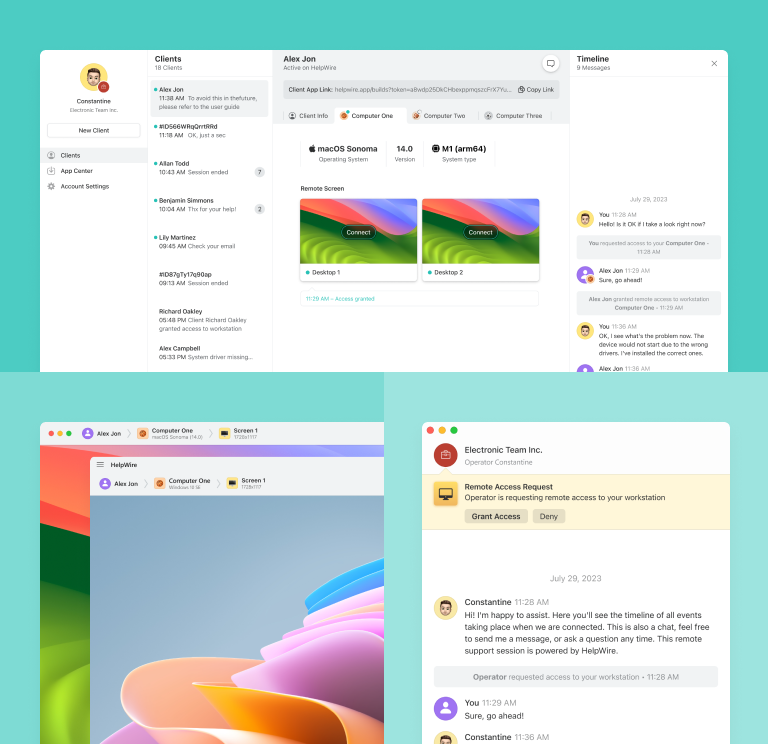
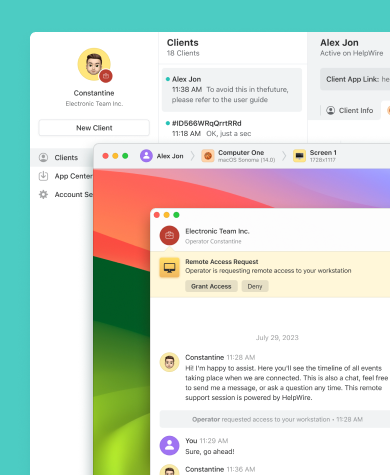
HelpWire vs. Remmina
Voyons en détail les tarifs et les fonctionnalités de Remmina et HelpWire.
| Fonctionnalité |
HelpWire
|
Remmina |
|---|---|---|
| Prix | ||
| Prix | Gratuit | Gratuit |
| Compatibilité multiplateforme | ||
| Compatibilité multiplateforme | Support natif pour Windows, macOS et Linux côté opérateur, avec clients Windows et macOS. | Uniquement Linux et Windows (avec solutions de contournement) |
| Open source | ||
| Open source | ||
| Transfert de fichiers | ||
| Transfert de fichiers | Drag-n-drop ou copier-coller | Partage d’un dossier distant |
| Presse-papiers partagé | ||
| Presse-papiers partagé | ||
| Partage audio | ||
| Partage audio | Ne prend pas encore en charge le partage de son | Prend en charge la transmission du son à distance via RDP |
Fonctionnalités de HelpWire
Opter pour HelpWire garantit un accès complet à toutes les fonctionnalités, une gestion fiable des bureaux à distance, et en fait une alternative gratuite et performante à Remmina.
En savoir plus
En savoir plus

Chat d’assistance
Grâce à HelpWire Chat, votre entreprise peut améliorer l’efficacité du support à distance à la demande et offrir des solutions rapides aux besoins des clients.

Bureau à distance facile et gratuit pour Windows
Partagez des liens uniques générés par HelpWire pour lancer des sessions à distance avec les postes clients — sans identifiants ni mots de passe requis.
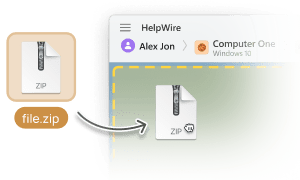
Transfert de fichiers
Copiez et collez facilement des fichiers directement dans la fenêtre de contrôle à distance de HelpWire pour transférer des fichiers à vos clients.

Gestion des clients
Gérez sans effort vos clients grâce aux outils conviviaux de HelpWire, comprenant l’historique des sessions d’assistance et une liste complète de clients.
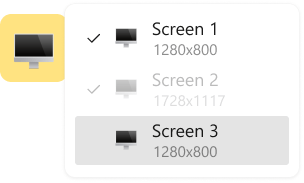
Vue multi-écrans
Améliorez la productivité grâce à la fonction HelpWire qui permet de visualiser et de gérer plusieurs écrans d’ordinateurs simultanément.
Assistance à distance pour tous les rôles et secteurs

Administrateurs système
Les outils avancés d’accès à distance sécurisé de HelpWire pour les administrateurs système permettent d’assurer le bon fonctionnement des réseaux et systèmes informatiques à distance.

Fournisseurs de services managés
Avec HelpWire, les fournisseurs de services managés (MSP) disposent d’outils de gestion à distance conçus pour une assistance informatique sécurisée.

Organisations gouvernementales
Offrez un support informatique à distance pour les administrations et améliorez vos services grâce au contrôle avancé de bureau à distance proposé par HelpWire.
Commentaires des Utilisateurs sur leur Expérience avec HelpWire

5.0
Établi sur 49 avis de clients

Version
2.2, le 4 Juil, 2025

Compatibilité
macOS, Windows, Linux

Prix
Gratuitement
Voici quelques-uns des avis publics sur HelpWire, rédigés par nos clients à partir de diverses sources :

I got a gatvol of teamviewer and its issues and moved over to HelpWire and I'm blown away.
Fast, effective and doesn't drain my computer's resources.
It works really well props to the devs.

My experience with HelpWire has been fantastic! The remote control process is incredibly smooth.

I appreciate HelpWire for its ease of use and comprehensive remote support tools all in one place.

HelpWire streamlines the remote support, allowing me to manage multiple clients efficiently, which improved overall service quality and client satisfaction.

The fact that I can easily segregate my clients and have a full history of my connection to them is amazing. I like the fact that I can send a link to them and then talk them through what to do when they receive it (many are elderly and techo-illiterate). The emails and link are professional and give them reassurance. I like unattended access for those clients that need that extra layer of help. Love this app.

The swift setup process and zero- configuration requirement for starting remote support sessions are what I appreciate most about HelpWire. It's remarkable how quickly I can connect with clients and start troubleshooting without any hassle.

Very good and free alternative to TV. Easy to use and nice concept. No annoying disconnections and forcing to buy premiumbussiness subscription or smth like that.

As a long-time TeamViewer user for personal projects and helping family, I grew increasingly frustrated with its frequent disconnections and persistent "commercial use" warnings. I decided to search for an alternative and found Helpwire. I am incredibly impressed. Helpwire provides a stable, reliable connection without any of the interruptions I faced before. The setup is simple, and it just works.

Its a great tool for remote support. It doesn't have the bells and whistles of its commercial rivals, but ask yourself how often do you need that stuff ? If you want to help someone out on a PC issue, or connect to a server for some admin this is perfect.

HelpWire software has been an invaluable asset for streamlining our customer support processes.

Probably the best free remote access app. I like seamless remote desktop experience and copy/paste functionality, reliability, and the fact it is free to use.

The experience is fantastic with a very smooth remote session experience. The optimised performance and smart connectivity feature ensures a seamless remote session with zero-lag.
It was handy for the odd occasion that someone needs a hand with their computer while I am not nearby. It was very reliable and able to see the other's screen to provide directions.
Absolutely Brilliant. Having worked on a whole bunch of other remote support software, from solarwinds dameware to anydesk and teamviewer, vnc viewer and the like, I have never had the joy I am having with Helpwire.

I've never been more satisfied with the service quality of a remote desktop application in my entire freelancing career. Considering the fact that it's a free remote desktop support solution, HelpWire is really worth a shot!

The interface is straightforward, so I can quickly connect to clients' devices and start troubleshooting without jumping through hoops. Plus, the performance is rock solid-no lag or sudden disconnections, which is crucial when I'm in the middle of solving a client's issue.
I appreciate Helpwire for its user-friendly interface and efficient problem-solving capabilities. It's designed to streamline the troubleshooting process, making it easier for people to find solutions to their technical issues quickly.
HelpWire really stands out for me because it's free and works seamlessly on both Mac and PC. I love how easy it is to get started. Basically, I can send a dedicated link to my colleague or client to initiate a remote session right away. The software is super fast and easy to use.
The Operator Dashboard is easy to use and you can start up a support session in seconds. The fact that it keeps the chat with the customer as well as logs of connections is a nice touch.

For nearly ten years I relied on another tool that recently became unusable, and HelpWire has stepped in as the perfect replacement.
How could I not like HelpWire! It ticks all the boxes for a great remote desktop/support service, and best of all, it's free. Real good, and worth more than a try.
Martin Lentz
Email Review

Your software worked just as well as Teamviewer. One thing works better and that is on the client side where they simply just have to grant me access. They don't have to provide me a one use password in order for me to connect.
Luca Albanese
Email Review
Simplicity of use, in particular on the client side that simply require to click on a link and give the required permissions. But the best feature, IMHO, is the ability to share the clients with other team members... and all of this for free! THANK YOU for this amazing app!!
Wilkin Miguel Julio Mercado
Email Review
It's easy to use and I didn't expect there to be a software as good as this one.
Michael Guggenbichler
Email Review
Absolutely Amazing Product for attended Access for individual operators or small teams! And you do not even have to pay!! There are so much remote access solutions, you have to pay tons of money and don't even provide the bare minimum. HelpWire Team, you're doing great! Looking forward to what you will bring in the future.
FAQ
Remmina est principalement un client de bureau à distance pour les systèmes Linux et n’est pas compatible avec les machines Windows. À ce jour, aucune version officielle de Remmina pour Windows n’a été publiée. Cependant, Remmina permet d’établir des connexions à distance de Linux vers Windows via le protocole RDP (Remote Desktop Protocol).
Basé sur FreeRDP, Remmina prend en charge plusieurs protocoles : RDP, VNC, NX, XDMCP, SPICE, X2Go et SSH.
Oui. Remmina est distribué sous la licence GNU General Public License v2.0, qui autorise l’utilisation commerciale, la modification, la distribution et l’utilisation privée du logiciel.