Alternative plus simple et gratuite à Splashtop
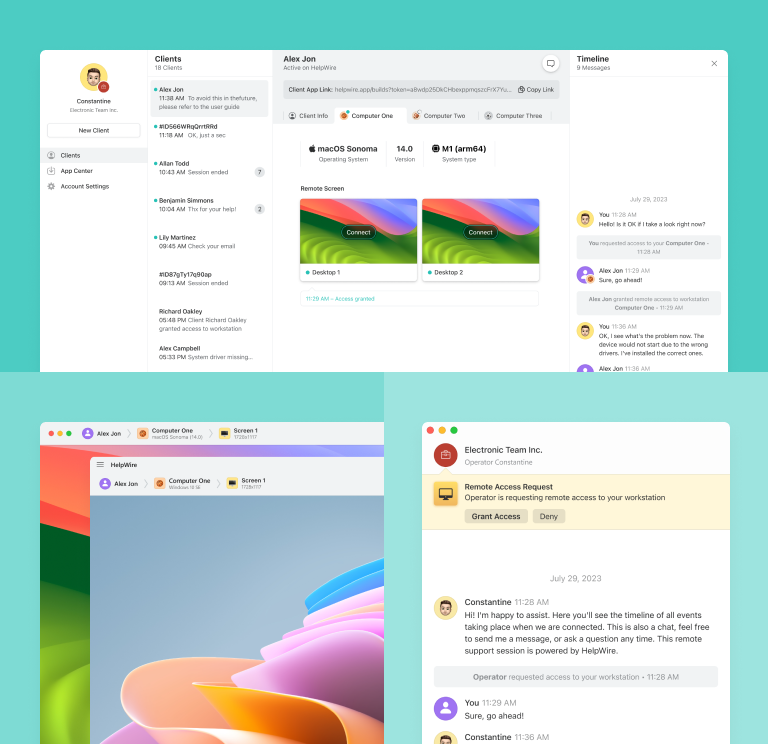
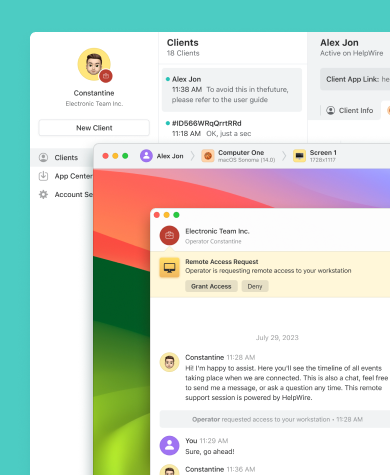
Passez à HelpWire, une alternative gratuite et intuitive à Splashtop SOS, et profitez d’économies importantes tout en bénéficiant de connexions à distance rapides sur PC, Mac et Linux.
- Interface intuitive
- Solution économique
- Accès à distance ultra-rapide
HelpWire vs Splashtop SOS : comparaison rapide
Découvrez une comparaison concise des fonctionnalités et modèles tarifaires proposés par Splashtop SOS et HelpWire.
| Fonctionnalités |
HelpWire
|
Splashtop SOS SOS +10 SOS Unlimited
| ||
|---|---|---|---|---|
| Tarifs | ||||
| Tarifs | Gratuit | 199 $ / 1 technicien | 219 $ / 1 technicien | 399 $ / 1 technicien |
| Compatibilité multiplateforme | ||||
| Compatibilité multiplateforme | Windows/ Mac/ Linux | Windows/ Mac/ Android/ iOS | Windows/ Mac/ Android/ iOS | Windows/ Mac/ Android/ iOS |
| Sessions simultanées par utilisateur | ||||
| Sessions simultanées par utilisateur | Plusieurs sessions de chat | 10 | 10 | 10 |
| Messagerie | ||||
| Messagerie | Chat | Chat | Messagerie et appels vocaux | Messagerie et appels vocaux |
| Postes opérateur | ||||
| Postes opérateur | 1 | 1 | 1 | 1 |
| Accès assisté simplifié | ||||
| Accès assisté simplifié | ||||
| Compatibilité multi-écrans | ||||
| Compatibilité multi-écrans | ||||
| Transfert de fichiers | ||||
| Transfert de fichiers | ||||
| Sécurité renforcée | ||||
| Sécurité renforcée | ||||
| Enregistrement de sessions | ||||
| Enregistrement de sessions | ||||
| Personnalisation de marque | ||||
| Personnalisation de marque |
Fonctionnalités HelpWire
Découvrez les principaux atouts de HelpWire en tant qu’alternative à Splashtop et comprenez pourquoi cette solution se démarque.
En savoir plus
En savoir plus

Démarrage de session simplifié
Démarrez une session distante en quelques secondes. Partagez le lien de connexion avec votre client — aucun identifiant ou mot de passe requis.

Chat intégré
Améliorez la communication entre équipes d’assistance et clients grâce au chat intégré.
Transfert de fichiers
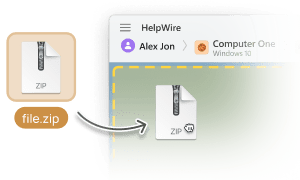
Transférez vos fichiers facilement d'une fenêtre locale à une session distante via un simple copier-coller.

Gestion des clients
Organisez et gérez efficacement votre clientèle grâce aux outils de gestion clients : listes, champs personnalisés, notes… tout depuis votre navigateur.
Gestion de plusieurs postes
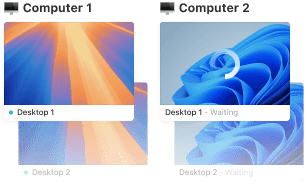
Accédez à plusieurs ordinateurs d’un même client et basculez entre les postes sans aucune difficulté.
Comment HelpWire optimise différents services

Support IT
Boostez le support informatique grâce à HelpWire, un logiciel d’assistance à distance pour consultants, en offrant une aide rapide lors de configurations système ou d’installations logicielles.

Petites et moyennes entreprises
Opter pour HelpWire, une solution de pointe en matière de support informatique à distance pour petites entreprises, plutôt que Splashtop, permet non seulement de réduire vos coûts opérationnels, mais aussi de renforcer considérablement l’efficacité et la réactivité de votre service client.

Équipes financières
Grâce aux solutions d’accès distant pour services financiers, les entreprises peuvent assister leurs clients efficacement, réduire les interruptions et rester en conformité avec les normes du secteur.
Commentaires des Utilisateurs sur leur Expérience avec HelpWire

5.0
Établi sur 49 avis de clients

Version
2.2, le 4 Juil, 2025

Compatibilité
macOS, Windows, Linux

Prix
Gratuitement
Voici quelques-uns des avis publics sur HelpWire, rédigés par nos clients à partir de diverses sources :

I got a gatvol of teamviewer and its issues and moved over to HelpWire and I'm blown away.
Fast, effective and doesn't drain my computer's resources.
It works really well props to the devs.

My experience with HelpWire has been fantastic! The remote control process is incredibly smooth.

I appreciate HelpWire for its ease of use and comprehensive remote support tools all in one place.

HelpWire streamlines the remote support, allowing me to manage multiple clients efficiently, which improved overall service quality and client satisfaction.

The fact that I can easily segregate my clients and have a full history of my connection to them is amazing. I like the fact that I can send a link to them and then talk them through what to do when they receive it (many are elderly and techo-illiterate). The emails and link are professional and give them reassurance. I like unattended access for those clients that need that extra layer of help. Love this app.

The swift setup process and zero- configuration requirement for starting remote support sessions are what I appreciate most about HelpWire. It's remarkable how quickly I can connect with clients and start troubleshooting without any hassle.

Very good and free alternative to TV. Easy to use and nice concept. No annoying disconnections and forcing to buy premiumbussiness subscription or smth like that.

As a long-time TeamViewer user for personal projects and helping family, I grew increasingly frustrated with its frequent disconnections and persistent "commercial use" warnings. I decided to search for an alternative and found Helpwire. I am incredibly impressed. Helpwire provides a stable, reliable connection without any of the interruptions I faced before. The setup is simple, and it just works.

Its a great tool for remote support. It doesn't have the bells and whistles of its commercial rivals, but ask yourself how often do you need that stuff ? If you want to help someone out on a PC issue, or connect to a server for some admin this is perfect.

HelpWire software has been an invaluable asset for streamlining our customer support processes.

Probably the best free remote access app. I like seamless remote desktop experience and copy/paste functionality, reliability, and the fact it is free to use.

The experience is fantastic with a very smooth remote session experience. The optimised performance and smart connectivity feature ensures a seamless remote session with zero-lag.
It was handy for the odd occasion that someone needs a hand with their computer while I am not nearby. It was very reliable and able to see the other's screen to provide directions.
Absolutely Brilliant. Having worked on a whole bunch of other remote support software, from solarwinds dameware to anydesk and teamviewer, vnc viewer and the like, I have never had the joy I am having with Helpwire.

I've never been more satisfied with the service quality of a remote desktop application in my entire freelancing career. Considering the fact that it's a free remote desktop support solution, HelpWire is really worth a shot!

The interface is straightforward, so I can quickly connect to clients' devices and start troubleshooting without jumping through hoops. Plus, the performance is rock solid-no lag or sudden disconnections, which is crucial when I'm in the middle of solving a client's issue.
I appreciate Helpwire for its user-friendly interface and efficient problem-solving capabilities. It's designed to streamline the troubleshooting process, making it easier for people to find solutions to their technical issues quickly.
HelpWire really stands out for me because it's free and works seamlessly on both Mac and PC. I love how easy it is to get started. Basically, I can send a dedicated link to my colleague or client to initiate a remote session right away. The software is super fast and easy to use.
The Operator Dashboard is easy to use and you can start up a support session in seconds. The fact that it keeps the chat with the customer as well as logs of connections is a nice touch.

For nearly ten years I relied on another tool that recently became unusable, and HelpWire has stepped in as the perfect replacement.
How could I not like HelpWire! It ticks all the boxes for a great remote desktop/support service, and best of all, it's free. Real good, and worth more than a try.
Martin Lentz
Email Review

Your software worked just as well as Teamviewer. One thing works better and that is on the client side where they simply just have to grant me access. They don't have to provide me a one use password in order for me to connect.
Luca Albanese
Email Review
Simplicity of use, in particular on the client side that simply require to click on a link and give the required permissions. But the best feature, IMHO, is the ability to share the clients with other team members... and all of this for free! THANK YOU for this amazing app!!
Wilkin Miguel Julio Mercado
Email Review
It's easy to use and I didn't expect there to be a software as good as this one.
Michael Guggenbichler
Email Review
Absolutely Amazing Product for attended Access for individual operators or small teams! And you do not even have to pay!! There are so much remote access solutions, you have to pay tons of money and don't even provide the bare minimum. HelpWire Team, you're doing great! Looking forward to what you will bring in the future.
FAQ
Splashtop SOS, pensé pour les équipes IT et de support, ne propose pas de version gratuite.
Splashtop SOS offre un essai de 7 jours pour tester ses fonctionnalités avant achat.
Oui ! HelpWire est une alternative totalement gratuite à Splashtop, sans frais cachés.
Voici quelques options :
HelpWire : Outil gratuit pour professionnels IT, utilisable à titre personnel ou commercial.
TeamViewer : Logiciel populaire compatible Mac, idéal pour le partage de fichiers, réunions en ligne et administration distante.
AnyDesk : Solution rapide et sécurisée pour Mac, avec transfert de fichiers et collaboration à distance.
HelpWire : Outil gratuit pour professionnels IT, utilisable à titre personnel ou commercial.
TeamViewer : Logiciel populaire compatible Mac, idéal pour le partage de fichiers, réunions en ligne et administration distante.
AnyDesk : Solution rapide et sécurisée pour Mac, avec transfert de fichiers et collaboration à distance.
Les causes possibles incluent des problèmes de pare-feu ou de connexion Internet. Pour résoudre cela :
- Vérifier la connexion Internet
- Contrôler l’installation du logiciel
- Examiner pare-feu et antivirus
- Redémarrer les appareils
- Confirmer les identifiants
- Contacter l’assistance Splashtop