Alternativa gratuita a Remmina
Passa a HelpWire — un’alternativa gratuita a Remmina — e approfitta di una funzionalità multipiattaforma fluida, un’interfaccia intuitiva e potenti soluzioni di supporto remoto per potenziare la tua azienda.
- Facile da usare
- Ideale per aziende di qualsiasi dimensione
- Nessun costo nascosto
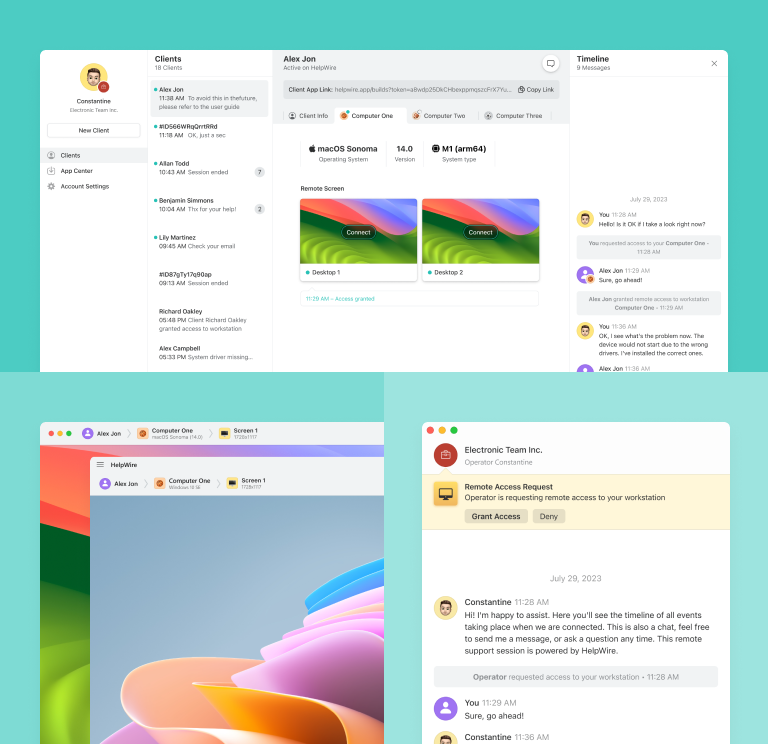
HelpWire vs. Remmina
Analizziamo nel dettaglio prezzi e funzionalità di Remmina e HelpWire.
| Funzionalità |
HelpWire
|
Remmina |
|---|---|---|
| Prezzo | ||
| Prezzo | Gratuito | Gratuito |
| Supporto multipiattaforma | ||
| Supporto multipiattaforma | Supporto nativo per operatori Windows, macOS e Linux, con client su Windows e macOS. | Solo Linux e Windows con soluzioni alternative |
| Open Source | ||
| Open Source | ||
| Trasferimento file | ||
| Trasferimento file | Trascina e rilascia o copia e incolla | Condivisione dell’accesso a una cartella remota |
| Appunti condivisi | ||
| Appunti condivisi | ||
| Condivisione audio | ||
| Condivisione audio | Non supporta ancora la condivisione audio | Supporta la condivisione audio remota tramite RDP |
Funzionalità di HelpWire
Scegliere HelpWire garantisce l’accesso completo a tutte le funzionalità, assicurando una gestione stabile del desktop remoto e rendendolo un’eccellente alternativa gratuita a Remmina.
Scopri di più
Scopri di più

Chat di supporto
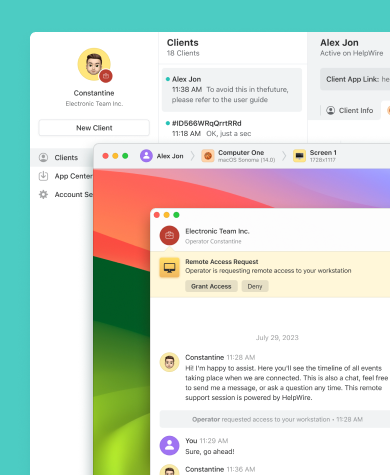
Con HelpWire Chat, la tua azienda può migliorare l’efficienza del supporto remoto on-demand e fornire soluzioni rapide ai problemi dei clienti.

Desktop remoto facile e gratuito per Windows
Condividi link univoci generati da HelpWire per avviare sessioni remote con le postazioni dei clienti — senza credenziali o password necessarie.
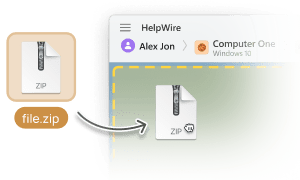
Trasferimento file
Copia e incolla facilmente i file, oppure utilizza la funzione drag-and-drop direttamente nella finestra di controllo remoto di HelpWire per trasferirli ai tuoi clienti.

Gestione dei clienti
Gestisci il supporto clienti in modo semplice con gli strumenti intuitivi di HelpWire, che includono la cronologia delle sessioni di assistenza e un elenco completo dei clienti.
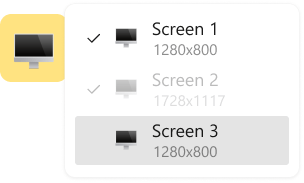
Visualizzazione multi-schermo
Aumenta l’efficienza e la produttività grazie alla capacità di HelpWire di visualizzare e gestire più schermi contemporaneamente.
Supporto remoto per qualsiasi ruolo, esigenza e settore

Amministratori di sistema
Gli avanzati strumenti sicuri di amministrazione dell’accesso remoto di HelpWire permettono agli amministratori di sistema di garantire il funzionamento affidabile dei sistemi e delle reti informatiche remote.

Provider di servizi gestiti
Con HelpWire, i Managed Service Provider (MSP) dispongono di strumenti di gestione remota progettati per un supporto IT sicuro ed efficiente.

Organizzazioni governative
Con HelpWire puoi offrire supporto IT remoto per enti governativi e migliorare i servizi grazie a un controllo avanzato del desktop remoto.
Gli utenti che parlano della loro esperienza su HelpWire

5.0
Basato sulle recensioni di piu’ di 209 clienti

Versione
2.2, 4 Febbr, 2026

Compatibilità
macOS, Windows, Linux

Prezzo
Gratis
Ecco alcune delle recensioni pubbliche riguardo HelpWire, da parte dei nostri clienti e da varie fonti:

I got a gatvol of teamviewer and its issues and moved over to HelpWire and I'm blown away.
Fast, effective and doesn't drain my computer's resources.
It works really well props to the devs.

My experience with HelpWire has been fantastic! The remote control process is incredibly smooth.

I appreciate HelpWire for its ease of use and comprehensive remote support tools all in one place.

HelpWire streamlines the remote support, allowing me to manage multiple clients efficiently, which improved overall service quality and client satisfaction.

The fact that I can easily segregate my clients and have a full history of my connection to them is amazing. I like the fact that I can send a link to them and then talk them through what to do when they receive it (many are elderly and techo-illiterate). The emails and link are professional and give them reassurance. I like unattended access for those clients that need that extra layer of help. Love this app.

The swift setup process and zero- configuration requirement for starting remote support sessions are what I appreciate most about HelpWire. It's remarkable how quickly I can connect with clients and start troubleshooting without any hassle.

Very good and free alternative to TV. Easy to use and nice concept. No annoying disconnections and forcing to buy premiumbussiness subscription or smth like that.

As a long-time TeamViewer user for personal projects and helping family, I grew increasingly frustrated with its frequent disconnections and persistent "commercial use" warnings. I decided to search for an alternative and found Helpwire. I am incredibly impressed. Helpwire provides a stable, reliable connection without any of the interruptions I faced before. The setup is simple, and it just works.

Its a great tool for remote support. It doesn't have the bells and whistles of its commercial rivals, but ask yourself how often do you need that stuff ? If you want to help someone out on a PC issue, or connect to a server for some admin this is perfect.

HelpWire software has been an invaluable asset for streamlining our customer support processes.

Probably the best free remote access app. I like seamless remote desktop experience and copy/paste functionality, reliability, and the fact it is free to use.

The experience is fantastic with a very smooth remote session experience. The optimised performance and smart connectivity feature ensures a seamless remote session with zero-lag.
It was handy for the odd occasion that someone needs a hand with their computer while I am not nearby. It was very reliable and able to see the other's screen to provide directions.
Absolutely Brilliant. Having worked on a whole bunch of other remote support software, from solarwinds dameware to anydesk and teamviewer, vnc viewer and the like, I have never had the joy I am having with Helpwire.

I've never been more satisfied with the service quality of a remote desktop application in my entire freelancing career. Considering the fact that it's a free remote desktop support solution, HelpWire is really worth a shot!

The interface is straightforward, so I can quickly connect to clients' devices and start troubleshooting without jumping through hoops. Plus, the performance is rock solid-no lag or sudden disconnections, which is crucial when I'm in the middle of solving a client's issue.
I appreciate Helpwire for its user-friendly interface and efficient problem-solving capabilities. It's designed to streamline the troubleshooting process, making it easier for people to find solutions to their technical issues quickly.
HelpWire really stands out for me because it's free and works seamlessly on both Mac and PC. I love how easy it is to get started. Basically, I can send a dedicated link to my colleague or client to initiate a remote session right away. The software is super fast and easy to use.
The Operator Dashboard is easy to use and you can start up a support session in seconds. The fact that it keeps the chat with the customer as well as logs of connections is a nice touch.

For nearly ten years I relied on another tool that recently became unusable, and HelpWire has stepped in as the perfect replacement.
How could I not like HelpWire! It ticks all the boxes for a great remote desktop/support service, and best of all, it's free. Real good, and worth more than a try.
Martin Lentz
Email Review

Your software worked just as well as Teamviewer. One thing works better and that is on the client side where they simply just have to grant me access. They don't have to provide me a one use password in order for me to connect.
Luca Albanese
Email Review
Simplicity of use, in particular on the client side that simply require to click on a link and give the required permissions. But the best feature, IMHO, is the ability to share the clients with other team members... and all of this for free! THANK YOU for this amazing app!!
Wilkin Miguel Julio Mercado
Email Review
It's easy to use and I didn't expect there to be a software as good as this one.
Michael Guggenbichler
Email Review
Absolutely Amazing Product for attended Access for individual operators or small teams! And you do not even have to pay!! There are so much remote access solutions, you have to pay tons of money and don't even provide the bare minimum. HelpWire Team, you're doing great! Looking forward to what you will bring in the future.
FAQ
Remmina è principalmente un client di desktop remoto per sistemi Linux e non è compatibile con i computer Windows. Al momento, gli sviluppatori non offrono una versione per Windows. Tuttavia, Remmina supporta connessioni remote da Linux a Windows tramite il Remote Desktop Protocol (RDP).
Basato su FreeRDP, Remmina supporta diversi protocolli, tra cui RDP, VNC, NX, XDMCP, SPICE, X2Go e SSH.
Sì, Remmina può essere utilizzato anche a fini commerciali. Funziona sotto la GNU General Public License v2.0, che consente l’uso commerciale, la modifica, la distribuzione e l’uso privato del software.