Favori ücretsiz Zoho Assist alternatifiniz
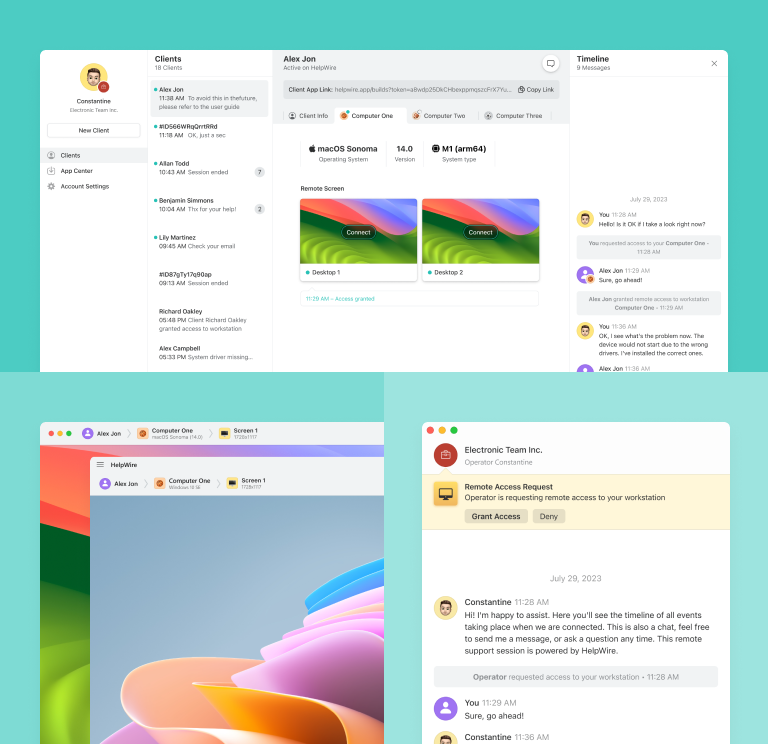
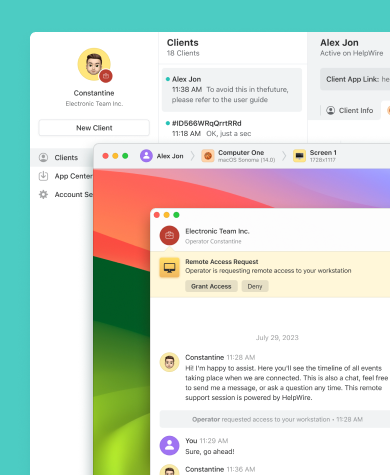
HelpWire’a geçin; Zoho Assist’e ücretsiz ve sezgisel bir alternatif olarak Windows, Linux ve macOS için hızlı uzaktan destek sunan temel özelliklerden yararlanın ve IT maliyetlerinizi düşürün.
- Sezgisel arayüz
- IT bütçenizi optimize etmeye yönelik ücretsiz çözüm
HelpWire vs. Zoho Assist: Yan Yana Karşılaştırma
HelpWire ve Zoho Assist’in fiyatlandırma ve özelliklerini karşılaştıran kapsamlı tablomuza göz atın.
| Özellikler |
HelpWire
|
Zoho Assist
Uzaktan Destek
Ücretsiz
Standard
Professional
Enterprise
Gözetimsiz Erişim
Standard
Professional
| |||||
|---|---|---|---|---|---|---|---|
| Aylık fiyat (yıllık faturalandırılır) | |||||||
| Aylık fiyat (yıllık faturalandırılır) | Ücretsiz | Ücretsiz | 10 $ | 15 $ | 24 $ | 10 $ | 15 $ |
| Çoklu platform desteği | |||||||
| Çoklu platform desteği | Windows/ Mac/ Linux | Windows/ Mac/ Linux/ Chrome OS | Windows/ Mac/ Linux/ Chrome OS | Windows/ Mac/ Linux/ Chrome OS | Windows/ Mac/ Linux/ Chrome OS | Windows/ Mac/ Linux/ Chrome OS | Windows/ Mac/ Linux/ Chrome OS |
| Gizlilik ve Güvenlik (TLS ve AES-256 şifreleme, 2FA) | |||||||
| Gizlilik ve Güvenlik (TLS ve AES-256 şifreleme, 2FA) | |||||||
| Dosya transferi | |||||||
| Dosya transferi | |||||||
| Çoklu monitör görüntüleme | |||||||
| Çoklu monitör görüntüleme | |||||||
| Sohbet ve iletişim | |||||||
| Sohbet ve iletişim | Metin | Metin | Metin ve ses | Metin ve ses | Metin, ses, video ve VOIP | Metin ve ses | Metin, ses, video ve VOIP |
| Eşzamanlı destekli oturumlar | |||||||
| Eşzamanlı destekli oturumlar | Birden fazla oturum | 2 | 2 | 4 | 6 | Birden fazla oturum | Birden fazla oturum |
| Eşzamanlı gözetimsiz oturumlar | |||||||
| Eşzamanlı gözetimsiz oturumlar | Birden fazla oturum | 25 | 25 | ||||
| Mobil destek | |||||||
| Mobil destek | Ek modül gerekir | Ek modül gerekir | Ek modül gerekir | ||||
| Ekran paylaşımı | |||||||
| Ekran paylaşımı | |||||||
| Oturum kaydı | |||||||
| Oturum kaydı | |||||||
| Özelleştirme | |||||||
| Özelleştirme |
HelpWire’ın öne çıkan özellikleri
Uzaktan destek çözümleri arasında HelpWire’ı tercih edilen bir seçenek yapan noktaları keşfedin.
Daha fazla bilgi
Daha fazla bilgi

Kolay oturum başlatma
Her müşteriye özel bir uzaktan bağlantı URL'si göndererek oturumu saniyeler içinde başlatın. Bu yöntem, oturum ID’leri veya şifre yönetme zahmetini ortadan kaldırır.
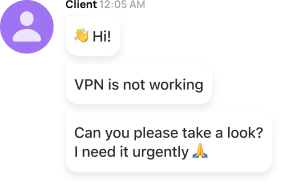
Anlık sohbet
Gerçek zamanlı sohbet özelliği ile sorun tespitini hızlandırın. Teknik ekip problemi hemen kavrar ve anında çözüm önerileri sunabilir.
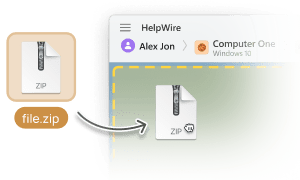
Zahmetsiz dosya transferi
Uzaktan masaüstü oturumu içinden kopyala–yapıştır yöntemiyle dosyaları kolayca operatörden müşteriye veya tam tersi yönde aktarın.
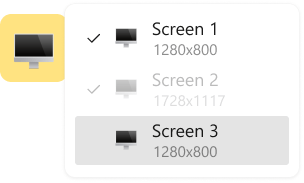
Çoklu monitör desteği
Müşterinin iki ekranını aynı anda görüntüleyebilir veya birden fazla monitör arasında hızlıca geçiş yapabilirsiniz.
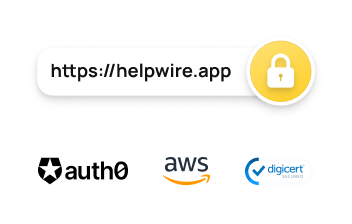
Güçlü güvenlik altyapısı
HelpWire, güvenliğinizi iki aşamalı doğrulama, TLS/SSL kanalları ve tam AES-256 veri şifreleme ile sağlar.
Çeşitli uzaktan destek kullanım senaryoları

Büyüyen işletmeler için
HelpWire ile KOBİ’ler maliyetlerini kontrol altında tutabilir, müşteri desteğini geliştirebilir ve teknik ekiplerinin verimliliğini artırabilir.

Eğitim kurumları için
Okullar ve üniversiteler, öğrencilerin ve akademik personelin cihazlarında yaşanan sorunları uzaktan hızlı biçimde tespit edip çözebilir.

IT destek ekipleri için
HelpWire, teknik danışmanlar ve IT uzmanları için mükemmel bir çözümdür; kullanıcıların yeni yazılım kurulumu veya sistem ayarı gibi konularda anlık destek almasını sağlar.
Kullanıcılar HelpWire Deneyimini Anlatıyor

5.0
209 müşterinin deneyimine göre

Sürüm
2.2, 04/02/2026

Uyumluluk
macOS, Windows, Linux

Fiyat
Ücretsiz
İşte müşterilerimizin farklı kaynaklardan paylaştığı bazı halka açık HelpWire yorumları:

I got a gatvol of teamviewer and its issues and moved over to HelpWire and I'm blown away.
Fast, effective and doesn't drain my computer's resources.
It works really well props to the devs.

My experience with HelpWire has been fantastic! The remote control process is incredibly smooth.

I appreciate HelpWire for its ease of use and comprehensive remote support tools all in one place.

HelpWire streamlines the remote support, allowing me to manage multiple clients efficiently, which improved overall service quality and client satisfaction.

The fact that I can easily segregate my clients and have a full history of my connection to them is amazing. I like the fact that I can send a link to them and then talk them through what to do when they receive it (many are elderly and techo-illiterate). The emails and link are professional and give them reassurance. I like unattended access for those clients that need that extra layer of help. Love this app.

The swift setup process and zero- configuration requirement for starting remote support sessions are what I appreciate most about HelpWire. It's remarkable how quickly I can connect with clients and start troubleshooting without any hassle.

Very good and free alternative to TV. Easy to use and nice concept. No annoying disconnections and forcing to buy premiumbussiness subscription or smth like that.

As a long-time TeamViewer user for personal projects and helping family, I grew increasingly frustrated with its frequent disconnections and persistent "commercial use" warnings. I decided to search for an alternative and found Helpwire. I am incredibly impressed. Helpwire provides a stable, reliable connection without any of the interruptions I faced before. The setup is simple, and it just works.

Its a great tool for remote support. It doesn't have the bells and whistles of its commercial rivals, but ask yourself how often do you need that stuff ? If you want to help someone out on a PC issue, or connect to a server for some admin this is perfect.

HelpWire software has been an invaluable asset for streamlining our customer support processes.

Probably the best free remote access app. I like seamless remote desktop experience and copy/paste functionality, reliability, and the fact it is free to use.

The experience is fantastic with a very smooth remote session experience. The optimised performance and smart connectivity feature ensures a seamless remote session with zero-lag.
It was handy for the odd occasion that someone needs a hand with their computer while I am not nearby. It was very reliable and able to see the other's screen to provide directions.
Absolutely Brilliant. Having worked on a whole bunch of other remote support software, from solarwinds dameware to anydesk and teamviewer, vnc viewer and the like, I have never had the joy I am having with Helpwire.

I've never been more satisfied with the service quality of a remote desktop application in my entire freelancing career. Considering the fact that it's a free remote desktop support solution, HelpWire is really worth a shot!

The interface is straightforward, so I can quickly connect to clients' devices and start troubleshooting without jumping through hoops. Plus, the performance is rock solid-no lag or sudden disconnections, which is crucial when I'm in the middle of solving a client's issue.
I appreciate Helpwire for its user-friendly interface and efficient problem-solving capabilities. It's designed to streamline the troubleshooting process, making it easier for people to find solutions to their technical issues quickly.
HelpWire really stands out for me because it's free and works seamlessly on both Mac and PC. I love how easy it is to get started. Basically, I can send a dedicated link to my colleague or client to initiate a remote session right away. The software is super fast and easy to use.
The Operator Dashboard is easy to use and you can start up a support session in seconds. The fact that it keeps the chat with the customer as well as logs of connections is a nice touch.

For nearly ten years I relied on another tool that recently became unusable, and HelpWire has stepped in as the perfect replacement.
How could I not like HelpWire! It ticks all the boxes for a great remote desktop/support service, and best of all, it's free. Real good, and worth more than a try.
Martin Lentz
Email İnceleme

Your software worked just as well as Teamviewer. One thing works better and that is on the client side where they simply just have to grant me access. They don't have to provide me a one use password in order for me to connect.
Luca Albanese
Email İnceleme
Simplicity of use, in particular on the client side that simply require to click on a link and give the required permissions. But the best feature, IMHO, is the ability to share the clients with other team members... and all of this for free! THANK YOU for this amazing app!!
Wilkin Miguel Julio Mercado
Email İnceleme
It's easy to use and I didn't expect there to be a software as good as this one.
Michael Guggenbichler
Email İnceleme
Absolutely Amazing Product for attended Access for individual operators or small teams! And you do not even have to pay!! There are so much remote access solutions, you have to pay tons of money and don't even provide the bare minimum. HelpWire Team, you're doing great! Looking forward to what you will bring in the future.
SSS
Aşağıdaki unsurlara dikkat edin:
- Özellikler: Gerçek zamanlı sohbet, dosya transferi ve çoklu işletim sistemi desteği kritik önem taşır.
- Kullanıcı arayüzü: Ekibinizin hızlıca adapte olabileceği sade ve sezgisel bir tasarım seçin.
- Fiyatlandırma: Bütçenize uygun ve gizli ücret içermeyen bir çözüm tercih edin.
Evet! HelpWire, güçlü özellikleri, güvenli bağlantıları ve sezgisel tasarımıyla en iyi ücretsiz Zoho Assist alternatiflerinden biridir.
Zoho Assist bir ücretsiz sürüm sunar, ancak özellikleri oldukça sınırlıdır. Temel uzaktan destek işlemleri için yeterli olsa da gelişmiş özellikler yalnızca ücretli planlarda mevcuttur.