Alternativa gratuita ad AnyDesk
Passa a HelpWire, un’alternativa semplice ad AnyDesk, e dotata delle funzioni principali per un’esperienza di supporto remoto veloce e professionale per utenti Mac, Linux e PC.
- Facile da usare
- Ottimo per aziende di qualsiasi dimensione
- Nessun costo implicito
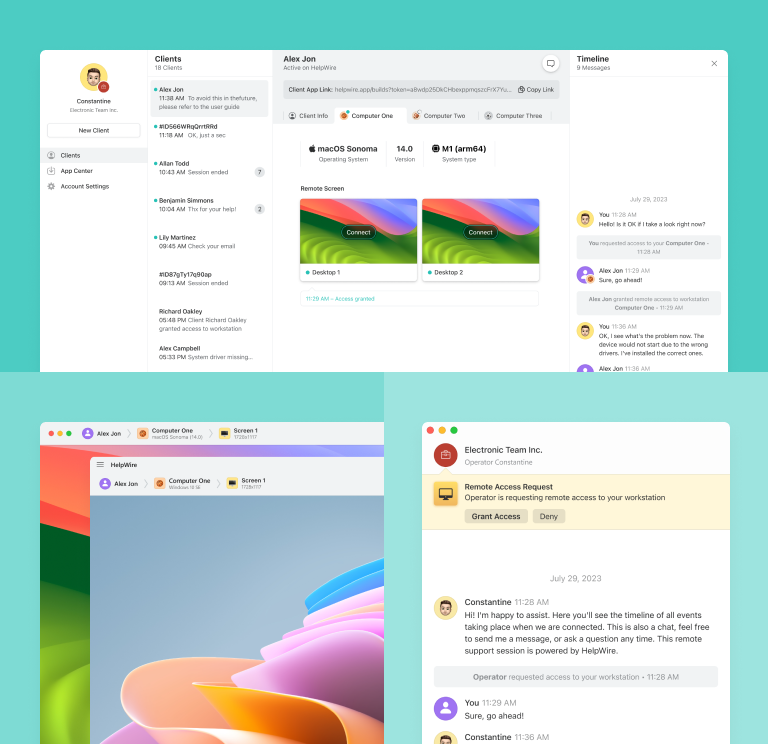
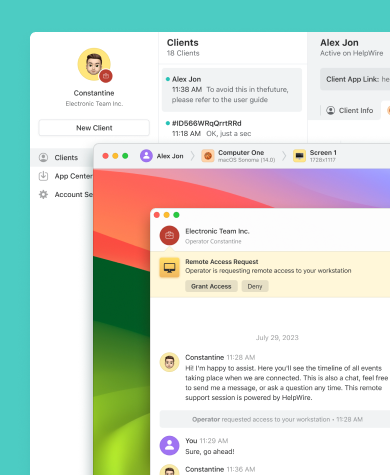
HelpWire vs AnyDesk: un confronto a colpo d'occhio
Tuffati nel confronto dettagliato tra le funzionalità e i piani tariffari di HelpWire e AnyDesk.
| Funzioni |
HelpWire
|
AnyDesk
Free
Solo
Standard
Advanced
| |||
|---|---|---|---|---|---|
| Prezzo al mese | |||||
| Prezzo al mese | Gratis per uso personale e aziendale | Gratis solo per uso personale | $23.12 | $39.92 | $89.52 |
| Importo della sessione alla volta | |||||
| Importo della sessione alla volta | 1 sessione, con più connessioni simultanee a postazioni lavorative remote dello stesso cliente | 1 | 1 | 1 connessione simultanea, con la possibilità di acquistare fino a 20 connessioni aggiuntive a 29,90 $ al mese. | 2 connessioni simultanee, con la possibilità di acquistare fino a 50 connessioni aggiuntive a 29,90 $ al mese. |
| Supporto piattaforme | |||||
| Supporto piattaforme | Windows, Mac, Linux | Mac, Windows, iOS, Linux, ChromeOS e Android | iOS, Windows, Mac, Android, Linux e ChromeOS | Windows, Android, Mac, iOS, ChromeOS e Linux | Windows, Android, Mac, ChromeOS, Linux e iOS |
| Messaggistica e collaborazione | |||||
| Messaggistica e collaborazione | Messaggistica | Messaggistica e lavagna | Messaggistica e lavagna | Messaggistica e lavagna | Messaggistica e lavagna |
| Sedute dell’operatore | |||||
| Sedute dell’operatore | 1 | 1 | 1 | 20 | 100 |
| Visione multi schermo | |||||
| Visione multi schermo | |||||
| Trasferimento documenti | |||||
| Trasferimento documenti | |||||
| Sicurezza forte | |||||
| Sicurezza forte | |||||
| Registrazione della sessione | |||||
| Registrazione della sessione | |||||
| Accesso non presidiato | |||||
| Accesso non presidiato | Fino a 3 dispositivi gestiti | Fino a 100 dispositivi gestiti | Fino a 500 dispositivi gestiti | Fino a 1000 dispositivi gestiti | |
| Personalizzazione del marchio | |||||
| Personalizzazione del marchio |
Funzioni di HelpWire
Alcune caratteristiche essenziali in evidenza, da considerare quando si confronta HelpWire con AnyDesk.
Conosci di più
Conosci di più
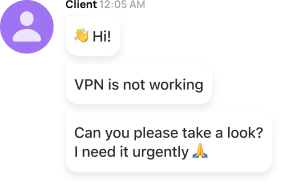
Messaggistica integrata
Con la messaggistica di supporto cliente incorporata di HelpWire, gli operatori tecnologici possono interagire con i clienti in tempo reale, garantendo chiarezza e precisione in merito alle sfide affrontate.

Avvio semplificato della sessione
HelpWire consente di avviare sessioni di supporto remoto condividendo un URL di connessione remota intuitivo con un cliente, eliminando la necessità di gestire ID di sessione e parole chiave.
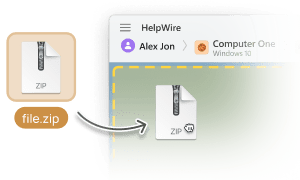
Trasferimento dei documenti
Invia i documenti dal sistema dell’operatore alla finestra del desktop remoto semplicemente copiandoli ed incollandoli.

Gestione della clientela
Semplifica la gestione dei tuoi clienti remoti creando profili cliente dettagliati, mostrando le informazioni critiche sui dispositivi e annotando sessioni di supporto remoto, il tutto direttamente dal tuo account internet.
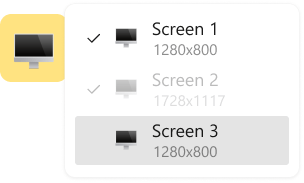
Visione multi schermo
Mostra in contemporanea due schermi remoti o passare da uno schermo all’altro durante la risoluzione dei problemi in remoto.
Supporto remoto per scenari diversi

Contabili
Semplifica i flussi di lavoro finanziari con le app di desktop remoto di HelpWire per i professionisti della finanza. Dalla revisione contabile alla contabilità, garantiscono un accesso rapido e sicuro ai sistemi critici mantenendo protetti i dati sensibili.

Aziende di media e piccola entità
HelpWire, la tua alternativa AnyDesk preferita per il supporto IT remoto per le piccole imprese, non solo riduce le spese operative, ma rafforza anche l’efficienza della tua squadra di supporto clienti con il suo intuitivo prontuario strumentale per la scrivania remota.

Amministratori di sistema
HelpWire funge da soluzione sicura di accesso remoto per gli amministratori di sistema, potenziando le operazioni e migliorando la qualità del supporto grazie a funzionalità di controllo robuste.
Gli utenti che parlano della loro esperienza su HelpWire

5.0
Basato sulle recensioni di piu’ di 209 clienti

Versione
2.2, 4 Febbr, 2026

Compatibilità
macOS, Windows, Linux

Prezzo
Gratis
Ecco alcune delle recensioni pubbliche riguardo HelpWire, da parte dei nostri clienti e da varie fonti:

I got a gatvol of teamviewer and its issues and moved over to HelpWire and I'm blown away.
Fast, effective and doesn't drain my computer's resources.
It works really well props to the devs.

My experience with HelpWire has been fantastic! The remote control process is incredibly smooth.

I appreciate HelpWire for its ease of use and comprehensive remote support tools all in one place.

HelpWire streamlines the remote support, allowing me to manage multiple clients efficiently, which improved overall service quality and client satisfaction.

The fact that I can easily segregate my clients and have a full history of my connection to them is amazing. I like the fact that I can send a link to them and then talk them through what to do when they receive it (many are elderly and techo-illiterate). The emails and link are professional and give them reassurance. I like unattended access for those clients that need that extra layer of help. Love this app.

The swift setup process and zero- configuration requirement for starting remote support sessions are what I appreciate most about HelpWire. It's remarkable how quickly I can connect with clients and start troubleshooting without any hassle.

Very good and free alternative to TV. Easy to use and nice concept. No annoying disconnections and forcing to buy premiumbussiness subscription or smth like that.

As a long-time TeamViewer user for personal projects and helping family, I grew increasingly frustrated with its frequent disconnections and persistent "commercial use" warnings. I decided to search for an alternative and found Helpwire. I am incredibly impressed. Helpwire provides a stable, reliable connection without any of the interruptions I faced before. The setup is simple, and it just works.

Its a great tool for remote support. It doesn't have the bells and whistles of its commercial rivals, but ask yourself how often do you need that stuff ? If you want to help someone out on a PC issue, or connect to a server for some admin this is perfect.

HelpWire software has been an invaluable asset for streamlining our customer support processes.

Probably the best free remote access app. I like seamless remote desktop experience and copy/paste functionality, reliability, and the fact it is free to use.

The experience is fantastic with a very smooth remote session experience. The optimised performance and smart connectivity feature ensures a seamless remote session with zero-lag.
It was handy for the odd occasion that someone needs a hand with their computer while I am not nearby. It was very reliable and able to see the other's screen to provide directions.
Absolutely Brilliant. Having worked on a whole bunch of other remote support software, from solarwinds dameware to anydesk and teamviewer, vnc viewer and the like, I have never had the joy I am having with Helpwire.

I've never been more satisfied with the service quality of a remote desktop application in my entire freelancing career. Considering the fact that it's a free remote desktop support solution, HelpWire is really worth a shot!

The interface is straightforward, so I can quickly connect to clients' devices and start troubleshooting without jumping through hoops. Plus, the performance is rock solid-no lag or sudden disconnections, which is crucial when I'm in the middle of solving a client's issue.
I appreciate Helpwire for its user-friendly interface and efficient problem-solving capabilities. It's designed to streamline the troubleshooting process, making it easier for people to find solutions to their technical issues quickly.
HelpWire really stands out for me because it's free and works seamlessly on both Mac and PC. I love how easy it is to get started. Basically, I can send a dedicated link to my colleague or client to initiate a remote session right away. The software is super fast and easy to use.
The Operator Dashboard is easy to use and you can start up a support session in seconds. The fact that it keeps the chat with the customer as well as logs of connections is a nice touch.

For nearly ten years I relied on another tool that recently became unusable, and HelpWire has stepped in as the perfect replacement.
How could I not like HelpWire! It ticks all the boxes for a great remote desktop/support service, and best of all, it's free. Real good, and worth more than a try.
Martin Lentz
Email Review

Your software worked just as well as Teamviewer. One thing works better and that is on the client side where they simply just have to grant me access. They don't have to provide me a one use password in order for me to connect.
Luca Albanese
Email Review
Simplicity of use, in particular on the client side that simply require to click on a link and give the required permissions. But the best feature, IMHO, is the ability to share the clients with other team members... and all of this for free! THANK YOU for this amazing app!!
Wilkin Miguel Julio Mercado
Email Review
It's easy to use and I didn't expect there to be a software as good as this one.
Michael Guggenbichler
Email Review
Absolutely Amazing Product for attended Access for individual operators or small teams! And you do not even have to pay!! There are so much remote access solutions, you have to pay tons of money and don't even provide the bare minimum. HelpWire Team, you're doing great! Looking forward to what you will bring in the future.
Domande frequenti (FAQ)
Sebbene AnyDesk sia gratuito per uso personale, se stai cercando un desktop remoto per scopi commerciali, considera HelpWire come alternativa gratuita ad AnyDesk. Offre una varietà di strumenti utili per il controllo remoto sia per le aziende che per i consulenti indipendenti nel campo delle tecnologie informatiche.
AnyDesk non impone un limite universale alla durata della sessione. Ogni utente può impostare la durata massima della sessione in base alle proprie preferenze.
Ai fatti, HelpWire è un servizio di scrivania remota totalmente gratuito.
AnyDesk include diverse misure di sicurezza integrate, come la whitelist dei dispositivi, una robusta crittografia AES-256 e controlli di autenticazione. Tuttavia, queste protezioni sono efficaci solo se il software viene mantenuto aggiornato. Per ridurre il rischio di esposizione alle truffe AnyDesk, è fondamentale installare tempestivamente le patch di sicurezza e seguire le migliori pratiche consolidate per l’accesso remoto.
Queste migliori pratiche includono l’utilizzo di password forti e uniche, il non condividere mai pubblicamente le credenziali AnyDesk e l’evitare sessioni remote da dispositivi sconosciuti o non affidabili.
Queste migliori pratiche includono l’utilizzo di password forti e uniche, il non condividere mai pubblicamente le credenziali AnyDesk e l’evitare sessioni remote da dispositivi sconosciuti o non affidabili.