Electronic Team uses cookies to personalize your experience on our website. By continuing to use this site, you agree to our cookie policy. Click here to learn more.

Talep Üzerine Uzaktan Destek HelpWire ile

HelpWire, talep üzerine uzaktan destek için başvurabileceğiniz yazılımdır. Her yerden teknik sorunları çözmek ve giderme sürecini kolaylaştıran, verimli bir çözüm sunar.
 G2 logo
G2
5.0
 capterra logo
Capterra
5.0
 SourceForge logo
SourceForge
5.0
 TrustRadius logo
TrustRadius
5.0

Talep Üzerine Uzaktan Destek Nedir?

Talep üzerine uzaktan destek, müşterilerin konumundan bağımsız olarak yardım sağlamanıza ve sorunları çözmenize olanak tanır. Katılımcı uzaktan destek olarak da bilinen bu özellik, uzakta bulunan müşterilere hemen yardımcı olmanızı sağlar. Genellikle bir kullanıcı, bir sorunu çözmek için yardım talep eder. Bir teknisyen daha sonra etkilenen makineye giriş yaparak sorunu uzaktan çözebilir. Talep üzerine uzaktan destek, teknik personel ile kullanıcı topluluğu arasında iletişim kurarak sorunların hızlı ve etkili bir şekilde çözülmesini sağlayarak verimliliği artırır.

Talep üzerine teknik destek hakkında bilinmesi gereken önemli noktalar şunlardır:

  • Ease of Use: On-demand support does not require a complicated setup to offer assistance.
  • Fast Access: Support personnel can quickly resolve issues after being granted access by the affected client.
  • Enhanced Security: Connectivity is established with a unique access link that can be revoked at any time by the client.
Bu destek yaklaşımını uygulamak, üretkenliği etkileyebilecek kritik sorunları hızlı, güvenli ve verimli bir şekilde çözmek için etkilidir.

HelpWire: Güvenli ve Basit Talep Üzerine IT Desteği

HelpWire, teknik destek ekiplerine talep üzerine teknik destek sağlamanın güvenli ve basit bir yolunu sunar. Yazılım, veri koruma ve kullanıcı kontrolünü ön planda tutar. Aşağıda, verimli ve güvenli uzaktan destek sağlayan temel özellikler yer almaktadır.
  • Permission-Based Access: Operators need to obtain permission from the client before establishing a connection to a remote computer. This allows users to retain control of their devices when receiving technical support.
  • Strong Data Encryption: Data transmission during a support session is protected by AES-256-bit encryption and the TLS/SSL protocols. Transfers use the WSS and HTTPS protocol for enhanced security.
  • Direct Peer-to-Peer Connections: HelpWire bypasses servers when possible and establishes a direct connection between an Operator and a Client. If servers are necessary when a direct connection is impossible, your data stays anonymous and encrypted to protect security.
  • Revoke Access Instantly: Clients can revoke access immediately to remain in control of their machine and the support session.

HelpWire’ı Talep Üzerine Uzaktan Destek İçin Nasıl Kullanılır

Adım 1:
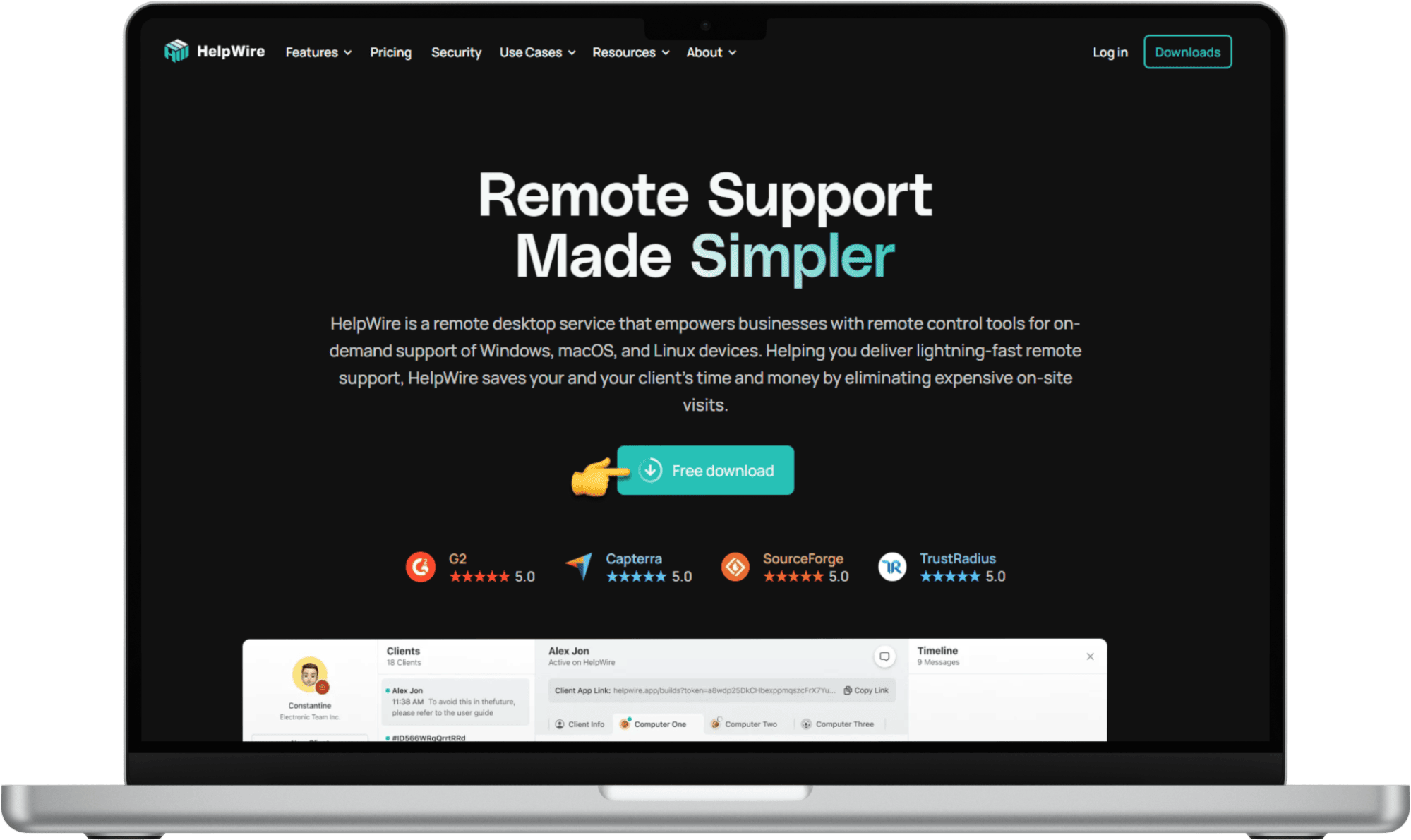
HelpWire Operator uygulamasını resmî HelpWire web sitesinden indirin. İndirildikten sonra, uygulama yazılımı kaydetmeden uzaktaki bir müşteriye hızlı ve güvenli bir şekilde bağlanmanızı sağlar.
Download the HelpWire Operator app from the official HelpWire website
Ayrıca, HelpWire hesabı oluşturabilir veya giriş yapabilirsiniz; böylece müşteri profillerini ve oturum geçmişini kaydedebilirsiniz. Hesap oluştururken, sizden Client uygulamasını indirmeniz istenecektir.
You can also create or log in to a HelpWire account
Adım 2:
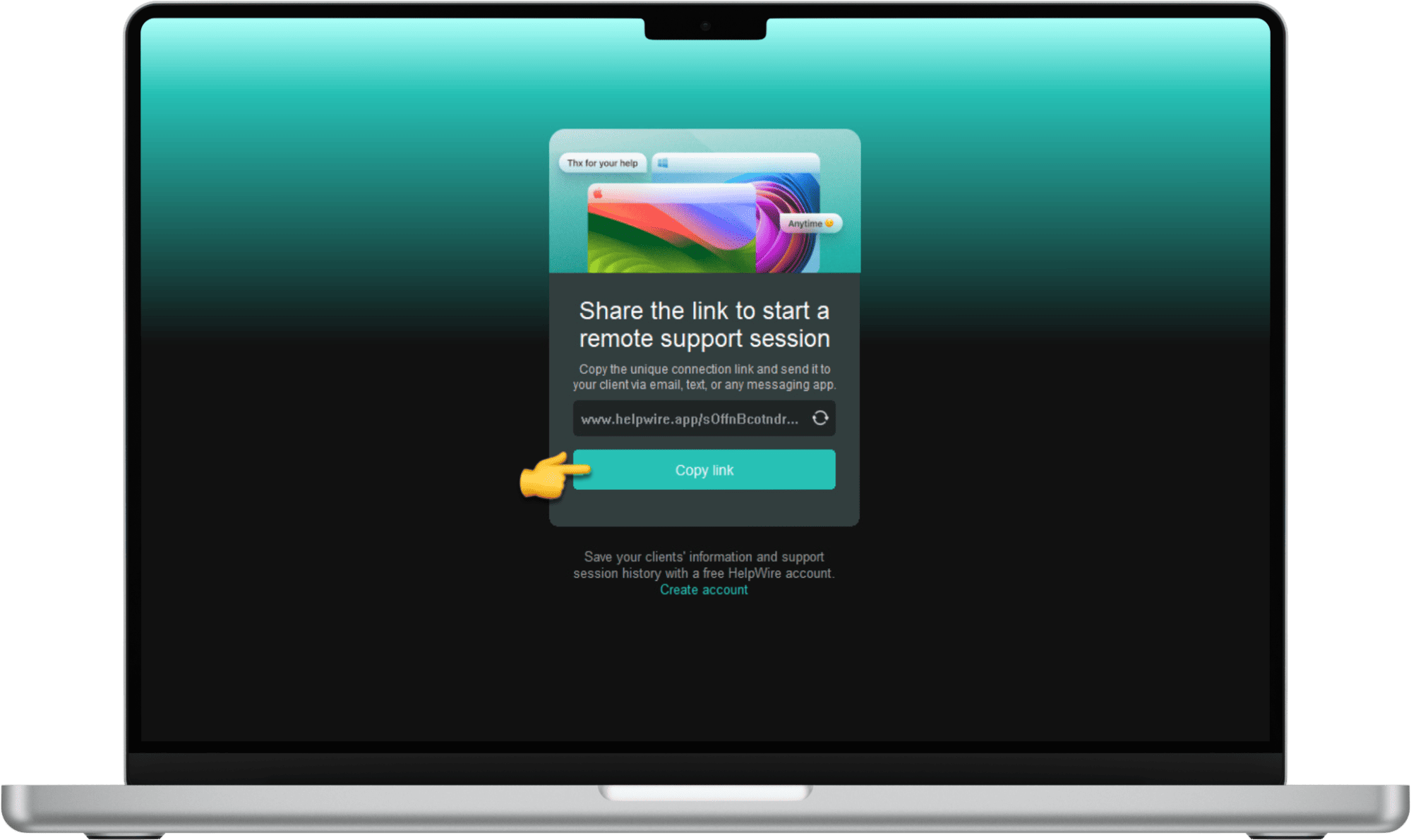
Uygulamayı açıp bağlantı linkini kopyalayarak hızlı bir bağlantı kurun. Linki, e-posta veya mesajlaşma uygulaması gibi güvenli bir yöntemle müşteriyle paylaşın.
Quickly establish a connection by opening the app and copying the connection link
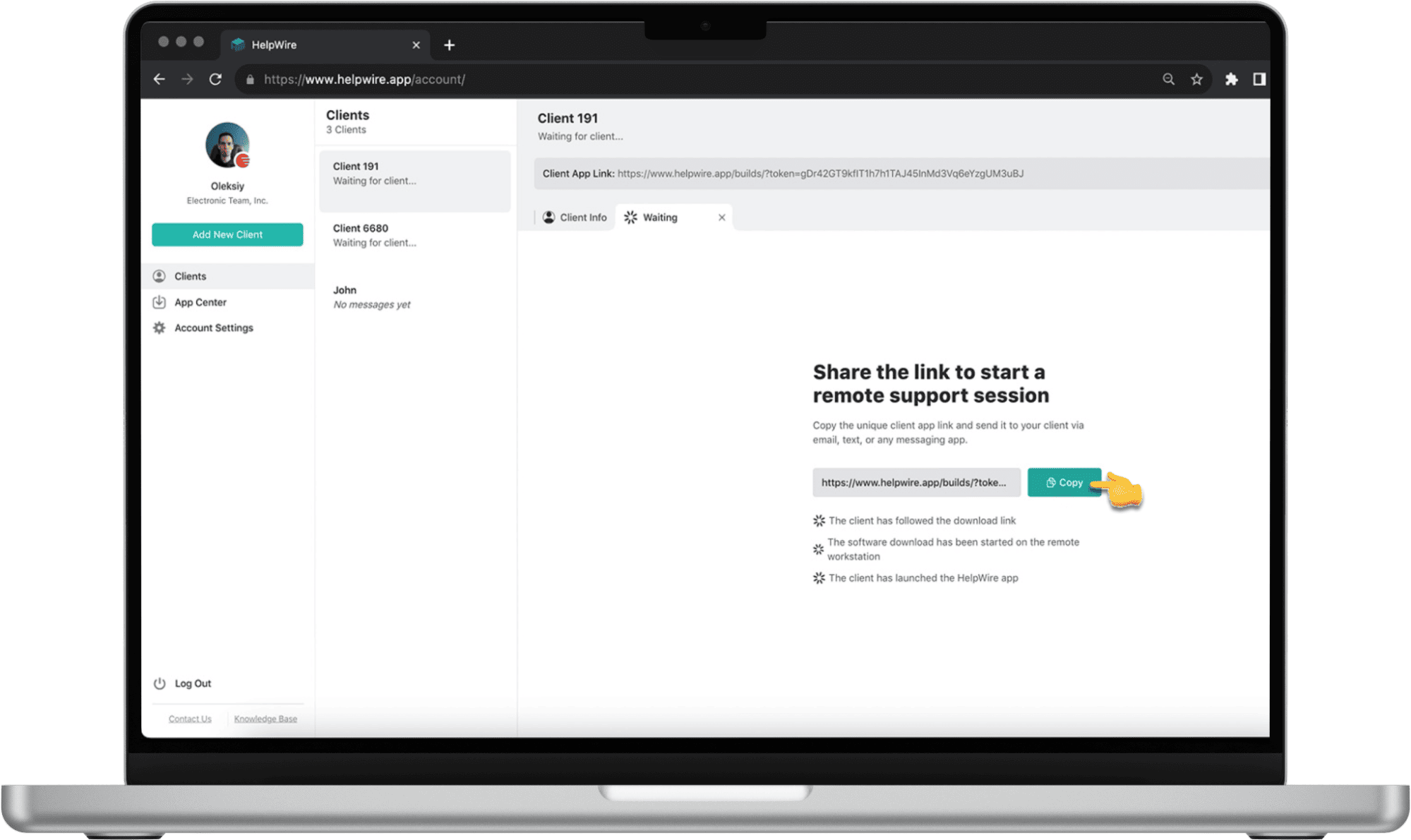
Bir hesap, mevcut bir müşteriyi seçmenize veya yeni bir profil oluşturmanıza olanak tanır. Ardından, destek oturumunu başlatmak için linki paylaşın.
An account lets you select an existing client or create a new profile
Adım 3:
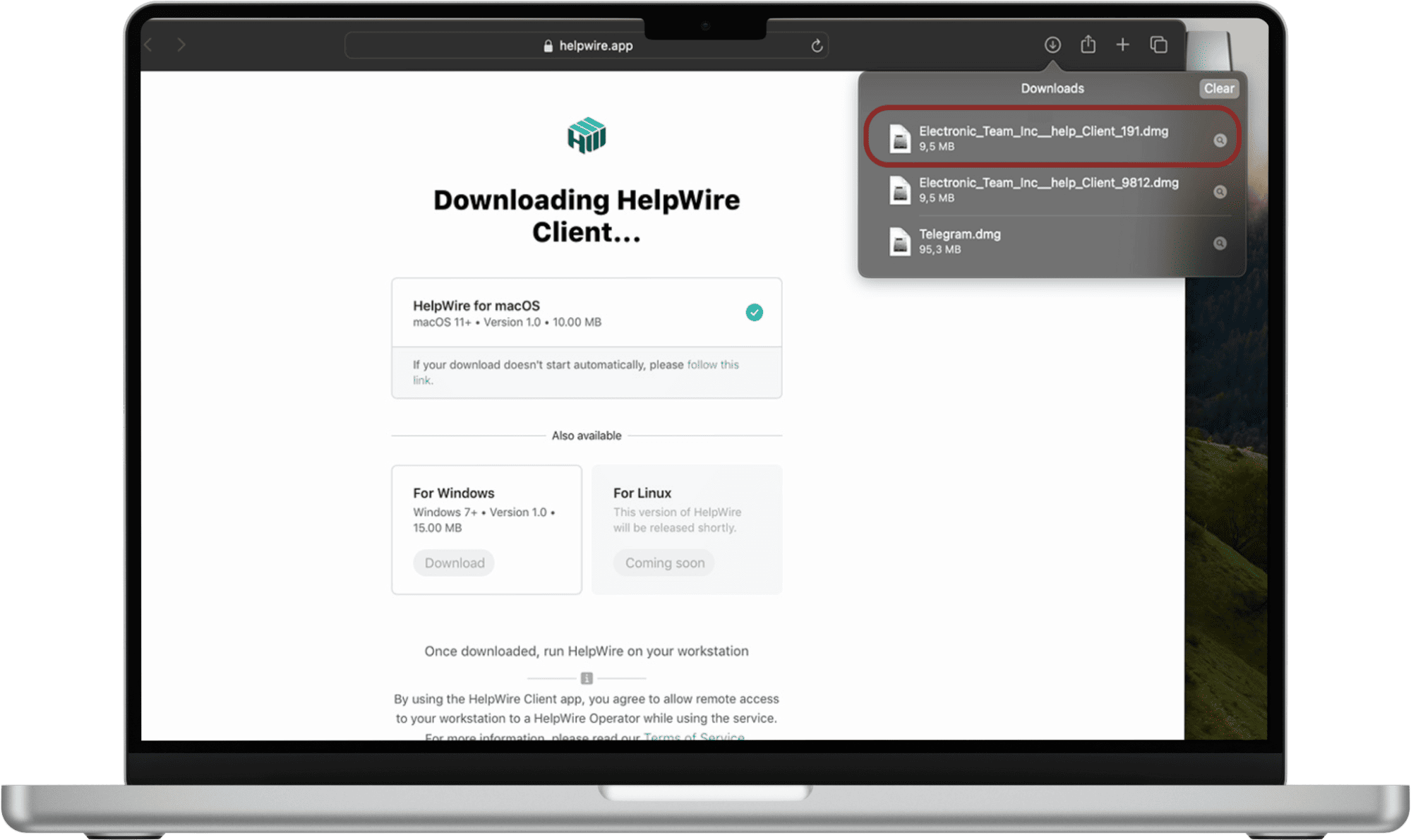
Müşteri daha sonra linki kullanarak bilgisayarına HelpWire Client uygulamasını indirir ve başlatır.
The client then uses the link to download and start the HelpWire Client app on their computer
Adım 4:
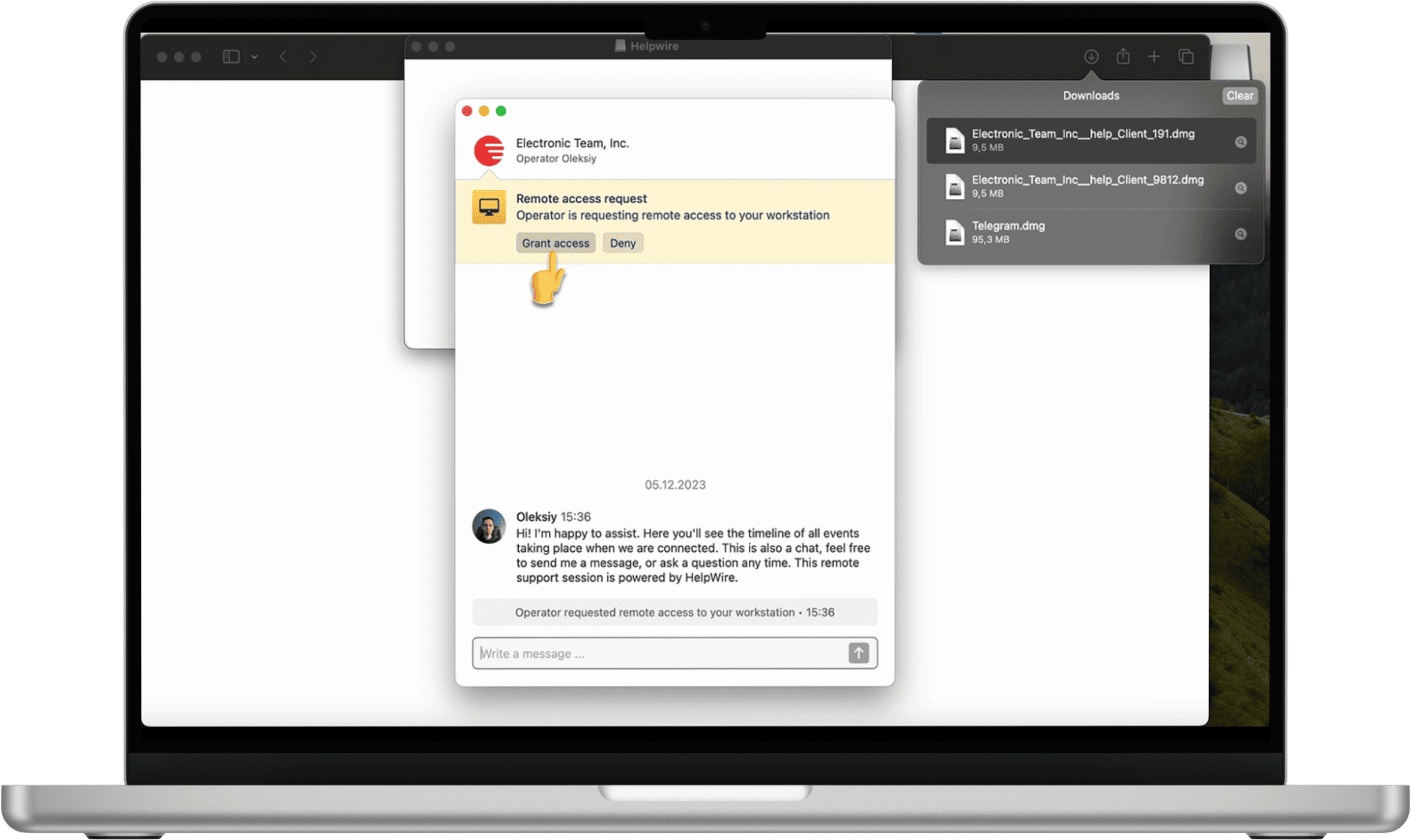
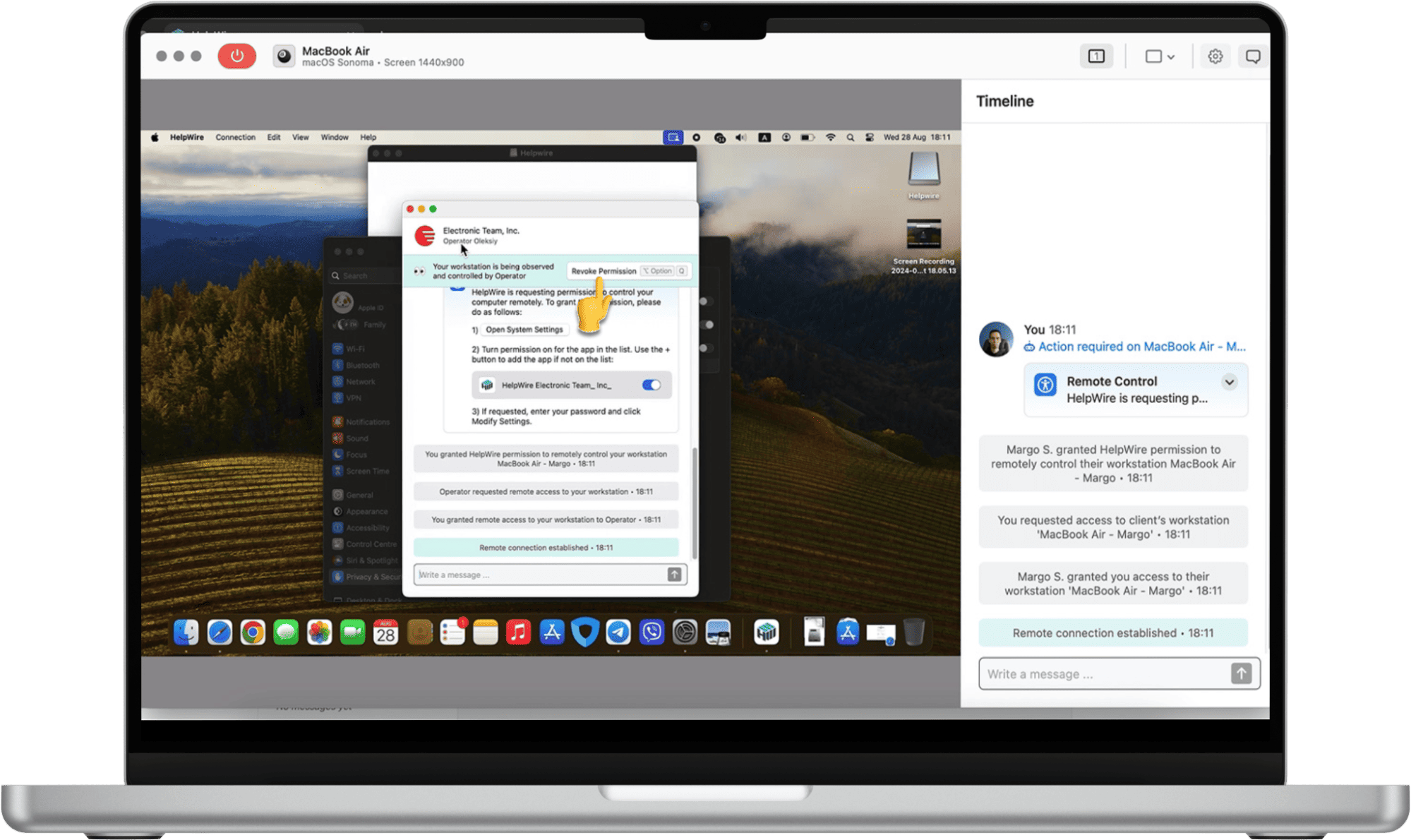
Müşteri uygulamayı başlattıktan sonra, uzaktan erişim isteğinizi alır. “Erişim Ver”e tıklamak, Operatörün uzak makineye tek seferlik erişim sağlamasına izin verir.
After the client launches the app, they will receive your remote access request
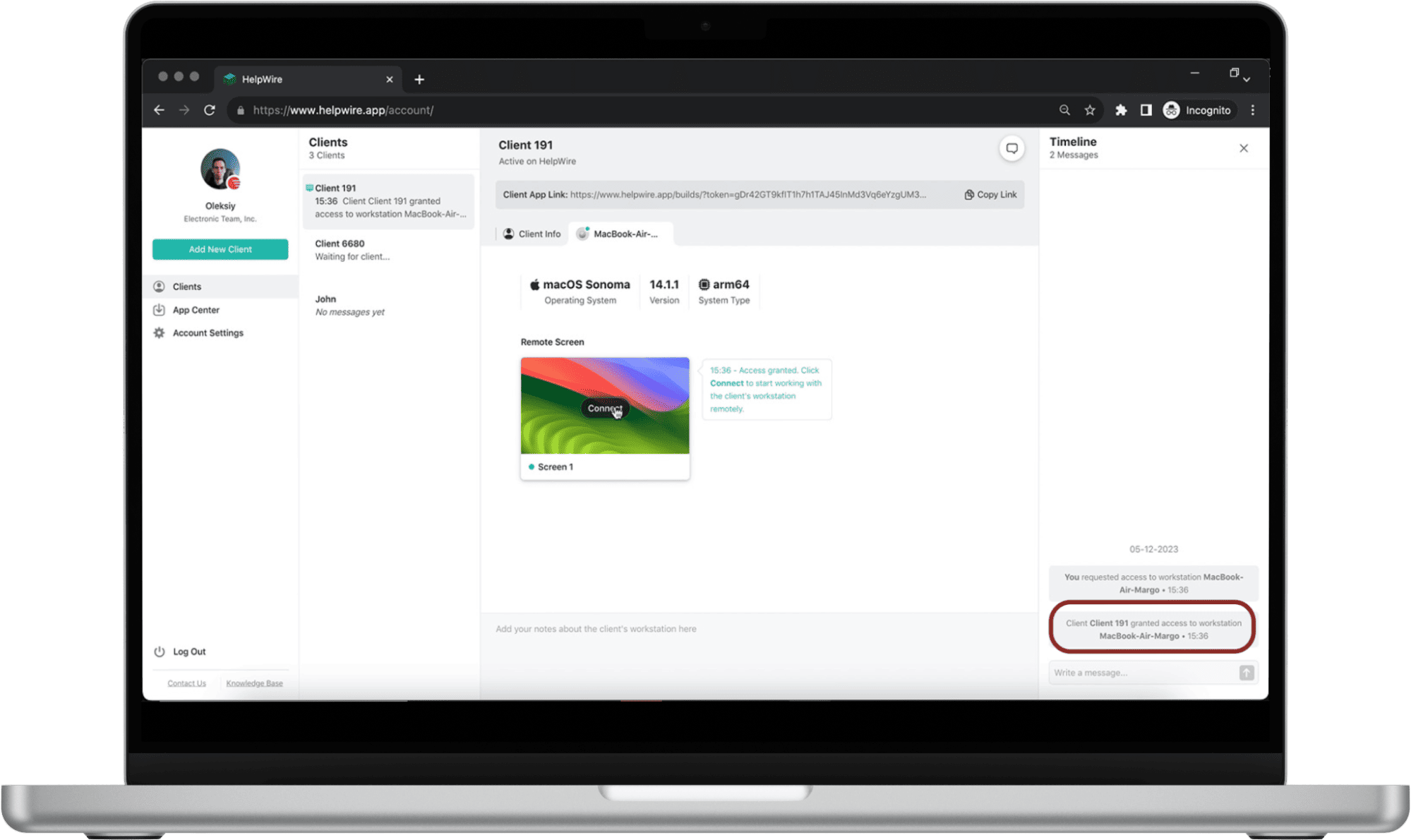
Müşteri bağlantıyı onayladığında bildirim alırsınız.
You will receive notification when the client approves the connection
Adım 5:
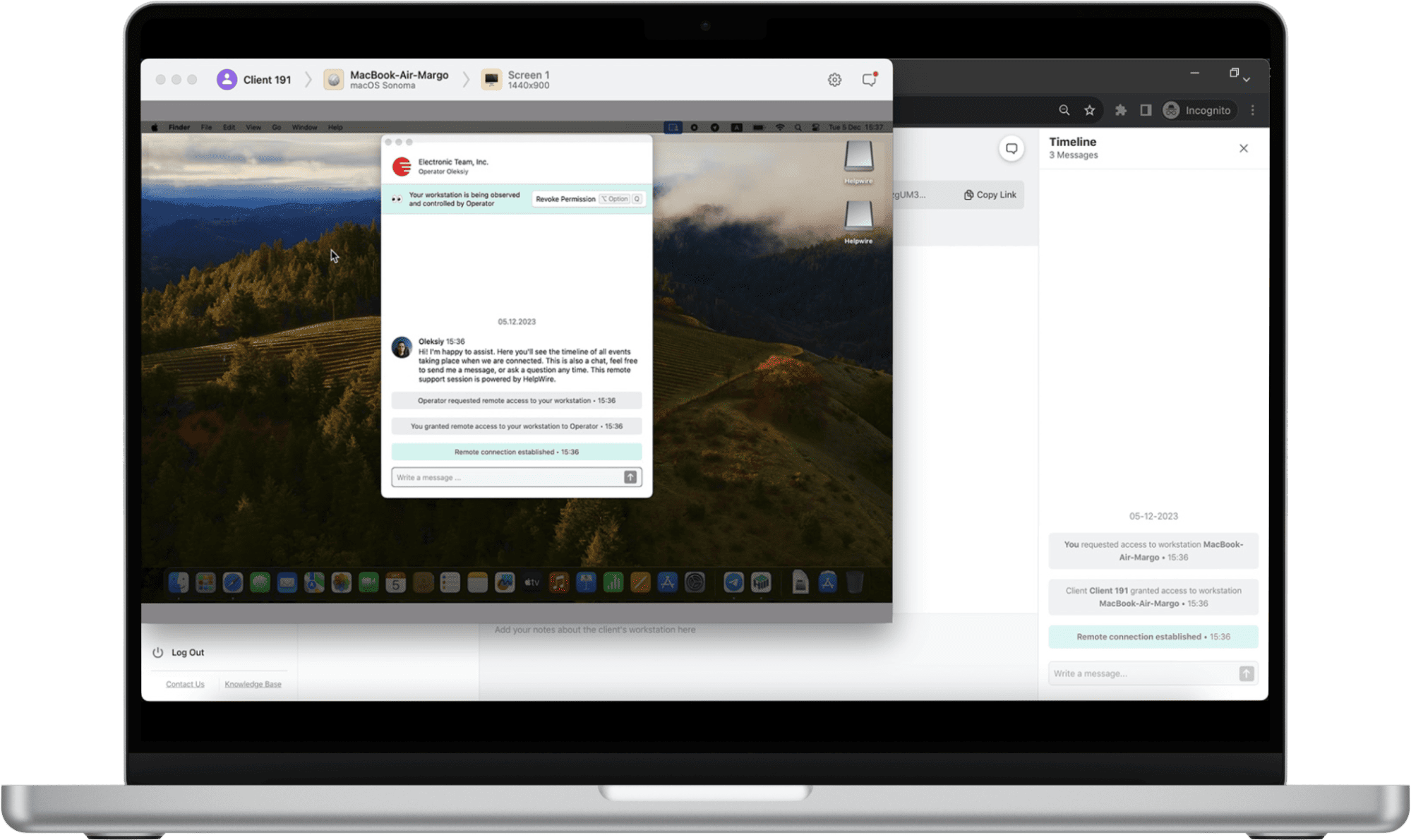
Erişim verildikten sonra, müşterinin bilgisayarını uzaktan kontrol etmek ve sorunu çözmek için HelpWire arayüzünü kullanın.
After access is granted, use HelpWire’s interface to remotely control the client’s computer to resolve their issue
Adım 6:
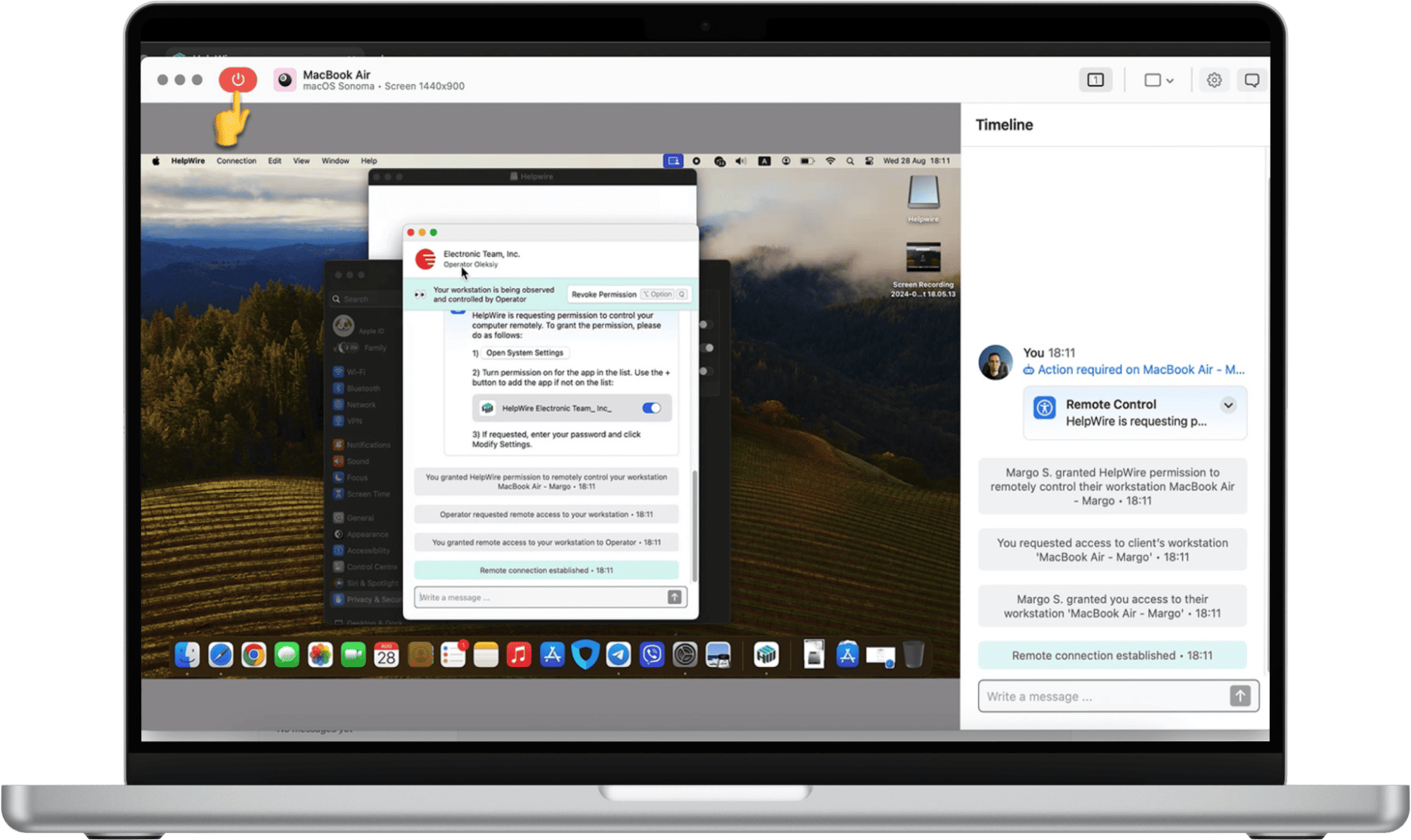
Oturumu, HelpWire uygulamasındaki “Bağlantıyı Kes” butonuna tıklayarak sonlandırın. end button
End the session by clicking the “Disconnect” button in the HelpWire app
Kullanıcı ayrıca izni geri alabilir ve bağlantıyı ve destek oturumunu her zaman sonlandırabilir.
The user can also revoke permission and end the connection and support session anytime

Gelişmiş HelpWire Talep Üzerine Uzaktan Erişim Özellikleri

Simple and Fast Remote Control

Basit ve Hızlı Uzaktan Kontrol

Her müşteri için benzersiz oluşturulmuş bir link ile müşterinin iş istasyonlarına sorunsuz bağlantılar kurun.
Admin Privileges

İzin Tabanlı Erişim

Operatörler, müşterinin iş istasyonlarına erişmeden önce onayını almak zorundadır; bu, müşteri güvenliği ve güvenini sağlar.
Cross-Platform Remote Control

Çapraz Platform Uzaktan Kontrol

HelpWire ile Windows, Linux ve macOS bilgisayarlardan bağlanın ve herhangi bir platformda talep üzerine uzaktan destek sağlayın.
Control Multiple Workstations

Birden Fazla İş İstasyonunu Kontrol Etme

Tek bir müşterinin birden fazla uzak iş istasyonuna eşzamanlı bağlantılar kurarak tüm bilgisayarlarında gerekli desteği sağlayın.
Workstation Details

İş İstasyonu Detayları

Daha kişiselleştirilmiş talep üzerine uzaktan destek için uzak iş istasyonlarının adını, türünü ve işletim sistemi sürümünü görüntüleyin.
Notes

Erişimi Geri Alma

Uzak müşteriler, Operatörün uzaktan erişimini istedikleri zaman global klavye kısayolu veya uygulama penceresindeki özel buton ile iptal edebilir.
Intuitive File Sharing

Dosya Transferi

Dosyaları HelpWire uzaktan kontrol penceresine kopyalayıp yapıştırarak müşterinizle değiş tokuş edin.

Güvenli Talep Üzerine Uzaktan Destek

shield

Güvenilir Doğrulama Mekanizması

HelpWire, güvenilir bir kullanıcı doğrulama servisi olan Auth0 kullanarak giriş bilgilerini korur.

lock

Uçtan Uca Şifreleme

Tüm veri aktarımlarını korumak için uçtan uca endüstri standardı SSL/TLS şifrelemesi kullanılır; bu, bilgilerinizin gizliliğini ve güvenliğini sağlar.

settings

Güvenli Veri Merkezleri

HelpWire’ın bulut altyapısı, geliştirilmiş güvenlik için AWS güvenli bulut hizmetleri üzerine inşa edilmiştir. NASA ve Netflix gibi birçok büyük kuruluş da AWS altyapısını kullanmaktadır.

shield-1

Güvenlik Duvarına Uyumlu

Bir müşterinin iş istasyonuna uzaktan bağlanırken ek güvenlik duvarı portları açma veya yapılandırma değişiklikleri yapma gerekliliği ortadan kaldırılarak güvenlik sağlanır.

Her Rol, İhtiyaç ve Sektör İçin Talep Üzerine Uzaktan Destek Yazılımı

Remote Tech Support Services

Uzaktan Teknik Destek Hizmetleri

HelpWire, yazılım kurulumu veya sistem yapılandırma sorunlarıyla karşılaşan müşterilere etkili talep üzerine veya ad-hoc teknik uzaktan destek sunmak için başvurabileceğiniz çözümdür.
Help & Service Desks

Freelance IT Uzmanları

Müşterilerinize, bulunduğunuz yer fark etmeksizin uygulamalı uzaktan destek sağlayın.
Daha fazla bilgi
Education

Eğitim

Eğitmenler ve öğrenciler için dijital araçların sorunsuz çalışmasını sağlayan sezgisel bir uzaktan çözüm ile eğitim için IT desteği sağlayın.

Kullanıcılar HelpWire Deneyimini Anlatıyor title icon

5.0 209 müşterinin deneyimine göre
version icon
Sürüm
2.3, 28/01/2026
compatibility icon
Uyumluluk
macOS, Windows, Linux
price icon
Fiyat
Ücretsiz
İşte müşterilerimizin farklı kaynaklardan paylaştığı bazı halka açık HelpWire yorumları:
Thea M.
Office admin
Thea M.
I got a gatvol of teamviewer and its issues and moved over to HelpWire and I'm blown away. Fast, effective and doesn't drain my computer's resources. It works really well props to the devs.
Molly
Production worker
Molly
My experience with HelpWire has been fantastic! The remote control process is incredibly smooth.
Daniel Domingues
Founder, Lusha
Daniel Domingues
I appreciate HelpWire for its ease of use and comprehensive remote support tools all in one place.
Rabeea Sarfraz
Associate Software Engineer, Coeus Solutions GmbH
Rabeea Sarfraz
HelpWire streamlines the remote support, allowing me to manage multiple clients efficiently, which improved overall service quality and client satisfaction.
Mark V.
Remote Technical Support
Mark V.
The fact that I can easily segregate my clients and have a full history of my connection to them is amazing. I like the fact that I can send a link to them and then talk them through what to do when they receive it (many are elderly and techo-illiterate). The emails and link are professional and give them reassurance. I like unattended access for those clients that need that extra layer of help. Love this app.
Kyle Paterson
CEO, Enspire
Kyle Paterson
The swift setup process and zero- configuration requirement for starting remote support sessions are what I appreciate most about HelpWire. It's remarkable how quickly I can connect with clients and start troubleshooting without any hassle.
Yaroslav H.
Owner
Yaroslav H.
Very good and free alternative to TV. Easy to use and nice concept. No annoying disconnections and forcing to buy premiumbussiness subscription or smth like that.
Muhammad Ammar Z.
Senior Lecturer at Shifa College of Pharmaceutical Sciences
Muhammad Ammar Z.
As a long-time TeamViewer user for personal projects and helping family, I grew increasingly frustrated with its frequent disconnections and persistent "commercial use" warnings. I decided to search for an alternative and found Helpwire. I am incredibly impressed. Helpwire provides a stable, reliable connection without any of the interruptions I faced before. The setup is simple, and it just works.
Jonathan B.
IT Director
Jonathan B.
Its a great tool for remote support. It doesn't have the bells and whistles of its commercial rivals, but ask yourself how often do you need that stuff ? If you want to help someone out on a PC issue, or connect to a server for some admin this is perfect.
Nilay N.
Senior Education Management, Self-employed
Nilay N.
HelpWire software has been an invaluable asset for streamlining our customer support processes.
Darko V.
SEO specialist
Darko V.
Probably the best free remote access app. I like seamless remote desktop experience and copy/paste functionality, reliability, and the fact it is free to use.
Samit B.
Senior Communication Executive, Dairy
Samit B.
The experience is fantastic with a very smooth remote session experience. The optimised performance and smart connectivity feature ensures a seamless remote session with zero-lag.
Ben T
Admin Assistant
Ben T
It was handy for the odd occasion that someone needs a hand with their computer while I am not nearby. It was very reliable and able to see the other's screen to provide directions.
Jean K.
Engineer
Jean K.
Absolutely Brilliant. Having worked on a whole bunch of other remote support software, from solarwinds dameware to anydesk and teamviewer, vnc viewer and the like, I have never had the joy I am having with Helpwire.
Govind P.
Content Writer, Marketing and Advertising
Govind P.
I've never been more satisfied with the service quality of a remote desktop application in my entire freelancing career. Considering the fact that it's a free remote desktop support solution, HelpWire is really worth a shot!
The interface is straightforward, so I can quickly connect to clients' devices and start troubleshooting without jumping through hoops. Plus, the performance is rock solid-no lag or sudden disconnections, which is crucial when I'm in the middle of solving a client's issue.
Adyrosan B.
Business Leader or Manager
Adyrosan B.
I appreciate Helpwire for its user-friendly interface and efficient problem-solving capabilities. It's designed to streamline the troubleshooting process, making it easier for people to find solutions to their technical issues quickly.
Anna K.
Sales Marketing
Anna K.
HelpWire really stands out for me because it's free and works seamlessly on both Mac and PC. I love how easy it is to get started. Basically, I can send a dedicated link to my colleague or client to initiate a remote session right away. The software is super fast and easy to use.
EJ S.
Business Leader or Manager
EJ S.
The Operator Dashboard is easy to use and you can start up a support session in seconds. The fact that it keeps the chat with the customer as well as logs of connections is a nice touch.
For nearly ten years I relied on another tool that recently became unusable, and HelpWire has stepped in as the perfect replacement.
How could I not like HelpWire! It ticks all the boxes for a great remote desktop/support service, and best of all, it's free. Real good, and worth more than a try.
Martin Lentz
Email İnceleme
Martin Lentz
Your software worked just as well as Teamviewer. One thing works better and that is on the client side where they simply just have to grant me access. They don't have to provide me a one use password in order for me to connect.
Luca Albanese
Email İnceleme
Luca Albanese
Simplicity of use, in particular on the client side that simply require to click on a link and give the required permissions. But the best feature, IMHO, is the ability to share the clients with other team members... and all of this for free! THANK YOU for this amazing app!!
Wilkin Miguel Julio Mercado
Email İnceleme
Wilkin Miguel Julio Mercado
It's easy to use and I didn't expect there to be a software as good as this one.
Michael Guggenbichler
Email İnceleme
Michael Guggenbichler
Absolutely Amazing Product for attended Access for individual operators or small teams! And you do not even have to pay!! There are so much remote access solutions, you have to pay tons of money and don't even provide the bare minimum. HelpWire Team, you're doing great! Looking forward to what you will bring in the future.
Sıkça Sorulan Sorular