
How to Reset AnyDesk After License Warning

- HelpWire
- →
- Blog
- →
- AnyDesk not working
- →
- AnyDesk license warning reset
AnyDesk provides its services for free to non-commercial users, but also has an algorithm to detect potentially commercial use and disable the client in such cases. The algorithm is not always accurate, and can sometimes trigger even if the user is not violating their license. If this is the case for you, you can try to remove AnyDesk license warning manually, or ask the AnyDesk crew for a spot on the official whitelist.
Ask to Be Whitelisted
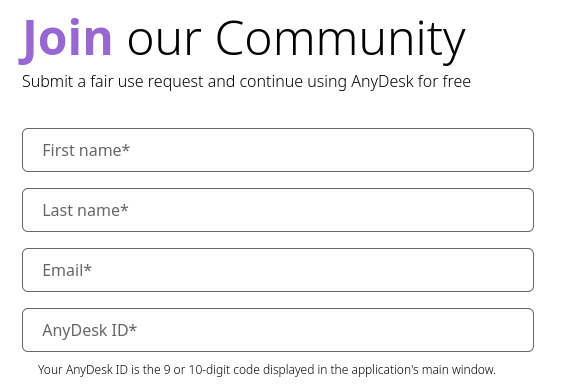
The AnyDesk website has an official whitelist request form for users that want purely non-commercial use. The admins can take a while to respond, so, if there’s no response for 2 days or more, you may need to contact u/AnyDeskSupport on Reddit.
Before contacting support, you likely need to write down your AnyDesk address; it’s the number you see when you start the client.

Delete the Configuration Files Manually
The files you need for an AnyDesk license warning reset are most likely in AppData/Roaming. However, before finding the folder, you need to terminate the AnyDesk process. Press Ctrl+Shift+Esc, find the process, and end it.
If AnyDesk is installed rather than run as a portable app, it also runs as a Windows service that can start the process again. Stop the service too: press Win+R, type services.msc, find AnyDesk in the list, and click Stop.

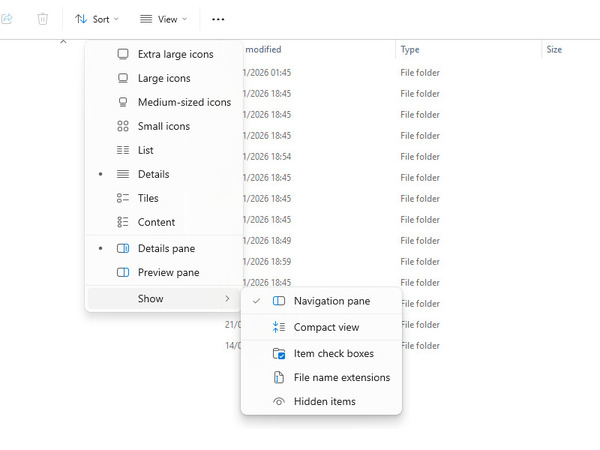
Before going to the AnyDesk folder, you need Explorer to show hidden files. Open Explorer, click “View” and navigate to “Show > Hidden items”.
Once you can see hidden files and folders, either navigate to “This PC > Local Disk (C:) > Users > [your username] > AppData > Roaming > AnyDesk”. AppData is hidden by default, so you can also type %AppData%\AnyDesk in the Explorer address bar.

As an alternative to partial removal, you can perform a full AnyDesk uninstallation by following the steps in that article. This is more drastic and will take more time, but if .conf removal didn’t help, it may be the thing you need.
These steps are for Windows. On macOS and Linux, AnyDesk keeps its settings in a hidden .anydesk folder in your home directory. Users report that removing it does not always clear the warning.
Try GitHub Scripts (Carefully)

There are numerous AnyDesk license warning reset scripts available on GitHub that mostly do the same that you would when deleting user.conf and system.conf. However, some of them do other things, or look for the files in alternative locations. Don’t run the scripts directly – first, inspect them, and carefully check what every command does. Once you’re sure that a command is safe, you can open PowerShell from the Win+X menu, and run it yourself, separately from the script. Luckily, GitHub will always show you the contents of any scripts hosted on the site.
HelpWire as AnyDesk Alternative for Work Use
The methods above either ask AnyDesk to review the flag or reset one installation. A reset does not change how AnyDesk classifies the way you use it, so the warning can return. If remote support is part of your work, the lasting options are a paid AnyDesk license or a tool licensed for that kind of use.
HelpWire offers a free plan that permits commercial use, with no nag screens and no session cutoffs. The Free plan covers one operator, up to five unattended devices, and one remote session at a time. Paid plans add operators, devices, and multiple sessions at a time.
See how HelpWire compares with AnyDesk.
HelpWire vs AnyDesk Free: What You Actually Get
| Feature | HelpWire | AnyDesk Free |
|---|---|---|
| Commercial use allowed | ✅ Included | ⚠️ Personal use only |
| License warning popups | ✅ None | ⚠️ Triggered by usage patterns |
| Manual reset or whitelist required | ✅ Not applicable | ⚠️ Whitelist request if flagged by mistake |
| Unattended access | ✅ Included free | ⚠️ Available for free but requires manual password configuration |
Frequently Asked Questions
AnyDesk’s free version is meant for personal use, and AnyDesk decides whether use looks professional based on usage patterns. That check can mistake personal use for commercial use. Many users report being flagged while only reaching their own computers or helping family, and AnyDesk itself provides a way to report a wrong flag. Deleting the configuration files resets the local installation but not the pattern of use, so the warning can return. If your use is personal, the whitelist request is the official way to correct a wrong flag. If it’s work-related, AnyDesk requires a paid license.
A reset changes files on your computer, not the terms you use AnyDesk under. AnyDesk states that work-related use requires a paid license.
Usually, yes. You get a new AnyDesk address, and saved settings such as the password for unattended access may be lost. Write down the new address and share it with anyone who connects to you.
In most cases, yes. AnyDesk’s free version is for personal use only, so connecting to your work computer to do your job counts as work-related use, which requires a paid license. For that kind of use, the options are a paid AnyDesk license or a tool such as HelpWire, whose free plan permits commercial use.