Electronic Team uses cookies to personalize your experience on our website. By continuing to use this site, you agree to our cookie policy. Click here to learn more.

Free online remote desktop software

HelpWire is a cloud-based remote access software – connect to clients on Windows, Mac, or Linux with a shareable link, from any of those platforms. No VPN, no same-network requirement.
 G2 logo
G2
5.0
 capterra logo
Capterra
5.0
 SourceForge logo
SourceForge
5.0
 TrustRadius logo
TrustRadius
5.0

HelpWire capabilities for online remote support

HelpWire’s feature set allows a remote technical team to offer users the same level of support as if they were on-site.
Unattended access

Unattended access

Connect to a remote computer even when no one is available to accept the session. Useful for scheduled maintenance, software updates, and follow-up tasks.
On-demand remote support

On-demand remote support

Launch a remote support session with a user who is actively using the device. Best suited for troubleshooting, guidance, and issues that require real-time collaboration.
Secure connections

Secure connections

Generate persistent, unique links to enable a secure connection to client workstations.
Multiple remote sessions

Multiple remote sessions

HelpWire enables users to set up multiple simultaneous connections to streamline client support.
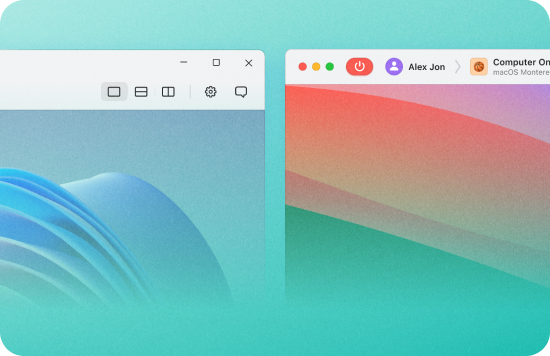
Multi-monitor view

Multi-monitor view

Manage multiple screens simultaneously, allowing for more efficient work and reducing the time spent switching between different computers.
Cross-platform support

Cross-platform support

This online remote desktop software provides cross-platform support for devices running the Windows, macOS, and Linux operating systems.
File transfer

File transfer

Drag files into the session window or use the clipboard to copy them between systems.
In-session chat

In-session chat

Built-in chat lets operators communicate with clients during a remote session – no separate messaging tool needed.

How to set up a remote desktop connection online

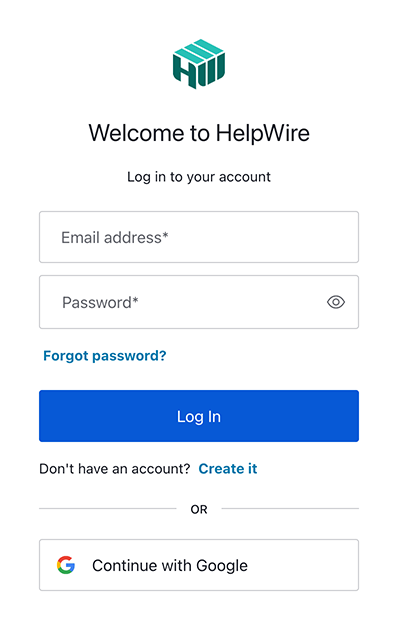
1. Register your HelpWire account:
Create a new account using an email address or your Google profile.
Register new HelpWire account
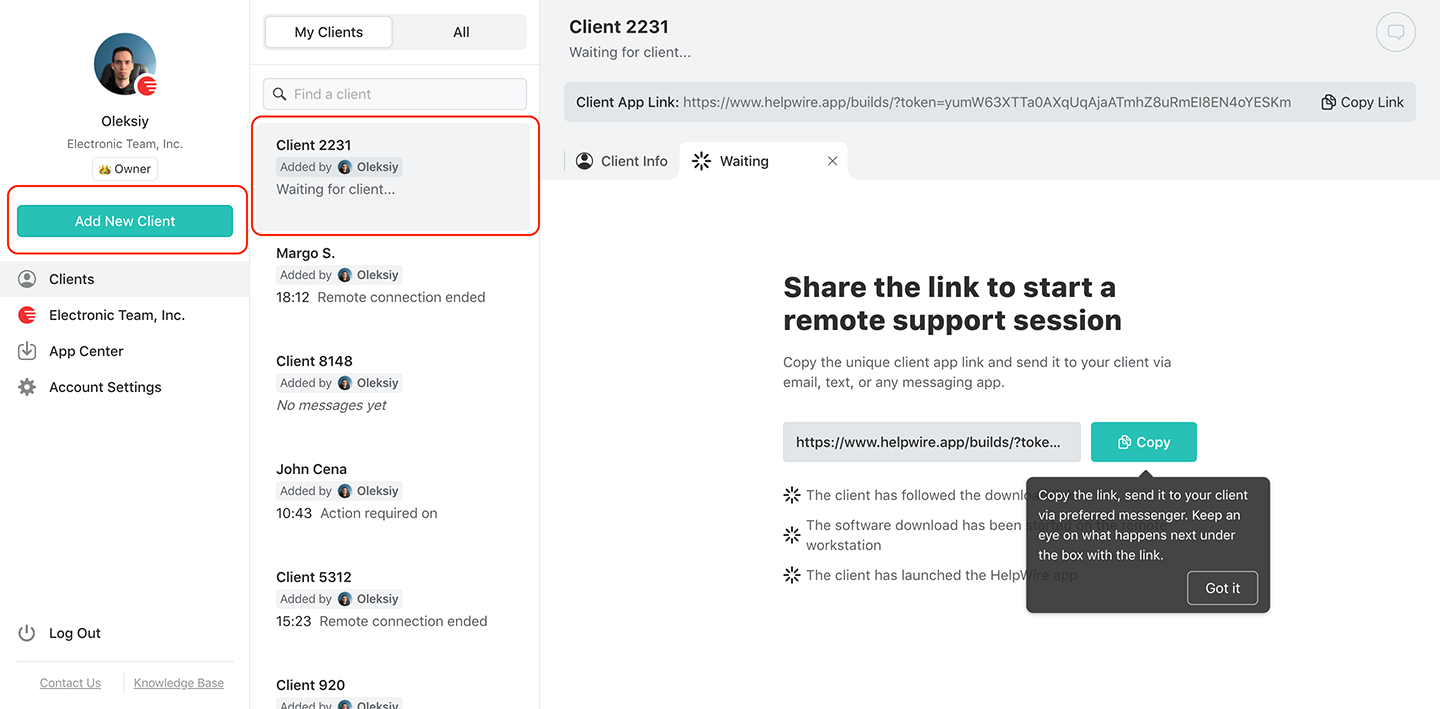
2. Create a new client.
Add a new client or select an existing one
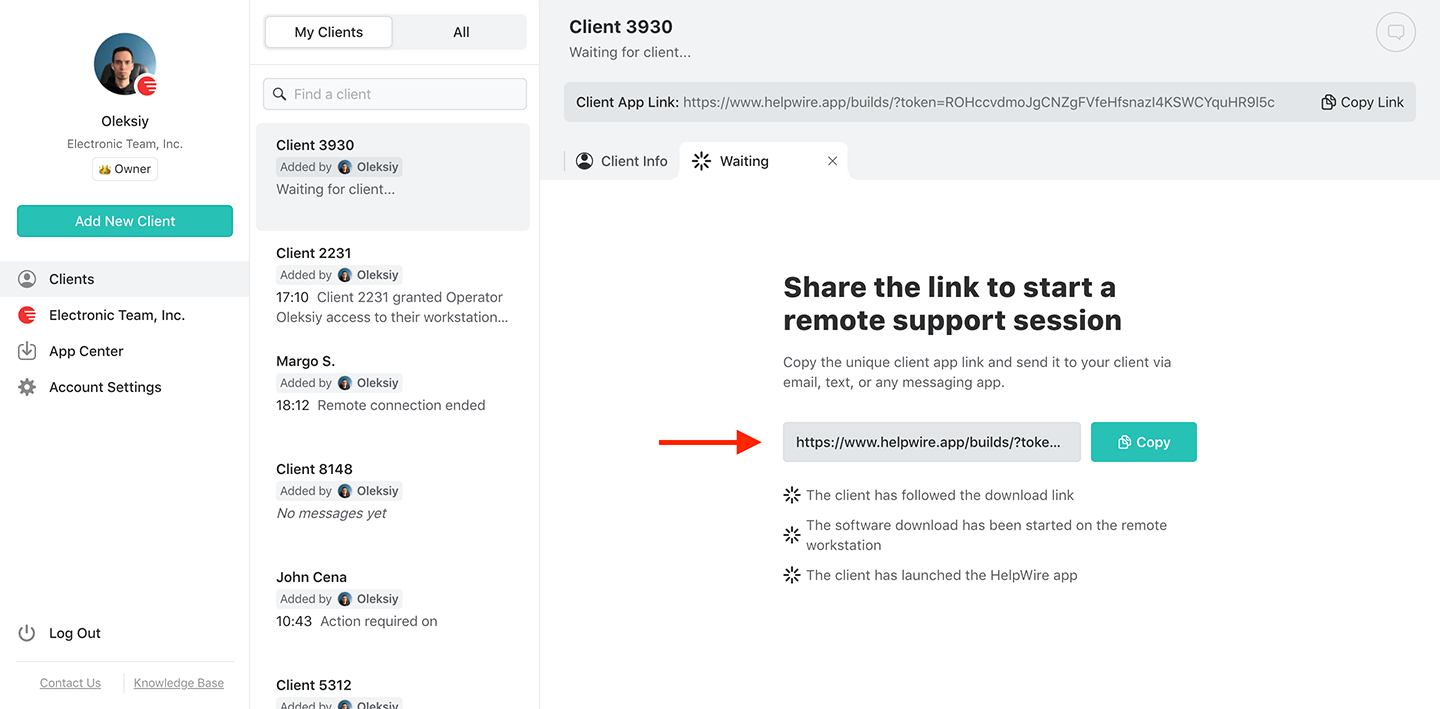
3. Share the link with the client:
Locate the Client app link in the user toolbar of the client profile. Send the link to your client via a secure email or instant message.
Share the link with your client for remote online support
4. Get access permission:
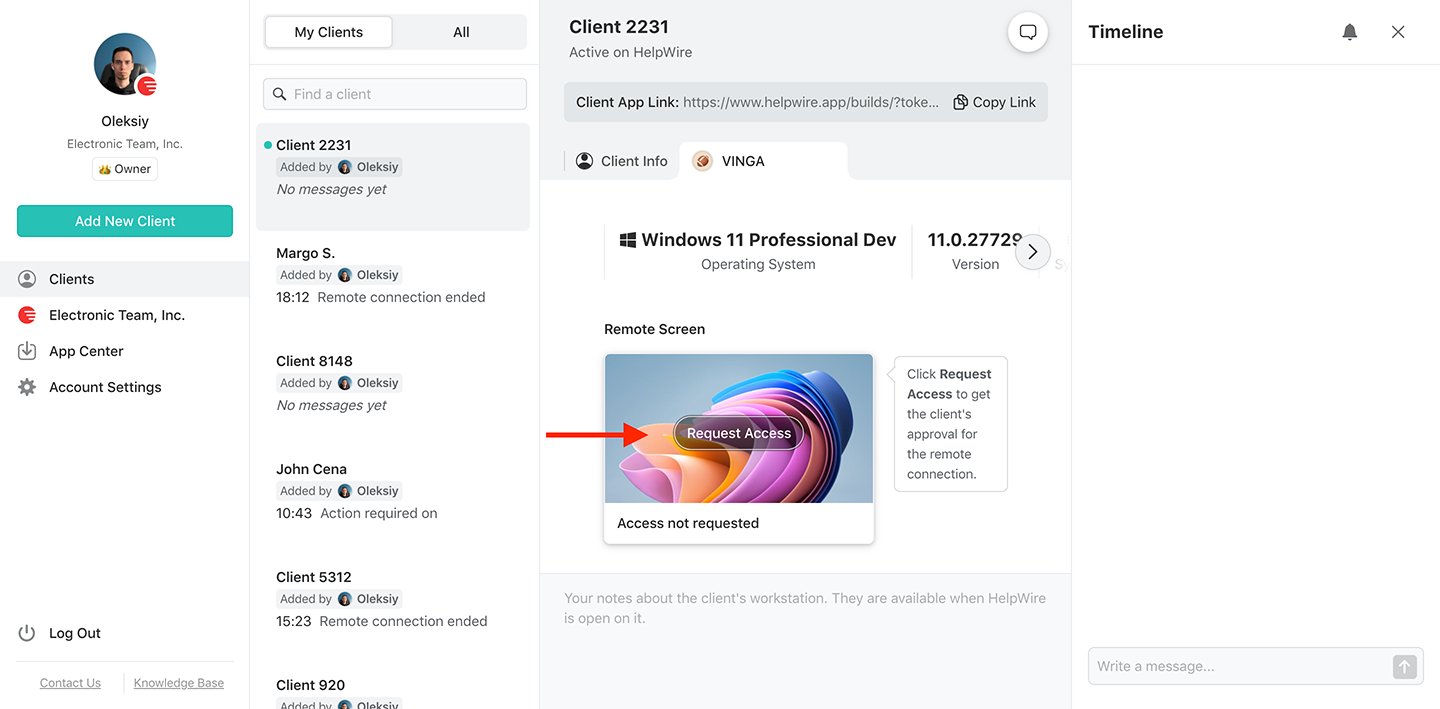
After the client receives the link, wait for them to install and launch the HelpWire Client application on their systems. Once done, request permission from the remote client by clicking the “Request Access” button and waiting for client approval.
Get access permissions from the remote client for online remote support
5. Connect to the remote client:
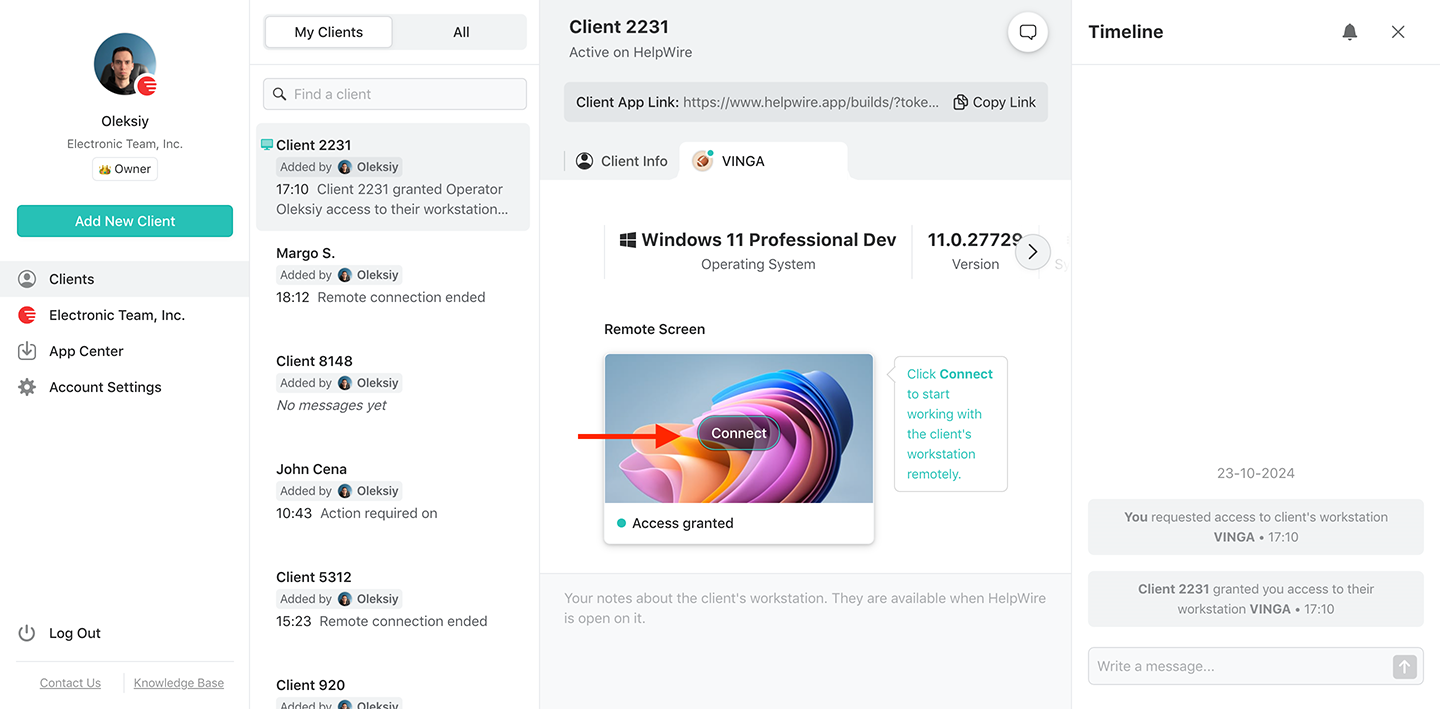
Press the “Connect” button on the client’s device in the browser-based dashboard.
Connect to your remote client for online remote support
6. Download HelpWire’s Operator application:
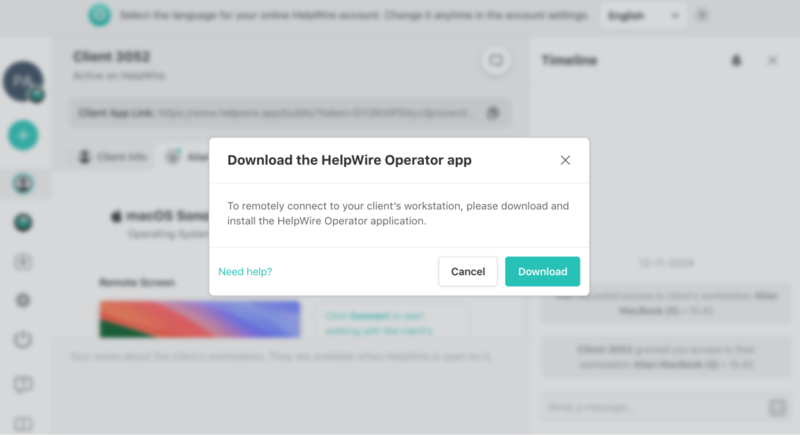
If this is the first time you are connecting to a remote client, you will be prompted to download and install the HelpWire Operator app.
Download HelpWire for remote support
7. You are in.

Why choose HelpWire’s remote desktop over competing solutions?

Let's take a look at some alternative online remote desktop solutions to see how they compare with HelpWire. We provide a chart after these reviews for easy comparison between the tools.

TeamViewer

TeamViewer is a popular online remote desktop tool offering users a simple interface and fast connection speed. Its web-based option lets teams achieve remote access without installing any software.
Pros:
  • Multiple pricing plans to fit your needs;
  • Many enterprise features for remote technical teams.
Cons:
  • The free version may be flagged for commercial usage, impacting session functionality.
Take a detailed look at the differences between TeamViewer vs HelpWire.

Chrome Remote Desktop

Chrome Remote Desktop is popular with users because of its simplicity and integration with Google services. This web-based remote desktop solution is typically used for personal use and does not provide the features necessary for a professional technical support team.
Pros:
  • Cross-platform access;
  • Free to use;
  • Easy set-up.
Cons:
  • Sessions are limited to a single user;
  • Requires a Google account to use;
  • Limited features with no chat or user management.
These disadvantages make HelpWire a better alternative to Chrome Remote Desktop for remote desktop support.

ISL Online

ISL Online offers professional support teams a versatile RDP online solution. In addition to providing remote access, ISL Online features multi-monitor support and file transfer functionality. It also provides excellent security with multi-factor authentication and end-to-end encryption.
Pros:
  • Customizable branding for a professional look;
  • Multiple integration options;
  • Advanced reporting and analytics capabilities.
Cons:
  • Setting up and accessing advanced features may require additional time and expertise;
  • More expensive than alternative remote access online solutions.
Learn more about how HelpWire works as an alternative to ISL Online.

Comparing the best remote desktop solutions

We believe HelpWire provides one of the best online remote desktop solutions for personal and business users.
Feature
HelpWire
TeamViewer
Chrome Remote Desktop
ISL Online
1
Free version availability
Free plan available for business and personal use
The free version is only for personal use
Free for personal and business use
Free version limited to 15 days
2
Cross-Platform Access
3
Team and Client Management
4
Security
TLS, AES-256 encryption, Auth0 authentication, uses Digicert signatures, secure AWS hosting, and client-controlled remote operator access.
Two-factor authentication, 256-bit AES encryption, and access controls.
Google account authentication, end-to-end TLS encryption, PIN protection.
256-bit AES encryption, session recording, two-factor authentication, and a self-hosting option.
5
Learning Curve
Link-based session start
More complex setup and usage
Accessible setup and use
More complex setup and usage

What our users say title icon

4.6 Based on 209 customers' reviews
version icon
Version
2.2, 4 Feb, 2026
compatibility icon
Compatibility
macOS, Windows, Linux
price icon
Price
Free
Public reviews from the IT teams and technicians using HelpWire.
Thea M.
Office admin
Thea M.
I got a gatvol of teamviewer and its issues and moved over to HelpWire and I'm blown away. Fast, effective and doesn't drain my computer's resources. It works really well props to the devs.
Molly
Production worker
Molly
My experience with HelpWire has been fantastic! The remote control process is incredibly smooth.
Daniel Domingues
Founder, Lusha
Daniel Domingues
I appreciate HelpWire for its ease of use and comprehensive remote support tools all in one place.
Rabeea Sarfraz
Associate Software Engineer, Coeus Solutions GmbH
Rabeea Sarfraz
HelpWire streamlines the remote support, allowing me to manage multiple clients efficiently, which improved overall service quality and client satisfaction.
Mark V.
Remote Technical Support
Mark V.
The fact that I can easily segregate my clients and have a full history of my connection to them is amazing. I like the fact that I can send a link to them and then talk them through what to do when they receive it (many are elderly and techo-illiterate). The emails and link are professional and give them reassurance. I like unattended access for those clients that need that extra layer of help. Love this app.
Kyle Paterson
CEO, Enspire
Kyle Paterson
The swift setup process and zero- configuration requirement for starting remote support sessions are what I appreciate most about HelpWire. It's remarkable how quickly I can connect with clients and start troubleshooting without any hassle.
Yaroslav H.
Owner
Yaroslav H.
Very good and free alternative to TV. Easy to use and nice concept. No annoying disconnections and forcing to buy premiumbussiness subscription or smth like that.
Muhammad Ammar Z.
Senior Lecturer at Shifa College of Pharmaceutical Sciences
Muhammad Ammar Z.
As a long-time TeamViewer user for personal projects and helping family, I grew increasingly frustrated with its frequent disconnections and persistent "commercial use" warnings. I decided to search for an alternative and found Helpwire. I am incredibly impressed. Helpwire provides a stable, reliable connection without any of the interruptions I faced before. The setup is simple, and it just works.
Jonathan B.
IT Director
Jonathan B.
Its a great tool for remote support. It doesn't have the bells and whistles of its commercial rivals, but ask yourself how often do you need that stuff ? If you want to help someone out on a PC issue, or connect to a server for some admin this is perfect.
Nilay N.
Senior Education Management, Self-employed
Nilay N.
HelpWire software has been an invaluable asset for streamlining our customer support processes.
Darko V.
SEO specialist
Darko V.
Probably the best free remote access app. I like seamless remote desktop experience and copy/paste functionality, reliability, and the fact it is free to use.
Samit B.
Senior Communication Executive, Dairy
Samit B.
The experience is fantastic with a very smooth remote session experience. The optimised performance and smart connectivity feature ensures a seamless remote session with zero-lag.
Ben T
Admin Assistant
Ben T
It was handy for the odd occasion that someone needs a hand with their computer while I am not nearby. It was very reliable and able to see the other's screen to provide directions.
Jean K.
Engineer
Jean K.
Absolutely Brilliant. Having worked on a whole bunch of other remote support software, from solarwinds dameware to anydesk and teamviewer, vnc viewer and the like, I have never had the joy I am having with Helpwire.
Govind P.
Content Writer, Marketing and Advertising
Govind P.
I've never been more satisfied with the service quality of a remote desktop application in my entire freelancing career. Considering the fact that it's a free remote desktop support solution, HelpWire is really worth a shot!
The interface is straightforward, so I can quickly connect to clients' devices and start troubleshooting without jumping through hoops. Plus, the performance is rock solid-no lag or sudden disconnections, which is crucial when I'm in the middle of solving a client's issue.
Adyrosan B.
Business Leader or Manager
Adyrosan B.
I appreciate Helpwire for its user-friendly interface and efficient problem-solving capabilities. It's designed to streamline the troubleshooting process, making it easier for people to find solutions to their technical issues quickly.
Anna K.
Sales Marketing
Anna K.
HelpWire really stands out for me because it's free and works seamlessly on both Mac and PC. I love how easy it is to get started. Basically, I can send a dedicated link to my colleague or client to initiate a remote session right away. The software is super fast and easy to use.
EJ S.
Business Leader or Manager
EJ S.
The Operator Dashboard is easy to use and you can start up a support session in seconds. The fact that it keeps the chat with the customer as well as logs of connections is a nice touch.
For nearly ten years I relied on another tool that recently became unusable, and HelpWire has stepped in as the perfect replacement.
How could I not like HelpWire! It ticks all the boxes for a great remote desktop/support service, and best of all, it's free. Real good, and worth more than a try.
Martin Lentz
Email Review
Martin Lentz
Your software worked just as well as Teamviewer. One thing works better and that is on the client side where they simply just have to grant me access. They don't have to provide me a one use password in order for me to connect.
Luca Albanese
Email Review
Luca Albanese
Simplicity of use, in particular on the client side that simply require to click on a link and give the required permissions. But the best feature, IMHO, is the ability to share the clients with other team members... and all of this for free! THANK YOU for this amazing app!!
Wilkin Miguel Julio Mercado
Email Review
Wilkin Miguel Julio Mercado
It's easy to use and I didn't expect there to be a software as good as this one.
Michael Guggenbichler
Email Review
Michael Guggenbichler
Absolutely Amazing Product for attended Access for individual operators or small teams! And you do not even have to pay!! There are so much remote access solutions, you have to pay tons of money and don't even provide the bare minimum. HelpWire Team, you're doing great! Looking forward to what you will bring in the future.
Frequently asked questions