Free Alternative to AnyDesk
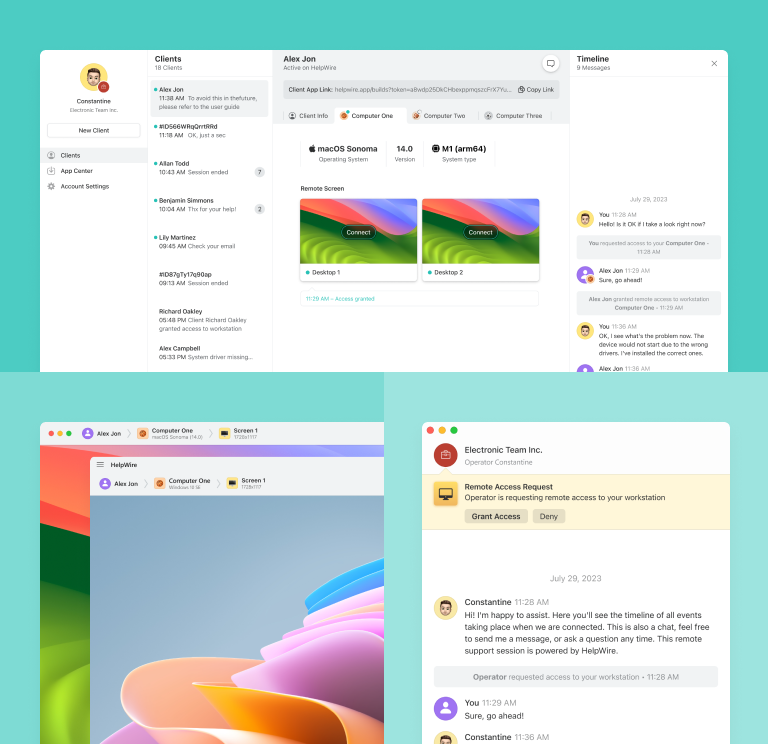
Transition to HelpWire, a seamless alternative to AnyDesk, and equip yourself with core functionalities for a fast, professional remote support experience for Mac, Linux, and PC users.
- Simple-to-use
- Great for businesses of any scale
- No hidden charges
HelpWire vs AnyDesk: Comparison at a Glance
Dive deep into a detailed comparison between HelpWire and AnyDesk features and pricing plans.
| Features |
HelpWire
|
AnyDesk
Free
Solo
Standard
Advanced
| |||
|---|---|---|---|---|---|
| Price per Month | |||||
| Price per Month | Free for personal and business use | Free for personal use only | $28.90 | $49.90 | $111.90 |
| Session Amount at a Time | |||||
| Session Amount at a Time | 1 session with multiple concurrent connections to remote workstations of the same client | 1 | 1 | 1 concurrent connection, with the option to purchase up to 20 additional connections for $29.90 each per month. | 2 concurrent connections, with the option to purchase up to 50 additional connections for $29.90 each per month. |
| Multi-Platform support | |||||
| Multi-Platform support | Windows, Mac, Linux | Mac, Windows, iOS, Linux, ChromeOS, and Android | iOS, Windows, Mac, Android, Linux, and ChromeOS | Windows, Android, Mac, iOS, ChromeOS, and Linux | Windows, Android, Mac, ChromeOS, Linux, and iOS |
| Chat and Collaboration | |||||
| Chat and Collaboration | Chat | Chat and Whiteboard | Сhat and Whiteboard | Сhat and Whiteboard | Сhat and Whiteboard |
| Operator Seats | |||||
| Operator Seats | 1 | 1 | 1 | 20 | 100 |
| Multi-Monitor View | |||||
| Multi-Monitor View | |||||
| File Transfer | |||||
| File Transfer | |||||
| Strong Security | |||||
| Strong Security | |||||
| Session Recording | |||||
| Session Recording | |||||
| Unattended Access | |||||
| Unattended Access | Up to 3 managed devices | Up to 100 managed devices | Up to 500 managed devices | Up to 1000 managed devices | |
| Brand Customization | |||||
| Brand Customization |
HelpWire Features
Integrated Chat
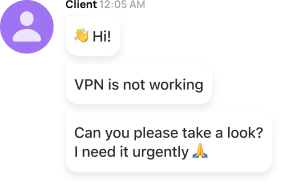
With HelpWire’s embedded customer support chat, tech operators can engage with clients in real-time, ensuring clarity and precision concerning the challenges being addressed.

Simple Session Start
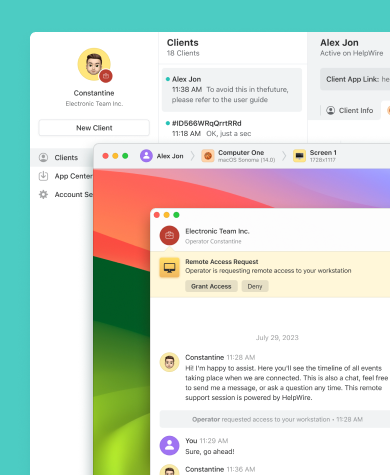
HelpWire allows to initiate remote support sessions by sharing an intuitive remote connection URL with a client, eliminating the need to deal with session IDs and passwords.
File Transfer
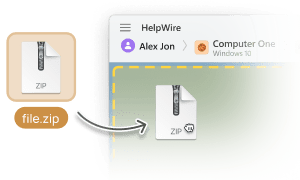
Send files from the operator’s system to the remote desktop window by simply copying and pasting them.

Client Management
Streamline your remote client management by creating detailed client profiles, viewing critical device information, and annotating remote support sessions, all directly from your web account.
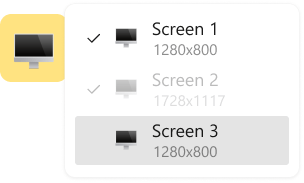
Multi-Monitor View
Visualize dual remote screens concurrently or transition amongst multiple displays while troubleshooting issues remotely.
Remote Support for Diverse Scenarios

Accountants
Simplify financial workflows with HelpWire’s remote desktop apps for financial professionals. From auditing to bookkeeping, it ensures fast, secure access to critical systems while keeping sensitive data protected.

Small and Medium Businesses
HelpWire, your go-to AnyDesk alternative for remote IT support for small businesses, not only curtails operational expenditure but also bolsters your client support team's efficiency with its intuitive remote desktop toolkit.

SysAdmins
HelpWire acts as a secure remote access administrator solution for SysAdmins, enhancing operations and improving support quality through robust control features.
What our users say

4.6
Based on 209 customers' reviews

Version
2.2, 4 Feb, 2026

Compatibility
macOS, Windows, Linux

Price
Free
Public reviews from the IT teams and technicians using HelpWire.

I got a gatvol of teamviewer and its issues and moved over to HelpWire and I'm blown away.
Fast, effective and doesn't drain my computer's resources.
It works really well props to the devs.

My experience with HelpWire has been fantastic! The remote control process is incredibly smooth.

I appreciate HelpWire for its ease of use and comprehensive remote support tools all in one place.

HelpWire streamlines the remote support, allowing me to manage multiple clients efficiently, which improved overall service quality and client satisfaction.

The fact that I can easily segregate my clients and have a full history of my connection to them is amazing. I like the fact that I can send a link to them and then talk them through what to do when they receive it (many are elderly and techo-illiterate). The emails and link are professional and give them reassurance. I like unattended access for those clients that need that extra layer of help. Love this app.

The swift setup process and zero- configuration requirement for starting remote support sessions are what I appreciate most about HelpWire. It's remarkable how quickly I can connect with clients and start troubleshooting without any hassle.

Very good and free alternative to TV. Easy to use and nice concept. No annoying disconnections and forcing to buy premiumbussiness subscription or smth like that.

As a long-time TeamViewer user for personal projects and helping family, I grew increasingly frustrated with its frequent disconnections and persistent "commercial use" warnings. I decided to search for an alternative and found Helpwire. I am incredibly impressed. Helpwire provides a stable, reliable connection without any of the interruptions I faced before. The setup is simple, and it just works.

Its a great tool for remote support. It doesn't have the bells and whistles of its commercial rivals, but ask yourself how often do you need that stuff ? If you want to help someone out on a PC issue, or connect to a server for some admin this is perfect.

HelpWire software has been an invaluable asset for streamlining our customer support processes.

Probably the best free remote access app. I like seamless remote desktop experience and copy/paste functionality, reliability, and the fact it is free to use.

The experience is fantastic with a very smooth remote session experience. The optimised performance and smart connectivity feature ensures a seamless remote session with zero-lag.
It was handy for the odd occasion that someone needs a hand with their computer while I am not nearby. It was very reliable and able to see the other's screen to provide directions.
Absolutely Brilliant. Having worked on a whole bunch of other remote support software, from solarwinds dameware to anydesk and teamviewer, vnc viewer and the like, I have never had the joy I am having with Helpwire.

I've never been more satisfied with the service quality of a remote desktop application in my entire freelancing career. Considering the fact that it's a free remote desktop support solution, HelpWire is really worth a shot!

The interface is straightforward, so I can quickly connect to clients' devices and start troubleshooting without jumping through hoops. Plus, the performance is rock solid-no lag or sudden disconnections, which is crucial when I'm in the middle of solving a client's issue.
I appreciate Helpwire for its user-friendly interface and efficient problem-solving capabilities. It's designed to streamline the troubleshooting process, making it easier for people to find solutions to their technical issues quickly.
HelpWire really stands out for me because it's free and works seamlessly on both Mac and PC. I love how easy it is to get started. Basically, I can send a dedicated link to my colleague or client to initiate a remote session right away. The software is super fast and easy to use.
The Operator Dashboard is easy to use and you can start up a support session in seconds. The fact that it keeps the chat with the customer as well as logs of connections is a nice touch.

For nearly ten years I relied on another tool that recently became unusable, and HelpWire has stepped in as the perfect replacement.
How could I not like HelpWire! It ticks all the boxes for a great remote desktop/support service, and best of all, it's free. Real good, and worth more than a try.
Martin Lentz
Email Review

Your software worked just as well as Teamviewer. One thing works better and that is on the client side where they simply just have to grant me access. They don't have to provide me a one use password in order for me to connect.
Luca Albanese
Email Review
Simplicity of use, in particular on the client side that simply require to click on a link and give the required permissions. But the best feature, IMHO, is the ability to share the clients with other team members... and all of this for free! THANK YOU for this amazing app!!
Wilkin Miguel Julio Mercado
Email Review
It's easy to use and I didn't expect there to be a software as good as this one.
Michael Guggenbichler
Email Review
Absolutely Amazing Product for attended Access for individual operators or small teams! And you do not even have to pay!! There are so much remote access solutions, you have to pay tons of money and don't even provide the bare minimum. HelpWire Team, you're doing great! Looking forward to what you will bring in the future.
Frequently Asked Questions (FAQs)
Although AnyDesk is free for personal use, if you’re searching for a remote desktop for commercial purposes, consider HelpWire as your free alternative to AnyDesk. It offers a variety of handy remote control tools to both enterprises and independent IT consultants.
AnyDesk doesn't enforce a universal session duration cap. Every user can set the maximum session duration according to their individual preferences.
Indeed, HelpWire is an entirely free remote desktop service.
AnyDesk includes several built-in security measures, such as device whitelisting, strong AES-256 encryption, and authentication checks. However, these protections are only effective when the software is kept up to date. To reduce the risk of exposure to AnyDesk scams, it’s essential to install security patches promptly and follow established remote access best practices.
These best practices include using strong, unique passwords, never sharing AnyDesk credentials publicly, and avoiding remote sessions from unknown or untrusted devices.
These best practices include using strong, unique passwords, never sharing AnyDesk credentials publicly, and avoiding remote sessions from unknown or untrusted devices.