categories
Published on in

Dealing with the Splashtop “Session password is incorrect” Error

Author: Helga York
Helga York Article author
  • HelpWire
  • Blog
  • Splashtop “Session password is incorrect”

In Splashtop, the “Session password is incorrect” error can appear when attempting to access a remote computer through the SOS client. It has two primary causes – either a simple typo, or the wrong client downloaded for the supported region.

Download the Correct Installer for the Region

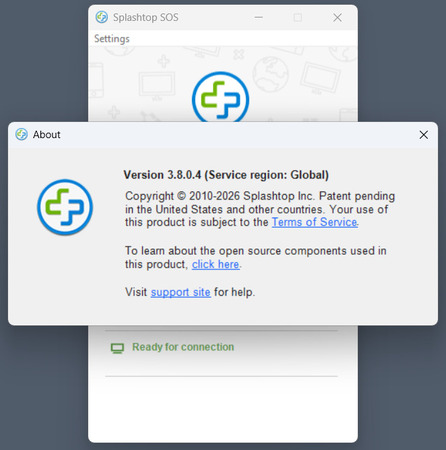
Checking the service region of the SOS client

When signing up to use Splashtop for support, businesses can choose between two regions – Europe and Global (US). The region of the SOS client can be viewed by selecting Settings > About from the menu bar. The wrong region is often the cause of the Splashtop “Session password is incorrect” error.

In order to download the correct version of Splashtop SOS, your customer needs to use the right website; it’s sos.splashtop.eu for the European client, and sos.splashtop.com for the Global/US client. Make sure to give them a direct link instead of having the customer google “Splashtop SOS” and choosing the wrong one.

Carefully Paste the Code

When being given the password verbally, or having it retyped by the customer, it’s likely that a typo will occur. Instead, make certain that they use Ctrl+C/Ctrl+V or the Windows context menus to copy and paste the code. You can also quickly verify the code visually – a proper SOS code has 9 digits.

In turn, when pasting the code, be careful not to capture additional characters in the selection. While Splashtop has likely implemented parsing to avoid unneeded characters in the text field, updates may change the parsing algorithm and introduce bugs. You don’t want to be the first one to run into a fresh bug.