categories
Published on in

How to Perform an AnyDesk License Warning Reset

Author: Helga York
Helga York Article author

AnyDesk provides its services for free to non-commercial users, but also has an algorithm to detect potentially commercial use and disable the client in such cases. The algorithm is not always accurate, and can sometimes trigger even if the user is not violating their license. If this is the case for you, you can try to remove AnyDesk license warning manually, or ask the AnyDesk crew for a spot on the official whitelist.

Delete the Configuration Files Manually

The files you need for an AnyDesk license warning reset are most likely in AppData/Roaming. However, before finding the folder, you need to terminate the AnyDesk process. Press Ctrl+Shift+Esc, find the process, and end it.

Ending the AnyDesk process so it doesn't retain sign-in data

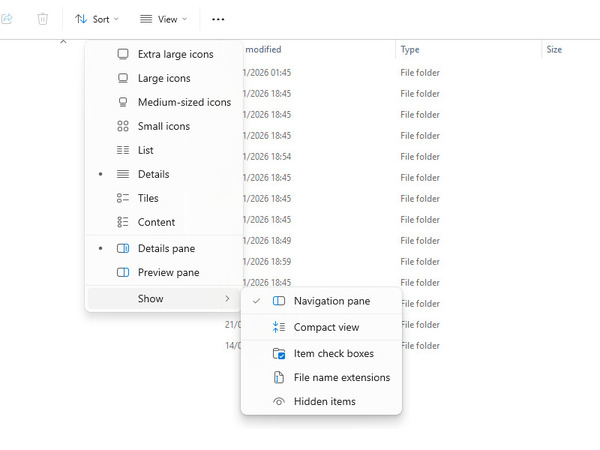
Before going to the AnyDesk folder, you need Explorer to show hidden files. Open Explorer, click “View” and navigate to “Show > Hidden items”.

Showing hidden files and folders in Explorer

Once you can see hidden files and folders, either navigate to “This PC > Local Disk (C:) > Users > [your username] > Roaming > AnyDesk”, or type %APPDATA% in the search bar and get to the AnyDesk folder that way.

A common location for AnyDesk data

There, delete the user.conf and system.conf files.

As an alternative to partial removal, you can perform a full AnyDesk uninstallation by following the steps in that article. This is more drastic and will take more time, but if .conf removal didn’t help, it may be the thing you need.

Ask to Be Whitelisted

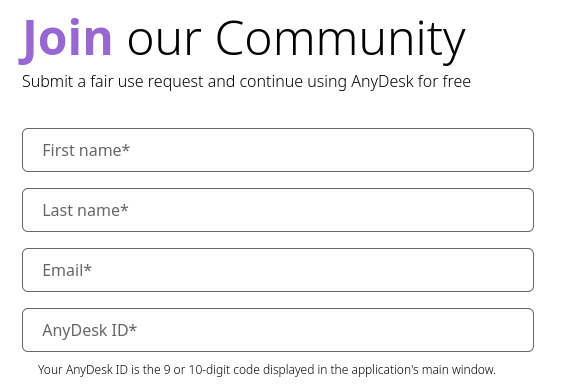
The AnyDesk whitelist request form

The AnyDesk website has an official whitelist request form for users that want purely non-commercial use. The admins can take a while to respond, so, if there’s no response for 2 days or more, you may need to contact u/AnyDeskSupport on Reddit.

Before contacting support, you likely need to write down your AnyDesk address; it’s the number you see when you start the client.

AnyDesk ID

Try GitHub Scripts (Carefully)

Windows 11 PowerShell with admin rights

There are numerous AnyDesk license warning reset scripts available on GitHub that mostly do the same that you would when deleting user.conf and system.conf. However, some of them do other things, or look for the files in alternative locations. Don’t run the scripts directly – first, inspect them, and carefully check what every command does. Once you’re sure that a command is safe, you can open PowerShell from the Win+X menu, and run it yourself, separately from the script. Luckily, GitHub will always show you the contents of any scripts hosted on the site.

Note  Be extremely careful when running someone else’s code. There are various tricks that can make a command dangerous without making the danger apparent. Never run a command if you aren’t sure what it (or a weird-looking part of it) does, and that goes double for entire scripts.

Try a Free Alternative

If AnyDesk isn’t working out for you, try HelpWire – commercial use is even permitted with the standard, free plan. HelpWire is easy-to-use, reliable, and perfectly suited to remote support. The app is available on Windows, macOS, and Linux, with full cross-platform interoperability.

HelpWire allow you to:
  • Switch between multiple monitors on the client’s computer
  • Save information about the computers you serviced
  • Set up a computer for unattended access
  • Form and manage remote support teams
  • Use the in-app text chat to communicate with clients

But, most importantly, you won’t have to deal with license warnings.