

Help desk metrics and Key Performance Indicators (KPIs) are important for any IT team, especially when handling remote support. These numbers show service quality and customer experience clearly, and how well agents are working. They also help teams spot problems early and make improvements before issues grow bigger.
Still, looking at too much data can make it hard to know which details really matter for your IT Service Desk metrics.
This guide explains 15 key help desk metrics and KPIs. They are grouped into four areas: productivity, performance, quality, and financial. You’ll see which ones are most common in the industry, why they’re crucial, and how they can help you deliver excellent service.
Knowing how the two differ from each other is important. Metrics are simple numbers, like the average time it takes to solve a problem. KPIs (Key Performance Indicators) are goals that show how well you are reaching a specific business target. One example is hitting a 95% first call resolution rate. In short, every KPI is a metric, but not every metric counts as a KPI.
Productivity & Volume
These metrics show your support team’s workload and how many requests they can handle. Tracking them helps with staffing, planning resources, and avoiding overworking or having too many agents.
Ticket Volume
The first example of help desk metrics, support tickets by status, is a crucial metric because it provides a concise insight into ticket volume that your organization receives—along with the corresponding ticket status.
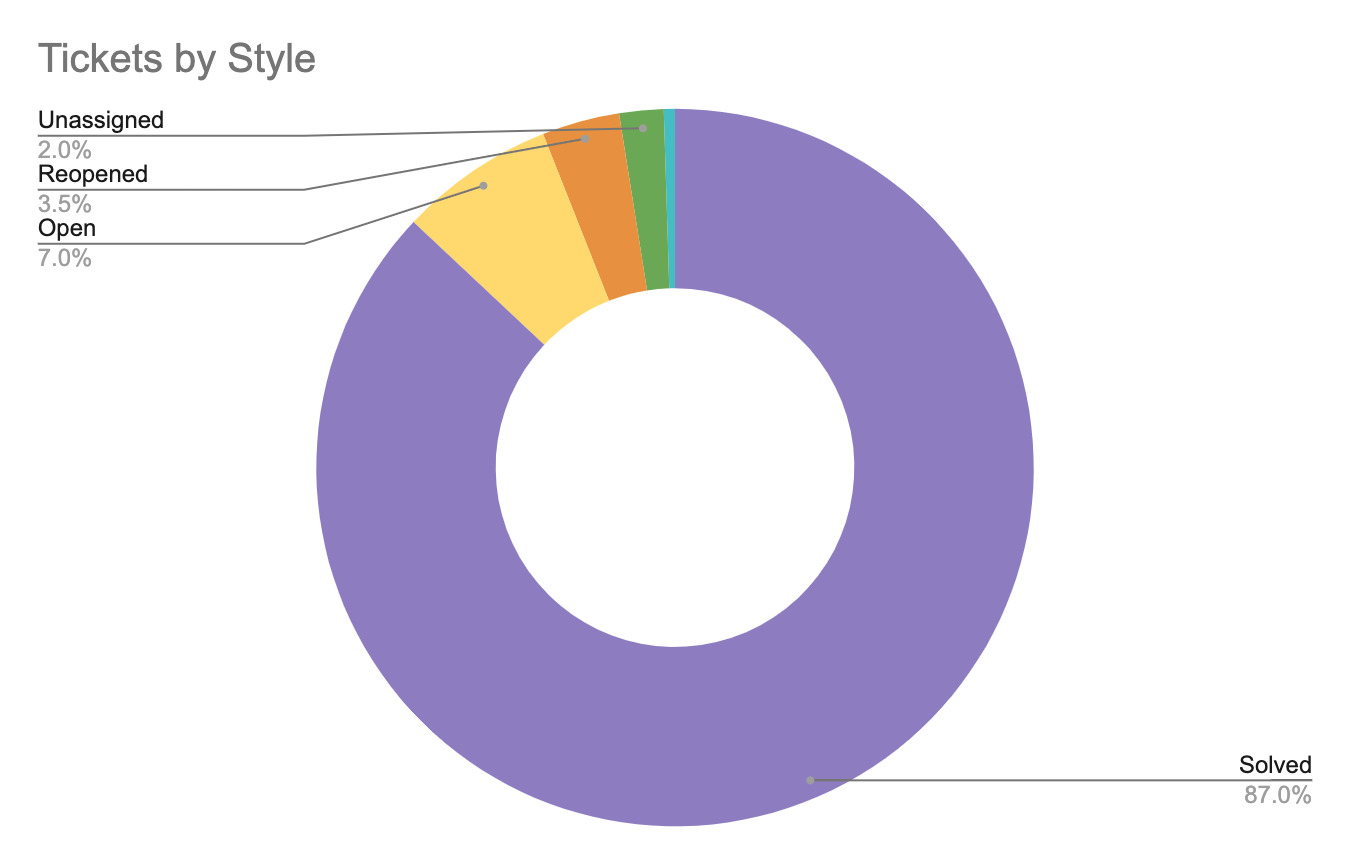
By tracking customer inquiry ticket statuses (new, open, pending, on-hold, solved, closed) regularly, brands can monitor the overall performance metrics and the responsiveness of your support service operations. This IT help desk metric insight provides the chance to make vital improvements and offer internal support that can vastly increase customer satisfaction levels.
Ticket Backlog
The Ticket Backlog is the number of support requests still open at the end of a day or week. This metric shows if the team is solving issues as quickly as new tickets come in. If the backlog keeps growing, it can point to problems with staffing, agent performance, or slow processes.
Agent Utilization Rate
The Agent Utilization Rate is a vital metric that tells the percentage of time agents spend supporting customers with their issues compared to their total work hours.
Performance & Speed
This category looks at how quickly and effectively your team deals with customer issues. High scores in these KPIs mean customers face fewer delays and have a better experience.
First Response Time, FRT
First response time (FRT) is crucial because it measures the average response time between the receipt of a customer inquiry to the initial communication from an agent.
Maintaining a fast FRT must be one of an organization’s biggest customer-facing priorities. According to the survey, for 45% of US online customers it’s important to get a quick response, otherwise they don’t finish their purchase. This help desk metric can help brands keep a visual record of FRT over time, providing prime opportunities to routinely enhance customer support strategies.
Time to Resolution, TTR
Average resolution time (AKA Full resolution time) is a visualization metric that helps businesses accurately assess the average timeline from when a support request comes into the help desk software to final resolution—this excludes non-business/non-operational hours.
When it comes to CX, the motto is “the faster—the better” for IT support professionals resolving customer issues. Thus, if it becomes obvious that the average resolution time is less than optimal, it’s easier to start developing solutions to fix it.
First Contact Resolution, FCR
A crucial element of any help desk metric dashboard, is the First Contact Resolution Rate (FCR) displays the total number of tickets/support requests that a customer support team fixes during the initial point of contact.
With such a high volume of touchpoints and channels to navigate in the modern world of digital, solving customer problems with minimal steps/follow-ups can significantly increase efficiency and satisfaction levels.
Average Handle Time, AHT
Average Handle Time (AHT) measures how long an agent works on each ticket or interaction. This includes the time dedicated to talking to the customer, putting them on hold, and finishing any follow-up work after the issue is solved. Unlike time to resolution (TTR), AHT only looks at how efficiently the agent works. A lower AHT is usually better, but it should be balanced with the Customer Satisfaction Score (CSAT) so agents don’t rush through calls and hurt the customer experience.
Transfer Rate
Transfer rate is the number of tickets an agent ultimately transfers to another support professional or department. High transfer rates can indicate that customers or agents are contacting the incorrect first-touch agent—which could mean the help desk’s internal routing system may be at fault.
Implementing automation tools can more easily (and quickly) route employees or customers to the appropriate agent based on their request type, language, or knowledge base. For example, using a chatbot to collect key customer data upfront, which can then route the discussion to the correct support professional.
Incident Severity
Incident Severity is the way an issue is ranked based on how much it affects the business and the end user. It is usually shown on a scale, such as SEV 1, SEV 2, SEV 3, or critical, high, medium, and low.
Severity is often mixed up with Priority, but they are not the same. Priority is about urgency, while severity is only about how big the disruption is for the business.
Quality & Satisfaction
These KPIs focus on the customer and show how they feel about the support they receive and the company as a whole. These metrics give the clearest feedback on how well your service is doing.
Customer Satisfaction Score, CSAT
This customer satisfaction measure is useful because it gives a quick view of how happy customers are during a certain period.
It is usually tracked on a scale from 1 to 5. The Customer Satisfaction Score (CSAT) reveals how customers feel about a company’s service or a specific support experience. CSAT works best when it is used together with the Net Promoter Score (NPS).
Net Promoter Score, NPS
A Net Promoter Score (NPS) is one of the most important customer-focused metrics because it measures how likely customers are to tell others about your service. Recommendations from other people strongly influence buying decisions, and many customers trust what other customers say. In fact, studies show that 66% of people would rely on the views of their friends or relatives.
These ITIL service desk metrics (ITIL KPI = Information Technology Infrastructure Library Key Performance Indicators) help organizations:
- • See how many customers are ‘Promoters,’ ‘Passives,’ or ‘Detractors’
- • Check their overall NPS score
- • Create plans to improve NPS and strengthen customer service performance
Customer Effort Score, CES
The help desk metric, Customer Effort Score (CES) tracks the effort that customers must invest in resolving their issue, receiving an answer, or finishing a task.
To find an accurate CES rating, send customers a survey requesting them to rate the ease of their support interaction on a scale of “very easy” to “very difficult.” It’s a good idea to offer a “comment” section so surveyors can have a place to explain the details of their experience and how they came to the rating they provided. Businesses can then calculate the median number reliant upon the total submitted survey responses. This data then enables the organization to make adjustments to improve and expedite the experience, which enhances the CX.
SLA Compliance Rate
SLA Compliance Rate (Service Level Agreement compliance) is a key KPI that checks the percentage of service requests or incidents solved within the time promised in the Service Level Agreements.
This metric illustrates how reliable and committed the IT Service Desk metrics are to supporting both employees inside the company and external customers.
Financial
Financial metrics turn daily performance into business value. They help leaders explain why investments are needed, keep costs under control, and show the Return on Investment (ROI) of the IT Service Desk metrics.
Cost Per Ticket, CPT
The price per ticket is vital to a productive service desk experience that reveals the total average expense required to resolve customer issues.
Through tracking this metric periodically, brands can develop a clear idea of how effective and efficient their support processes are—while simultaneously identifying the best resources to further optimize the process. This enables businesses to mitigate problems before they happen—thus, saving money and providing a better customer service experience.
Return on Investment, ROI
Return on Investment (ROI) is one of the most important financial help desk metrics. It assesses the money gained from help desk operations, software, or strategic projects like new automation tools or training, compared to what they cost.
ROI helps IT leaders explain spending to executives by turning operational metrics into clear business results.
- • Calculation: ROI is usually calculated as (Net Financial Benefit − Cost of Investment) / Cost of Investment.
Why IT Service Desk Metrics Are Crucial
Service desk metrics and KPIs play a big role in improving customer experience, loyalty, and even revenue. Here’s why they are so important:
Data-Driven Decision Making
Metrics give clear data that shows where problems exist. This helps leaders make smarter choices, like when to upgrade tools, improve training, or adjust staffing. Metrics give clear data that shows where problems exist. This helps leaders make smarter choices, like when to upgrade tools, improve training, or adjust staffing. Furthermore, integrating help desk remote support software, such as HelpWire, into the assistance process significantly bolsters the efficiency of resolving issues. These metrics help organizations better serve their customers or employees if we are talking about HR help desk software.
Alignment with Business Goals
When KPIs such as CSAT and FCR match business targets, service desks can prove their value by holding on to customers and improving profits.
Resource Optimization and Efficiency
Checking metrics, like ticket volume and agent utilization, makes sure the number of staff is right. You can avoid understaffing and overstaffing, and even save money or keep the operations running smoothly.
Enhanced Accountability and Ownership
Clear, easy-to-track metrics help everyone stay accountable, improve performance, and make sure resources are used on time. Supporting, engaging, and motivating staff is crucial to a company’s continual service success, even though managing a remote team could be challenging.
Strengthening Loyalty
High FCR and CSAT keep customers coming back, and fair workloads with clear metrics help staff stay happy and keep their jobs.
Best Practices for Improving Your Help Desk Metrics
Optimizing help desk performance is not just about tracking numbers. It’s about using KPIs to work smarter and deliver top-quality service. Here are some key ways to improve:
- • Define Service Quality and Set SMART Goals
Create SMART goals (Specific, Measurable, Achievable, Relevant, Time-bound) that match your business objectives. Check the numbers alongside other factors and gather feedback from your team to spot problems and simplify processes. - • Maximize Self-Service Adoption Rate
Get customers to handle easy problems through a self-service portal. This improves customer satisfaction and reduces backlog. Pay attention to the Self-Service Adoption Rate and keep the Knowledge Base easy to access. - • Leverage Automation for Speed and Accuracy
Use automation to make routing easier, cut down on Average Handle Time (AHT), and give better support remotely. Automation takes care of the repetitive stuff so agents can focus on the tricky problems. - • Focus on critical KPIs for remote teams
For remote teams, give priority to First Contact Resolution (FCR), First Response Time (FRT), and SLA compliance. These KPIs help deliver quick, reliable support and keep customer expectations met.
Help Desk Metrics FAQ
Check out our section on 15 help desk metrics and KPI section for more information. For now, here are some of the most important help desk metrics are:
- • Ticket volume
- • Resolution time
- • Initial response times
- • Resolution rates
- • Customer satisfaction
- • Conversations per agent
- • Tickets completed
How often you review depends on the purpose of the metric:
- • Daily/weekly: Check operational metrics like ticket volume or ticket backlog. This helps you see staffing problems or slowdowns quickly.
- • Monthly: Look at performance and quality KPIs such as FCR, CSAT, and SLA compliance rate. It will help you know how the team is doing and highlight overall trends.
- • Quarterly/annually: Review strategic and financial KPIs like NPS, ROI, and cost per ticket. These are important for long-term planning and explaining budget needs.
“Good” scores are usually within these industry standards:
- • First Contact Resolution (FCR): A good FCR rate is normally between 70% and 80%. Lower rates may point to problems with agent training or access to resources.
- • Customer Satisfaction Score (CSAT): A strong CSAT score is 90% or higher, or an average of 4.5 or more on a 1–5 scale.
They aren’t alike, yet they work together.
- • ITIL (Information Technology Infrastructure Library) is a set of best practices and guidelines for managing IT services (ITSM). It explains which processes to follow.
- • Help Desk KPIs are the measurable indicators, such as SLA Compliance or Time to Resolution, that show how well those ITIL processes are being followed and carried out.