
TeamViewer 13/14 End of Life: What Actually Breaks and What to Do Next?

If you’re still running TeamViewer 13 or 14, more has changed than just the end of updates and support. After the TeamViewer 13/14 end-of-life date, these versions could no longer use the online services required for remote access. This is not the usual situation where older software keeps working but stops receiving improvements. Here, the effect is much more significant.
We’ll cover what no longer works and why the changes affect everyday use so heavily. Available options for those looking to move away from older versions without spending more than necessary will also be discussed.
What "End of Life" Actually Means for TeamViewer - Technically
When most software reaches the end of life, the company simply stops providing updates, fixes, and security improvements. Most of the time, you can continue using the program for as long as you want, although you take on the risk of using unsupported software. The TeamViewer 13 and 14 end of support situation works differently.
TeamViewer does not handle every part of a remote connection by itself. Instead, it relies on TeamViewer’s servers for four important functions:
- • Device identity and authentication: TeamViewer uses its servers to recognize both the local and remote devices and verify the connection.
- • Session negotiation: The app helps both devices communicate and start the remote connection successfully.
- • NAT/firewall traversal: Most computers cannot accept direct connections because of router settings. TeamViewer helps create the connection without requiring any manual network setup.
- • Relay routing: If two devices cannot connect directly, TeamViewer sends the connection through its own network to keep the remote session running.
When TeamViewer reaches the end of support for a version, the changes go beyond security updates and bug fixes. The company no longer allows that version to use the systems required for remote connections. The software may still install and open normally, but it cannot perform the functions listed above across the internet.
What remains is local network access: you can still connect devices on the same network. For people who use TeamViewer to access office computers from another location, assist remote staff, manage systems in different locations, or work remotely, LAN-only access is not a practical replacement. This means the software no longer does what they purchased it to do.
If you’re moving or switching away from TeamViewer, see why HelpWire is a solid free replacement that keeps remote access over the internet working.
What Specifically Stops Working
Take a look at how the TeamViewer 13/14 EOL changes affect how people use it every day below:
Stops working:
- • Remote connections to devices outside your local network
- • Unattended access to remote computers using TeamViewer device IDs
- • Remote sessions between mobile devices and computers that rely on TeamViewer’s systems
- • Wake-on-LAN through TeamViewer (needs TeamViewer’s online services)
- • Managing devices through the TeamViewer Management Console (requires TeamViewer’s cloud services)
- • File transfers and remote printing for devices that are not on the same local network
Still works (within a local network only):
- • Connecting more than one device that is on the same network
- • Transferring files between devices connected to the same local network
Ongoing security risk:
Any security issues discovered after the TeamViewer 13/14 end-of-support date will not receive fixes for these versions. CVEs have affected 8 TeamViewer versions over the years, highlighting an ongoing risk for users who continue running software after TeamViewer version 13 is discontinued or TeamViewer version 14 is discontinued.
The EOL Timeline: How We Got Here
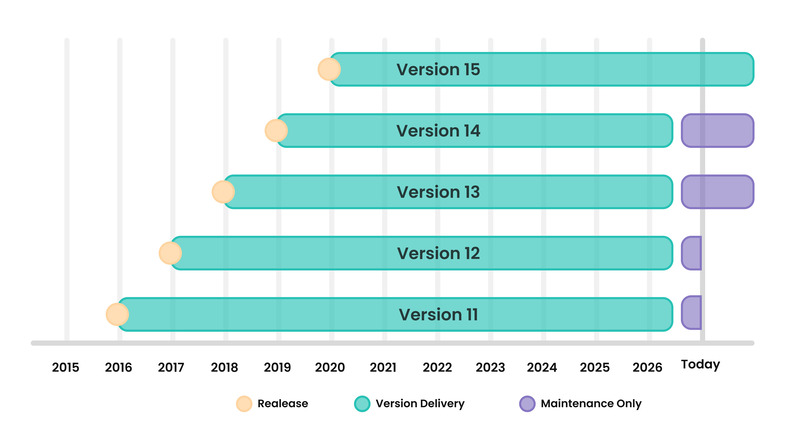
To understand the current TeamViewer legacy versions EOL situation, it helps to look at how earlier versions were handled. TeamViewer did not retire older releases all at once. Instead, support ended in stages, with each round affecting newer versions.
| Version | Released | EOL / Server cutoff | Users reaction |
|---|---|---|---|
| 5-8 | 2010-2013 | Before 2021 | Uncontroversial — very old |
| 9-10 | 2014-2015 | June 1, 2021 | Announced in 2021; perpetual holders affected |
| 11-12 | 2016-2017 | 2024-2025 | Triggered class action lawsuit (Thorner v. TeamViewer US, Inc., filed March 3, 2026) |
| 13-14 | 2018-2019 | October 31, 2026 | Current wave; same server cutoff mechanism |
| 15 | 2020 | Active (latest: 15.78.3) | Currently supported |
The end of support for versions 9 and 10 took effect on June 1, 2021. At that time, the app informed users that remote access would be limited to devices on the same network. This highlighted that the change affected remote access itself, not just future software updates. Users who owned perpetual licenses for versions 9 and 10 faced the same TeamViewer LAN-only after EOL limitation that now affects versions 13 and 14.
The removal of remote access over the internet for versions 11 and 12 drew even more attention because those releases were newer. They had also been sold as perpetual-license products at higher prices. The situation eventually led to a class action lawsuit. The same concerns now apply to TeamViewer 13 EOL and TeamViewer 14 EOL at present.
Should You Upgrade to TeamViewer 15?
- • If you already have a subscription, moving to the latest version is usually simple. Your plan includes access to current releases, so you can upgrade without paying extra as long as the subscription remains active.
- • The situation is different for users with perpetual licenses. Owning a perpetual license for an older version does not automatically give you access to TeamViewer 15. To continue with TeamViewer, you would need to buy a new license or move to a subscription plan. Since similar end-of-support decisions have already affected several older versions, some users question whether the same thing could happen in version 15 in the future. That concern becomes more important when the upgrade requires another purchase.
- • On pricing: cost is another factor worth considering. Over the years, the software has moved away from its older licensing model and placed more focus on subscriptions. For many users, especially individuals and small businesses, the ongoing subscription cost can be noticeably higher than the one-time license fees they paid in the past.
Why This Is a Good Moment to Switch
Having to change remote access tools can be frustrating. Still, you can check whether TeamViewer’s reliance on cloud-based connections and company-managed systems still makes sense for the way you work today and in the future.
The TeamViewer EOL pattern reveals a clear risk. TeamViewer uses its own services to keep remote access running. When a provider controls those services, it can decide how long certain features remain available. What happened to TeamViewer versions 9 through 14 shows the impact this can have.
If you’re looking for a TeamViewer 13/14 alternative, here are a few questions worth asking:
- • Does the software rely entirely on the provider’s systems, or are there other ways for devices to connect?
- • Are the pricing plans clear and predictable, or do costs increase over time?
- • How has the company treated older versions and existing license holders in the past?
- • Does the software include the features you need, such as unattended access, support for different operating systems, file transfers, multiple monitors, and mobile access?
HelpWire: A Direct Alternative Worth Considering
For anyone planning to migrate from TeamViewer 13/14, there are several reasons to consider it:
Free for business use. HelpWire lets businesses use remote access without paying a fee. It is not a trial that expires after a short period, and it does not place key features behind a paid plan. For individuals and small businesses dealing with an unexpected TeamViewer EOL switch to an alternative, this can help avoid paying for another remote access tool.
No risk of losing key remote access features. HelpWire does not create the same concern that many users faced after the TeamViewer legacy versions’ EOL changes. Users do not have to worry about a version losing remote access over the internet and being limited to connections on the same network.
Works with Windows and macOS. HelpWire supports both operating systems, making it a practical TeamViewer 13/14 alternative. Users can connect over the internet—setting up port forwarding or a VPN is not needed for this. That level of simplicity is one of the reasons many people chose TeamViewer in the first place.
Unattended access. You can install this free TeamViewer alternative on a remote computer and access it even when nobody is there to accept the connection. This supports many of the same tasks that users handled with TeamViewer 13 and 14. IT support, computer management, and remote work are among them.
File transfer. The software lets users transfer files directly between connected devices during a remote session.
Easy setup. Users do not need to make major changes to their existing setup before switching. There is no need to add new servers or change network settings. Install the HelpWire operator app, install the client on the remote device, and start connecting. The overall experience feels familiar to TeamViewer users.
The Bottom Line
The TeamViewer 13/14 end-of-support date has already passed. Unlike many older programs that still work even when the company no longer releases updates for them, this one removes the remote access many users paid for. Remote connections over the internet stop working, and any new security problems will stay in these versions. Companies that follow SOC 2, ISO 27001, or HIPAA may also have difficulty meeting those rules.
Moving to a newer TeamViewer version may require another purchase. For some users, that raises concerns because earlier licensing changes affected perpetual license owners and eventually led to the class action lawsuit Thorner v. TeamViewer US, Inc., filed in March 2026 and still pending.
For users searching for a TeamViewer 13/14 alternative, HelpWire is another option to consider. It is free for business use and avoids the problems highlighted by the TeamViewer legacy versions EOL experience. Plus, many of the same remote access features available in TeamViewer 13 and 14 are available in this app. You might want to switch to the TeamViewer replacement that is less likely to create the same problems later, if changing tools is already going to take time anyway.