How to Fix Splashtop Multiple Monitors Not Working
In Splashtop, multiple monitors can be used in a variety of modes. These modes can sometimes work in unclear ways, making it look like something went wrong. In addition, you need both the app and operating system to be set up to use multiple monitors.
Sometimes, the problem is caused by incompatibility, and can only be resolved in future patches. However, you can check if any of the following advice works before resorting to customer support.
Check System Settings
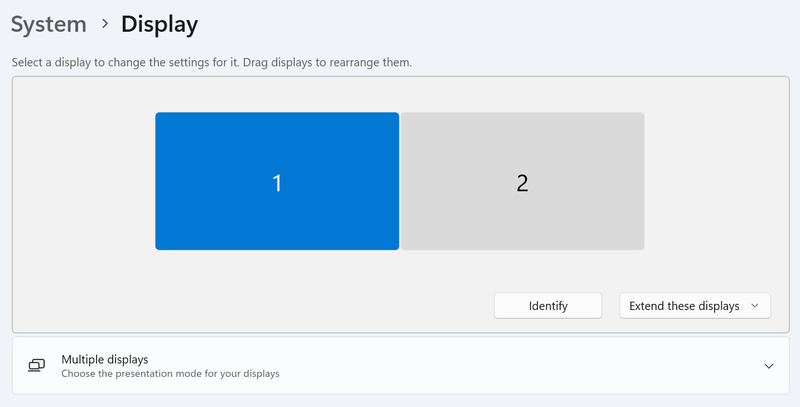
Often, when connecting a second monitor, the OS will select the “Duplicate” mode for it by default. The ways to check your display mode for multiple monitors varies by OS, but most commonly, it’s located in the system settings.
For instance, on Windows you can access them by opening Settings from the Start menu, then going to System > Display, and selecting “Extend” as the display mode.
Look for the Hidden Window
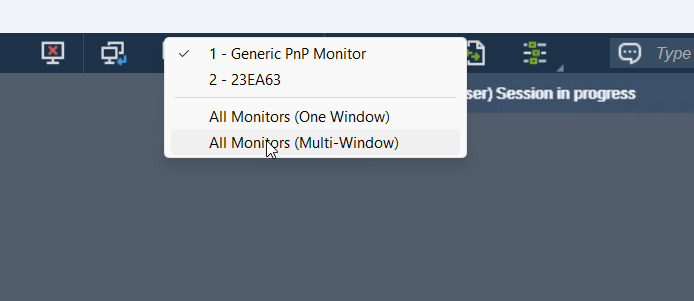
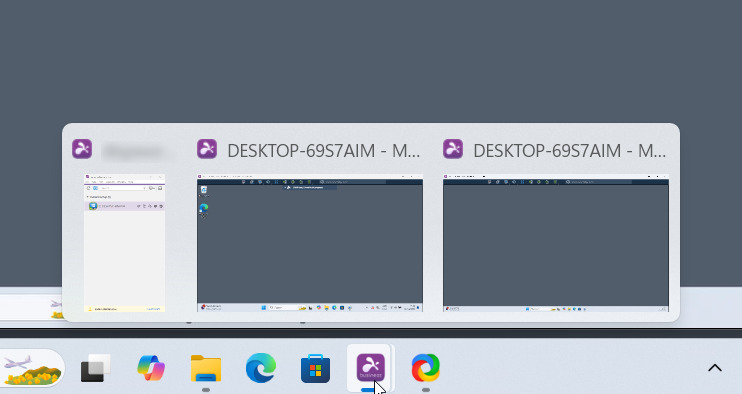
When selecting the Multi-window mode for multiple monitors, the separate windows will show up under a single icon on the Windows toolbar. This makes it harder to select separate windows, and can create the impression that the window didn’t open. Alt-tabbing to it won’t work, as well.
Instead, hover over the Splashtop icon and wait for the different windows to show up. You can then select the window that was hidden in the background.
Other Tips
If accessing the second display is vital, but the multi-window and single-window modes aren’t cooperating, you may have to switch to the single-window mode and manually select the current window.
You don’t have to use the mouse to switch between windows. Splashtop provides hotkeys for this by default – Ctrl+Alt+Left and Ctrl+Alt+Right.
Finally, it may also help you to know that the orientation of displays in extended mode may not match their physical layout. As a result, if you’re using the multi-window mode in Splashtop, and trying to drag one of the windows onto the second workspace, this may fail. Simply try dragging the other way – or changing which display is the main one in system settings.